

- What are tags?
- Tagging Strategy
- How Automation Assembler processes tags
- Tag Types
- Sequencing and Simulation
- Inside the Cloud Template
- Tag operations using Aria Automation Orchestrator
What are tags?
Tag format
[!]tag_key[:tag_value][:hard|:soft]
Broadly,Tags express capabilities and constraints that determine how and where resources are allocated to workloads during the provisioning process. Tags facilitate policy-driven placement by directing how and where VMware Aria Automation Assembler uses resources and infrastructure to build services across private and public clouds.
Tagging Strategy
Before you create and use tags in VMware Aria Automation Assembler, you must establish a well-defined and adaptive tagging strategy and taxonomy. A tagging strategy ensures that users who create and use tags understand what the tags mean, how the tags must be used, and where or when the tags must be applied.
Best practices for an effective tagging strategy:
- Plan and communicate – Create, communicate, and execute a plan for tagging that relates to the structure of your organization.
- Simple and adaptive – Use simple, clear, and meaningful names and values for tags.
Example: for simplicity, a customer is using CIDR range as tag to know exactly which range the VM IP will be part of.
- tag: 'subnet:192.168.210.0/24'How Automation Assembler processes tags
Before that, lets see how tags get processed. Automation Assembler uses a specific order and hierarchy of operations in resolving tags to create provisioned deployments. Understanding the basics of this process will help you to implement tags efficiently to create predictable deployments.
The following list summarizes the high level operations and sequence that Automation Assembler uses to resolve tags and define a deployment:
- Cloud zones are filtered by several criteria, including availability and profiles; tags in profiles for the region the zone belongs to are matched at this point.
- Zone and compute capability tags are used to filter the remaining cloud zones by hard constraints.
- Out of the filtered zones, priority is used to select a cloud zone. If there are several cloud zones with the same priority, they are sorted by matching soft constraints, using a combination of the cloud zone and compute capabilities.
- After a cloud zone is selected, a host is selected by matching a series of filters, including hard & soft constraints as expressed in cloud templates.
Tag Types
In terms of origination, tags can be external and internal:
External tags
Discovered and imported from vSphere, NSX, and VMware Cloud on AWS, as well as from public clouds, such as Amazon Web Services and Microsoft Azure. External tags are visible in both the originating cloud account and VMware Aria Automation Assembler. When imported, the external tags are available as user-defined tags.
Internal tags
Defined and visible only in VMware Aria Automation Assembler.
Tags can be also divided into standard and user-defined types:
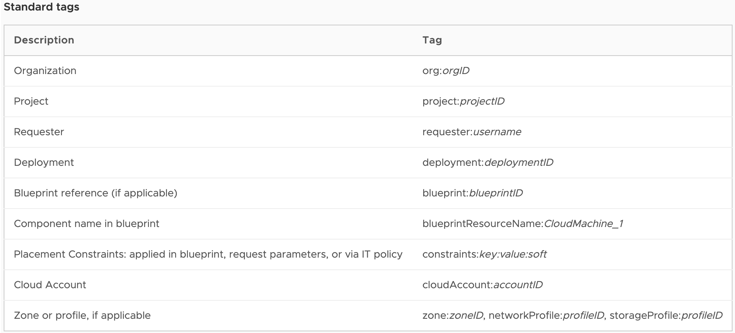
Standard tags
Applied automatically during provisioning on vSphere, Amazon Web Services, and Microsoft Azure deployments.
Unlike other tags, users cannot use standard tags during deployment configuration, and no constraints are applied. Standard tags are stored as system custom properties and are added to deployments after provisioning.
User-defined tags
Defined by a VMware Aria Automation Assembler user.
In terms of use, tags can be divided into capability and constraints:
Capability tags
Used to define capabilities of an object and to define placement logic for deployment. These tags define the required connectivity, functionality, and capabilities for deployments.
You can create capability tags on resources, such as cloud zones, storage and storage profiles, and networks and network profiles. Capability tags on storage or network components affect only the components on which they are applied.
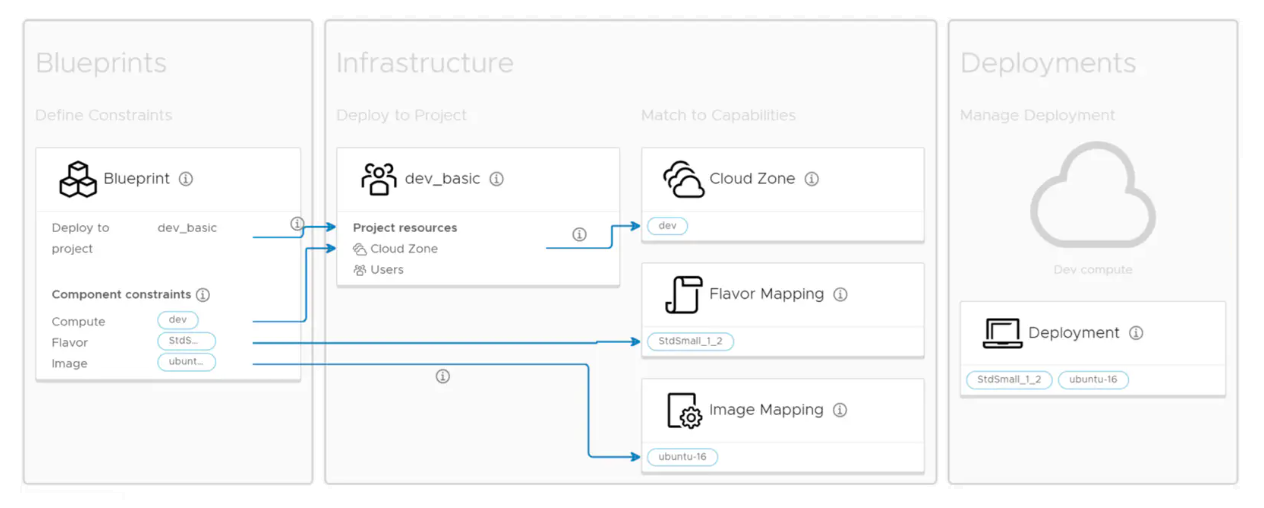
VMware Aria Automation Assembler matches capability tags with constraints from cloud zones and on cloud templates at deployment time.
Constraint tags
Used to define deployment requirements. Constraint tags on cloud templates and components match capabilities defined on resources, cloud zones, and network and storage profiles to generate deployments with the required configuration.
You can apply constraint tags to two constructs – project and image configuration, and cloud template deployment. Constraints applied to both constructs are merged in cloud templates to form a set of deployment requirements.
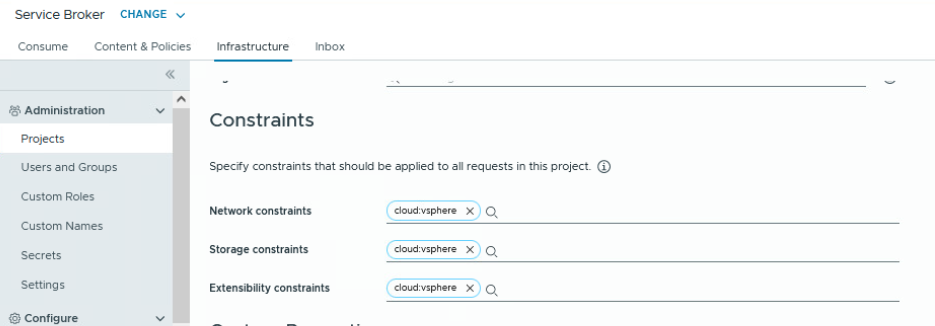
When configuring VMware Aria Automation Assembler, you apply constraint tags to projects to provide governance directly at the project level. All constraints added at this level are applied to all cloud templates that are requested for the applicable project. If a tag on a project conflicts with a tag on a cloud template, the project tag takes precedence, allowing you to enforce governance rules.
On cloud templates, you add constraint tags in the YAML structure to match the appropriate capability tags that your cloud administrator created on VMware Aria Automation Assembler objects and resources. In addition, there are other more complex options for implementing constraint tags. For example, you can use a variable to populate one or more tags on a request, so that you can specify one or more of the tags at request time. Create constraint tags by using the tag label in the cloud template YAML. Constraint tags from projects are added to the constraint tags created in cloud templates.
In this example, the cloud template constraint attempts to deploy on objects with the cloud:private capability tag applied:
constraints:
     - tag:
          cloud:private
In this example, a cloud template expression is added for user selection with a cloud template input:
inputs:
     targetCloud:
          type:string
               enum:
                    - private
                    - vmc
                    - aws
                    - azure
                    - gcp
                    - ......
 constraints:
 - tag: '${"cloud:" + to_lower(input.targetCloud)}'
If the user selects private, the constraint tag is set to cloud:private.
Constraints are typically defined in a cloud template in the format –
[!]tag_key[:tag_value][:hard|:soft].
Consider the following formats when you configure constraints:
| Format | Description |
|---|---|
| key:value or key:value:hard | Use this tag format when a cloud template must be provisioned on resources with a matching capability tag. If no matching tag is found, the deployment process fails. |
| key:value:soft | Use this tag format when you prefer a matching resource. If there is no matching tag, the deployment process proceeds without failing and accepts resources. |
| !key:value | Use this tag format, with the hard or soft value, when you want the deployment process to avoid resources with a matching tag. |
| Objects Type | Objects | Capability | Constraint |
|---|---|---|---|
| General | Cloud account | ✓ | x |
| Integration | ✓ | x | |
| Cloud zone | ✓ | x | |
| Project | x | ✓ | |
| Mappings | Image mapping | x | ✓ |
| Flavor mapping | x | x | |
| Profiles | Storage profile | ✓ | x |
| Network profile | ✓ | x | |
| Compute | Cluster | ✓ | x |
| Resource pool | ✓ | x | |
| Availability zone | ✓ | x | |
| Storage | Storage policy | x | x |
| Datastore / Cluster | x | x | |
| Network | Network profile | ✓ | x |
| IP range | x | x | |
| Load balancer | ✓ | x | |
| Network domain | x | x | |
| Machines | Machine | x | x |
| Volumes | Volume | x | x |
| Kubernetes | Kubernetes Zone | ✓ | x |
| Security | Security group | ✓ | x |
| Cloud template | Cloud template | x | ✓ |
Sequencing and Simulation
The following list summarizes the high-level operations and sequence of capability and constraint tag processing:
- Cloud zones are filtered by several criteria, including availability and profiles. Tags in profiles for the zone are matched.
- Cloud zone and compute capability tags are used to filter the remaining cloud zones by hard constraints.
- Provisioning priority is used to select a cloud zone from the remaining filtered cloud zones. If there are several cloud zones with the same provisioning priority, they are sorted by matching soft constraints, using a combination of the cloud zone and compute capabilities.
- After a cloud zone is selected, a host is selected by matching a series of filters, including hard and soft constraints as expressed in cloud templates.
- Hard policies are ranked higher than soft policies. Hard policies override soft policies. If a conflict occurs between a soft lease policy applied to an organization and a soft lease policy applied to a project, the project lease policy takes precedence because it is more specific.
You can simulate a provisioning request to validate your configurations. Based on the provided values, the request goes through the projects, cloud zones, and profiles configurations without executing the provisioning.
The design decisions regarding the use of tags on cloud accounts, cloud zones, projects, and profiles are provided within the specific architecture topics.
Inside the Cloud Template
While working on templates, how would you know what tag is doing what exactly. There will be some tags that will created at infrastructure level as part of provisioning. Lets try to understand it using this picture below.
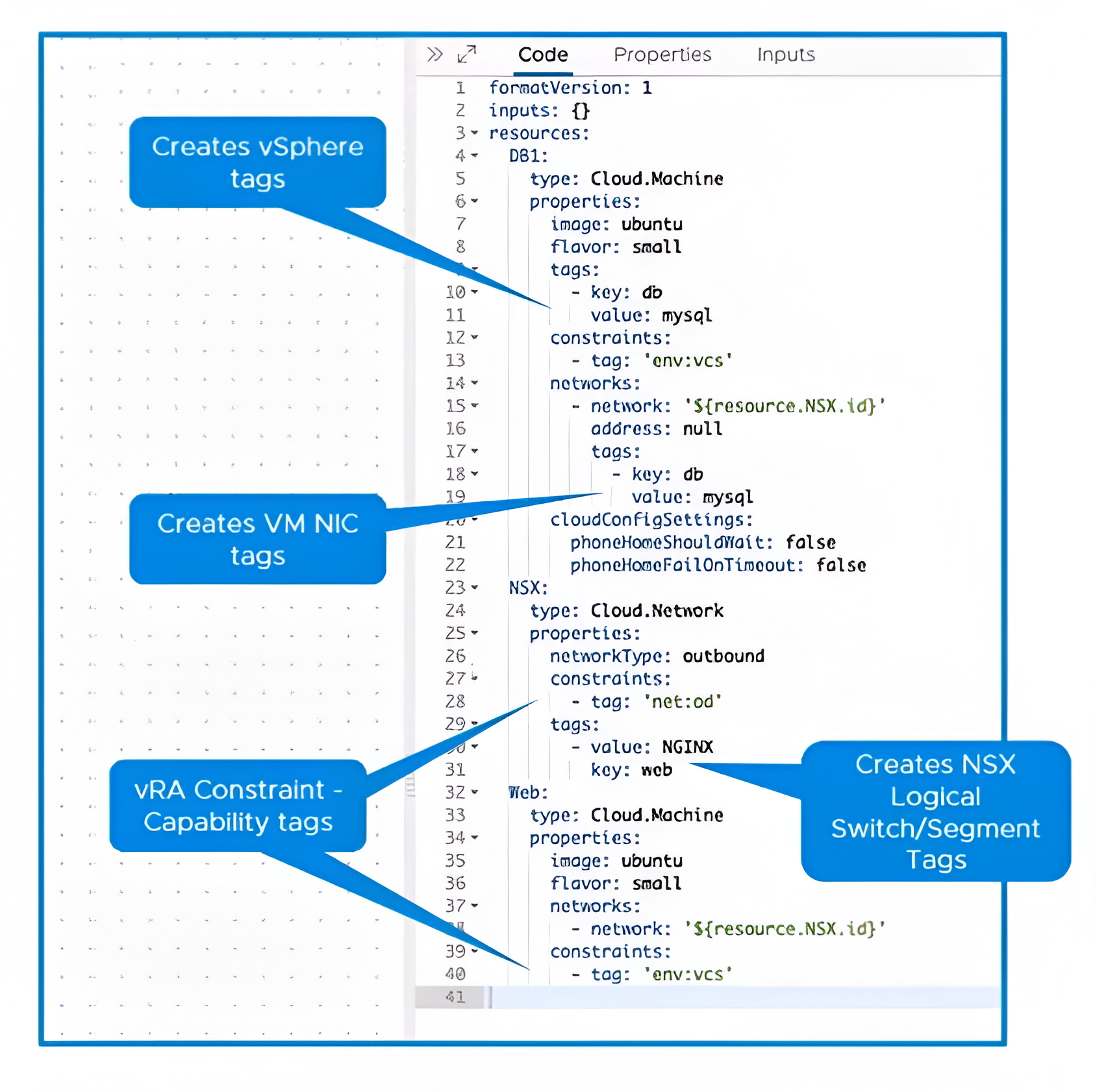
In terms of using them inside cloud template, tags can be divided into constraints and metadata:
Constraint tags
These are the tags that we put in the contraints keyword. Cloud Admins already create these tags in Aria Automation to define flow of provisioning before wokring on the actual templates. In the picture above, both Cloud.Machine and Cloud.Network constructs have these tags to justify their landing.
constraints:
     - tag:
          cloud:private
We have already decribed them in detail in constraint and capability tags section.
Metadata tags
Metadata tags are special tags that gets created as part of provisioing in the backend infrastructure. Based on the construct type, these tags get created at multiple places in the infrastructure as an additional metadata for the provisioned projects. In the picture above, notice how vSphere and NSX tags will be created.
Cloud_vSphere_Machine_1:
    type: Cloud.vSphere.Machine
    tags:
    - key: db
      value: sql
There are ways to control the behavior of these tags creation. Toggle some values may avoid creating tags on NSX and would just applies at vSphere level.
| nsxt.vm.tagging.enable | Enables replicating tags to NSX as it does for vSphere |
Know how to toggle this value here.
Tag operations using Aria Automation Orchestrator
We can modify the tags on-the-go during the provisioning cycle using Event Subscription and a custom Orchestrator workflow. Likewise, you can go with ABX too.
Note By design, you cant modify the constraint tags passed in the template as they are not visible to subscription parameters. Only metadata tags can be modified using this approach.
Without going too deep into the approach, basic thing is to capture the payload and parse the tags and CRUDify them. Notice the tags parameter is not Read-only.
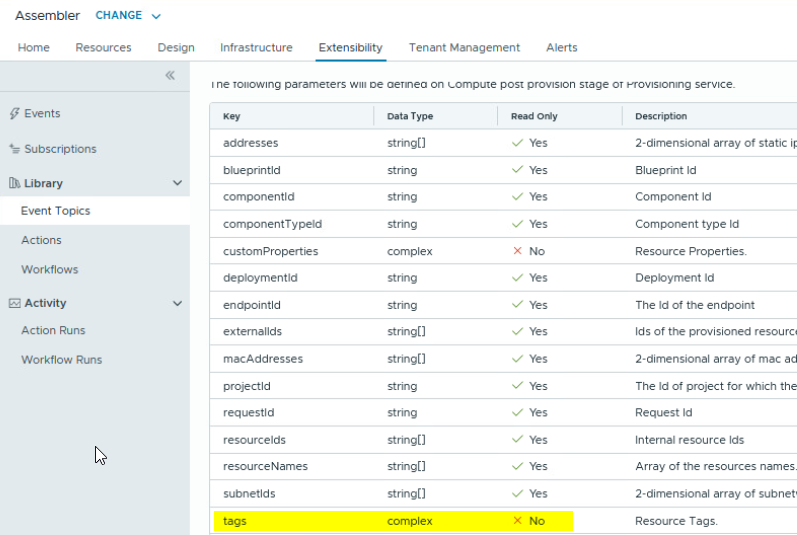
For example, if you want to add a flavor tag.
var customProperties = new Properties();
var flavour;
var tags = new Properties();

for each(entry in inputProperties.keys) {
    System.log(entry + " : " + inputProperties.get(entry));
    if (entry == "customProperties") {
        customProperties = inputPropeties.get(entry);
    }
}

if (customProperties.keys.length > 0) {
    System.log("Fetching custom properties");
    for each(customProperty in customProperties.keys) {
        if (customProperty == "flavor") {
            flavour = customProperties.get(customProperty);
        }
    }
}

if (flavour) {
    tags.put("osFlavour", flavour); //adding flavor tag
}
That’s all in this post. See you. Thanks.
Discover more from Cloud Blogger
Subscribe to get the latest posts sent to your email.













