- Enterprise Framework
- Day 0 – Stage A
- Day 0 – Stage B
- Day 0 – Stage C
- Day 0 – Stage D
- Day 1 – Stage E
- Day 1 – Stage F
- Day 2 – Stage G
- Day 2 – Stage H
- References
This post presents a robust framework for a network automation solution that effectively supports every stage of the IT service delivery lifecycle, alongside comprehensive guidance on implementing the solution across the entire enterprise.
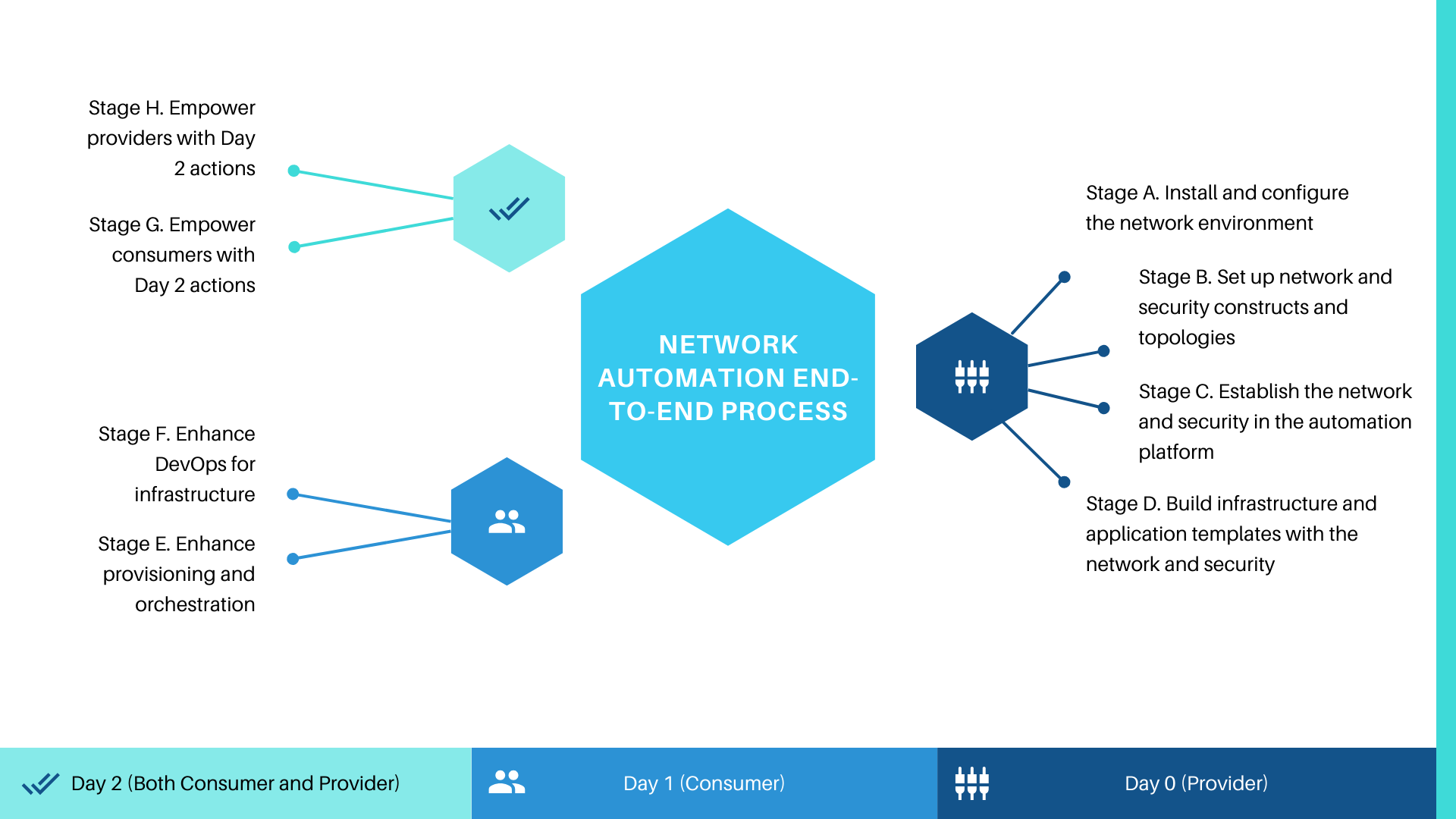
Enterprise Framework
An optimal solution efficiently automates the Day 0 tasks associated with the initial environment establishment and fabric preparation, facilitating the management of configurations, modifications, instructions, or troubleshooting at scale. Moreover, the solution should enable the creation and storage of network configurations within files that can be version-controlled and utilized subsequently in infrastructure and application templates during Day 1 and Day 2 processes, thereby maximizing operational efficiencies and productivity improvements across the enterprise.
- Day 0 focuses on establishing a robust network environment and deploying essential network and security services for our users. This includes empowering both providers—internal IT teams, such as network engineers and cloud administrators—and consumers—end users like developers, application owners, application users, and SecOps and DevOps engineers.
- Day 1 focuses on efficiently provisioning infrastructure and applications with robust network and security services through self-service automation and embedded policy management. This approach empowers organizations to assert control over key decisions, including resource provisioning locations and the types of resources that can be requested by users.
- Day 2 is focused on empowering both consumers and providers with robust self-service operations management capabilities (e.g., reconfigure, re-provision, snapshot), ensuring seamless control over individual networking services or entire application stacks, incorporating networking and security throughout their lifecycle.


These tasks can be further divided into stages that illustrate enabling key VCF components individually via SDKs, Plugins, APIs, and other integration methods. Each stage serves as a critical step in facilitating the deployment and functionality of these components, ensuring that developers have the necessary tools and resources at their disposal. By systematically addressing each component, we can enhance the overall efficiency and effectiveness of the integration process, thereby optimizing the performance and usability of the overall system for users and developers alike.
Day 0 – Stage A
Install and configure the network environment
- Enable network engineers to deploy VMware NSX® Manager™, register with VMware vCenter Server®, deploy a cluster of VMware NSX Controller™ nodes, and prepare the VMware ESXi™ hosts/transport nodes for NSX.
- Configure VXLAN or GENEVE encapsulation, specify virtual network interface (VNI) ranges, and create transport zones.
- Programmatically orchestrate VMware NSX-T™ Day 0 tasks (e.g., configuring NSX-T manager, NSX-T policies, NSX-T transport nodes, NSX-T transport zone, uplink profiles, IP address pool) with Ansible or Terraform, leveraging the modules for NSX-T or even via REST Plugin in VMware Aria Automation Orchestrator. You can also opt for Tanzu Salt module for NSX.
Day 0 – Stage B
Set up network and security constructs and topologies
- Enable network engineers to set up logical switches/segments, logical routers/T0–T1 gateways, NSX L2 bridging, VMware NSX Edge™ services, NSX Edge VPN services, and NSX security services, and build out the NSX deployment topology.
- Programmatically orchestrate NSX-T Day 0 tasks (e.g., create T0–T1 gateways, segments) with Salt or VMware Aria Automation Config and the open source Salt extension modules for NSX-T. Run commands via CLI, or build out state files to call the modules.
- Provide an extensible framework with standardized APIs and plug-in models to easily integrate with third-party configuration management tools that can also be leveraged to create logical topologies and complex configurations, including setting up routing, switching, and setting up distributed firewall rules.
Day 0 – Stage C
Establish the network and security in the automation platform
- Enable cloud admins to discover existing resources (network and security constructs) via data collection (resources created out of band via NSX, Terraform, etc.) and set up network profiles.
- Create on-demand network and security constructs directly via VMware Aria Automation™ on the endpoint.
- Integrate with Infoblox IPAM solutions, or use an IPAM SDK to develop packages that integrate third-party IPAM providers with VMware Aria Automation.
- Enable cloud admins to use the VMware Aria Automation Orchestrator™ plug-in to support VMware NSX Advanced Load Balancer™.
Day 0 – Stage D
Build infrastructure and application templates with the network and security
- Enable cloud admins to visually drag and drop existing and on-demand NSX & Avi logical components on a design canvas, then dynamically build networking and security services into infrastructure and application templates (easily create on-demand networks, load balancers and security groups, virtual services, app pools, etc).
- Enable cloud admins to apply an infrastructure-as-code approach via templates editable in YAML code.
- Provide configuration management tool files that are available as template resource types (e.g., Terraform configuration files managed as VMware Aria Automation resource types).
Day 1 – Stage E
Enhance provisioning and orchestration
- Enable end users to easily deploy, configure and manage production-ready applications with network and security services from a service catalog, or programmatically via an API or CLI. Users are only able to request and consume services associated with the projects they have access to.
- Integrate with a DevOps tool chain, including source/version control tools, CI, testing frameworks, and configuration management tools, including Ansible, Ansible Tower, Puppet, Salt and Terraform.
- Trigger configuration tasks, via VMware Aria Automation, as part to the deployment workflow (e.g., Ansible Tower Job Templates).
Day 1 – Stage F
Enhance DevOps for infrastructure
- Enable end users to automate the release process at each stage of the infrastructure or software delivery pipeline with network and security services.
- Integrate with existing software development, testing, artifact management and build systems to orchestrate tasks that need to be performed in the development process with network and security services.
Day 2 – Stage G
Empower consumers with Day 2 actions
- Apply NSX distributed firewall rules to a VM or a container, and change network configurations for provisioned networks and VMs.
- Enable end users to take Day 2 self-service actions, governed with approval policies.
- Enable the project administrator who manages deployment for teams to review all changes to the deployed catalog item.
Day 2 – Stage H
Empower providers with Day 2 actions
- Enable the project administrator who manages deployment for teams to review all changes to the deployed catalog item.
- Facilitate the ability for cloud administrators to modify network configurations or security policies for designated applications through the utilization of template updates, as changes arise within environments and applications. Additionally, the reconfiguration of Load Balancers and Security Groups may be executed as standard Day-2 operations provided by Aria Automation.
References
- Network Virtualization For Dummies®, 2nd VMware Special Edition.pdf
- Ansible for NSX-T
- Terraform Provider for VMware NSX
- Avi VMware Aria Automation Orchestrator Plugin
- Using Avi inside Aria Automation Templates
- HTTP-REST Plug-In for Orchestrator
- Infoblox IPAM Plug-In for Automation
- Managing VMware SDDC (& NSX) using Salt
- An example to NSX interation in Aria Automation Template
Discover more from Cloud Blogger
Subscribe to get the latest posts sent to your email.