

VMware Aria Automation offer several ways to implement customized automation, each with distinct characteristics and use cases. Here’s a detailed comparison:
vRO (Aria Automation Orchestrator) Workflow
Definition: A drag and drop, graphical representation of sequence of automated steps that can include logic, decisions, and interactions with external systems.
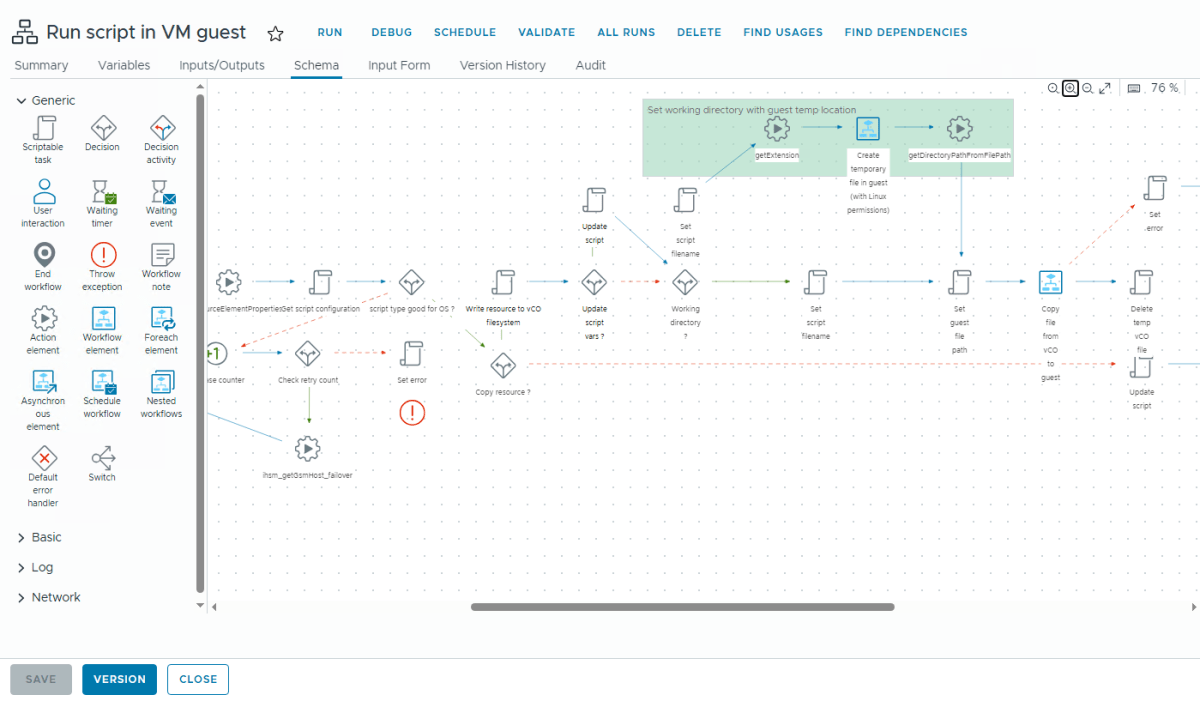
Key Characteristics:
- Graphical designer: Built using a drag-and-drop interface with a graphical representation
- Complex automation: Supports advanced branching logic, error handling, and parallel execution, workflow notes & asynchronous execution
- Stateful execution: Maintains state throughout the workflow run
- Long-running processes: Can execute over extended periods (hours/days)
- Input/Output: Accepts inputs and produces outputs at workflow level
- Scheduling: Can be scheduled or triggered by events
- Versioning: Supports version control of workflow definitions
- Reusability: Can call other workflows and actions
- Powerful Error Handling: Has built-in exception handling, waiting, and retry mechanisms
Use Cases:
- Multi-step provisioning processes
- Complex IT operations requiring conditional logic
- Processes that need to maintain state across steps
- Orchestrating interactions between 3rd party systems
vRO (Aria Automation Orchestrator) Action
Definition: A reusable function or procedure that performs a specific task.

Key Characteristics:
- Code-based: Simple function-styled code supporting Native JavaScript and Polyglot.
- Atomic operation: Performs a single, focused task
- Stateless: Doesn’t maintain context between calls
- Lightweight: Designed for quick operations. vRO can cache actions for faster repeated tasks
- Reusability: Can be called from multiple workflows and actions.
- Input/Output: Parameters are passed in/out of each call. Can have many inputs but one output
- No visual designer: purely written in code editor
Use Cases:
- Performing a single API call
- Data transformation functions
- Reusable utility functions
- Simple operations that don’t require workflow complexity
While the above two objects are part of Orchestrator, the below one lives inside Assembler.
vRA ABX (Action-Based Extensibility)
Definition: A serverless function-as-a-service capability within Aria Automation Assembler.

Key Characteristics:
- Serverless execution: Runs on VMware’s FaaS platform
- Language options: Supports Python, Node.js, PowerShell, and Bash. No JavaScript Support.
- vRA integration: Tightly coupled with vRA deployments. Support various vRA operations.
- Short-lived: Designed for quick execution (minutes max)
- Event-driven: Typically triggered by vRA events
- Stateless: No persistence between invocations
- Cloud-native: Designed for modern cloud architectures
- Little Complex Automation: Supports calling multiple actions, error handling and branching in FLOW mode.

Use Cases:
- Extending vRA native functionality
- Custom actions during cloud provisioning
- Event-driven responses in vRA deployments
- Lightweight integrations with cloud services
- Don’t want to use Orchestrator
Comparison Table
| Feature | vRO Workflow | vRO Action | vRA ABX |
|---|---|---|---|
| Type | Orchestration | Function | Serverless function |
| Execution | Long-running | Immediate | Short-lived |
| State | Stateful | Stateless | Stateless |
| Design | Visual designer | Code editor | Code editor and Basic Flow Designer |
| Language | JavaScript/Python/Node.js/PS/Bash | JavaScript/Python/Node.js/PS/Bash | Python/Node.js/PS/Bash/YAML |
| Runtime | Aria Automation Orchestrator | Aria Automation Orchestrator | VMware FaaS platform/Cloud Native |
| Reusability | Callable workflows | Callable actions | Callable actions |
| Complexity | High (multi-step) | Low (single task) | Low-Medium |
| vRA Integration | Can integrate | Can integrate | Native integration |
| Persistence | Workflow tokens | None | None |
| Versioning | Support version release | Indirect | Support version release |
| Best For | Complex orchestration | Reusable functions | Cloud-native extensions |
Final Note
If you have complex automation requirements, Orchestrator Workflows would be easily the best choice, especially when 3rd party systems have Orchestrator plugins available.
Actions are more developer-friendly as they support reusability, pseudo classes, faster execution and are more easily manageable.
ABX actions would be preferred choice when you avoid touching Orchestrator to avoid operational overhead in case you don’t many complex use cases. Also, if going serverless is your way to go. However, developing them can be little complex sometimes.
However, these observations represent my personal reflections over the past years. It is entirely possible that you hold a differing perspective and may choose to operate them in an opposing or completely different manner.
Discover more from Cloud Blogger
Subscribe to get the latest posts sent to your email.













