

Introduction
I am sure everyone is using the git feature of vRO 8.x and you probably be pushing & pulling your vRO content across your DEV, STAGING, UAT & PROD environments. The question is, “Are you using .gitignore while pushing code from vRO? and why do you need it?”. This question was asked in vRO community (link here), and since the comment that I made answered the query, I thought I should write about it. Let’s see how .gitignore can ease your life during code promotions and gives you fluidity to have environment specific values safe as well as keeps the gibberish away from PROD vRO etc. and keeps your assembly vRO’s codebase clean and compact.
Note If you are looking to setup git in vRealize Orchestrator, follow this official link https://blogs.vmware.com/management/2022/05/git-repository-integration-in-vrealize-orchestrator.html.
Advantages
I will not go in details on how .gitignore works. You can learn more about .gitignore online. Fundamentally, .gitignore allows you to exclude specific files or directories from being pushed to the remote repository. Hence, using .gitignore can drastically improve the performance of your CI\CD pipelines. For vRealize Orchestrator, I have come across mainly following types of files that I want to exclude:
- Test actions & workflows: Development generally relies on hits & trials. This leaves a lot of post-development debris.
- Environment specific assets like Configuration elements: This may include passwords or API keys.
- Packages: Since you have git-power, you don’t really need packages to move your code and hence, if you are using them, it’s probably something not as critical.
- Default Library content: Why would you copy something which is already there at first place.
- Multi Node Workflows: These dummy workflows doesn’t need to push across (starts with
VCO@). - Test Script Environments: The test script environments for polyglot actions etc.
- Polyglot ActionModules: All the test actions that uses Python, Nodejs or PowerCLI.
Question? Can you think of any other type of file that should be ignored? Comment down your answer.
You can use literal file names, wildcard symbols, etc to get them listed. Also, you can use negating patterns. A negating pattern is a pattern that starts with an exclamation mark (!) negates (re-include) any file that is ignored by the previous pattern. The exception to this rule is to re-include a file if its parent directory is excluded.
Procedure
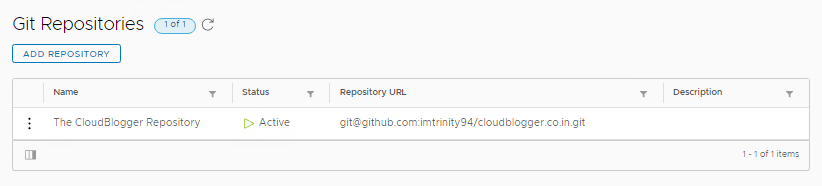
In the vRO, Go to repository which is already setup under Administration -> Git Repositories.

In our case, it will be github.com/imtrinity94/cloudblogger.co.in.
Simply, just create a .gitignore file in the root of your repo branch and list down all the files you want to ignore like
# Default Resource Elements
Resources/Library/*

# Library Workflows
Workflows/Library

# Environment Specific variables
Configurations/Vault/API Keys

# Negating pattern to explicitly include tenant specific information
!Configurations/Tenants/*

# Multi-Node Workflows
Workflows/VCO@*

# Packages
**/Packages/

# Test actions
Actions/org/mayank/testThe other way round is to ignore everything and use negating pattern to include very specific things.
# All packages, JavaScript actions,  resources, configurations, policies, Polyglot action bundles (.py, .ps1 & node.js) and Workflows
**/Packages/
**/Actions/
**/Resources/
**/Configurations/
**/ActionBundles/
**/Workflows/
**/Policy Templates/This will avoid all the packages, resources and configurations to be committed to the corresponding repo.
This should be enough. If you want to be more precise, The .gitignore tutorial is here https://www.atlassian.com/git/tutorials/saving-changes/gitignore
Limitations
- If you add
.gitignoreafter pushing everything even once, the.gitignorewill work for new files but will still track those existing files. - You may lose version control on ignored objects.
Flush Git from vRO
In case, you have already set up git in your vRO and want to do a fresh start due to unwanted tracking of files or being stuck in an undesirable git state, you can locally remove the git config from your vRO by removing the git configuration. Use it with caution though.
- To clear the local git history what we can do is move/remove the
__SYSTEM.gitdirectory:mv /data/vco/usr/lib/vco/app-server/data/git/__SYSTEM.git /home/root/BACKUP__SYSTEM.git
- When a user then navigates to the Git History page in Orchestrator, the local repository will be recreated
- The remote repo can now be pulled to get the latest changes locally
Available on gitignore.io
As we all know https://www.toptal.com/developers/gitignore/ is the largest collection of .gitignore files, I thought why shouldn’t I add vRO to their list as well. That’s why I created a pull request here at https://github.com/toptal/gitignore/pull/460 & it got approved. Now, if you got there and search for vRealizeOrchestrator, you will get the .gitignore file ready to be consumed in your projects.

That’s it in this post. Let me know what you think about it in the comments.
Discover more from Cloud Blogger
Subscribe to get the latest posts sent to your email.








You say “The .gitignore file will become part of vRO.” Where can i find it in VRO?
It can be seen in Workflows view under web-root
You are right. It’s not there.
Aria Automation 8.18.1. We did a ‘pull’ of the .gitignore file. The local changes list is reduced, but, we are missing some of the workflows in the list. We reverted the .gitignore to an empty state, and pulled the empty .gitignore. No change. How do we revert to step 1? Removing __SYSTEM.git and starting with a new git repo didnt work. Do we need a service restart?
Note: You can delete __SYSTEM.git and this will remove only version history for the local changes while preserving the changes.