Here is the list of all the PowerShell Modules that comes preinstalled in vRO 8.x. In later versions of vRO, we have 2 PowerShell environments 6.x and 7.x. There is a slight difference in the modules as you can notice below in both the versions.
| For Powershell 7.x | For Powershell 6.x |
|---|---|
| PowerNSX | PowerNSX |
| PowervRA | PowervRA |
| VMware.CloudServices | VMware.DeployAutomation |
| VMware.DeployAutomation | VMware.ImageBuilder |
| VMware.ImageBuilder | VMware.PowerCLI |
| VMware.PowerCLI | VMware.Vim |
| VMware.Vim | VMware.VimAutomation.Cis.Core |
| VMware.VimAutomation.Cis.Core | VMware.VimAutomation.Cloud |
| VMware.VimAutomation.Cloud | VMware.VimAutomation.Common |
| VMware.VimAutomation.Common | VMware.VimAutomation.Core |
| VMware.VimAutomation.Core | VMware.VimAutomation.Hcx |
| VMware.VimAutomation.Hcx | VMware.VimAutomation.HorizonView |
| VMware.VimAutomation.HorizonView | VMware.VimAutomation.License |
| VMware.VimAutomation.License | VMware.VimAutomation.Nsxt |
| VMware.VimAutomation.Nsxt | VMware.VimAutomation.Sdk |
| VMware.VimAutomation.Sdk | VMware.VimAutomation.Security |
| VMware.VimAutomation.Security | VMware.VimAutomation.Srm |
| VMware.VimAutomation.Srm | VMware.VimAutomation.Storage |
| VMware.VimAutomation.Storage | VMware.VimAutomation.StorageUtility |
| VMware.VimAutomation.StorageUtility | VMware.VimAutomation.Vds |
| VMware.VimAutomation.Vds | VMware.VimAutomation.Vmc |
| VMware.VimAutomation.Vmc | VMware.VimAutomation.vROps |
| VMware.VimAutomation.vROps | VMware.VumAutomation |
| VMware.VimAutomation.WorkloadManagement | Microsoft.PowerShell.Host |
| VMware.VumAutomation | Microsoft.PowerShell.Management |
| Microsoft.PowerShell.Host | Microsoft.PowerShell.Security |
| Microsoft.PowerShell.Management | Microsoft.PowerShell.Utility |
| Microsoft.PowerShell.Security | PackageManagement |
| Microsoft.PowerShell.Utility | PowerShellGet |
| PackageManagement | PSDesiredStateConfiguration |
| PowerShellGet | PSReadLine |
| PSReadLine | PSReadLine |
As you might have noticed, in 7.x, we have two additional modules i.e. VMware.CloudServices & VMware.VimAutomation.WorkloadManagement, but misses out PSDesiredStateConfiguration that is only available in 6.x.
Get your own list
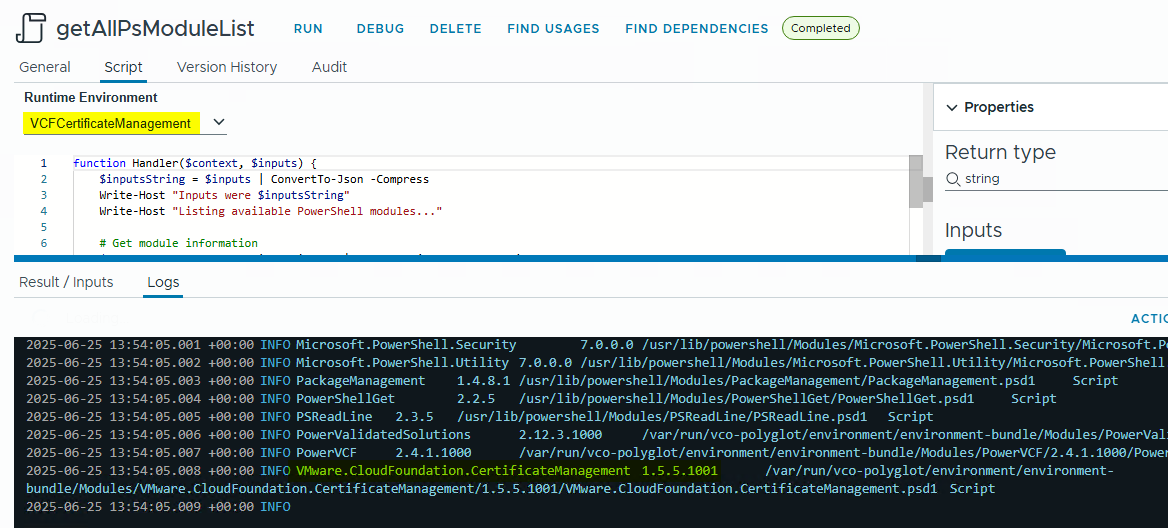
Run this code in a PowerShell or PowerCLI runtime or an action environment based on these runtimes.
function Handler($context, $inputs) {
    $inputsString = $inputs | ConvertTo-Json -Compress
    Write-Host "Inputs were $inputsString"
    Write-Host "Listing available PowerShell modules..."

    # Get module information
    $modules = Get-Module -ListAvailable | Select-Object Name, Version, Path, ModuleType

    # Create a table string
    $tableString = "Module Name`tVersion`tPath`tType`n"
    $tableString += "----------------------------------`n"

    foreach ($module in $modules) {
        $tableString += "$($module.Name)`t$($module.Version)`t$($module.Path)`t$($module.ModuleType)`n"
    }

    # Write the table
    Write-Host $tableString

    # Add to output
    $output = @{
        status = 'done'
        modules = @($modules | ForEach-Object {
            @{
                Name = $_.Name
                Version = $_.Version
                Path = $_.Path
                ModuleType = $_.ModuleType
            }
        })
    }

    return $output
}
Check out other list of modules here:
for Python: https://cloudblogger.co.in/2022/03/08/list-of-all-available-python-modules-in-vro/
for NodeJs: https://cloudblogger.co.in/2022/03/15/list-of-available-node-js-modules-in-vro/
Discover more from Cloud Blogger
Subscribe to get the latest posts sent to your email.