

- Understanding VMware Aria Automation
- NSX Integration
- vSAN Integration
- VCF SDDC Manager Integration
- Conclusion
VMware Cloud Foundation (VCF) is great for managing your hybrid cloud. But, to truly get the most out of it, you need automation. VMware Aria Automation is the key. It makes things like deployment, management, and upkeep way easier across your VCF setup. Ready to see how Aria Automation can change your VCF experience?
This guide shows how Aria Automation makes VCF even better. We will look at NSX working together, managing storage with vSAN, and how simple it is to get started with SDDC Manager. You’ll learn how to make your VCF work better with Aria Automation.
Welcome to the world of VMware Aria Automation! Today, we’re diving deep into how to consume and deploy VMware Cloud Foundation (VCF) components effectively. Whether you’re new to the cloud or looking to enhance your existing setup, this guide will walk you through the key features and capabilities specific to VCF, including integrations with NSX, vSAN, and SDDC Manager.
Understanding VMware Aria Automation
VMware Aria Automation is an infrastructure automation platform that delivers a secure, self-service multi-cloud environment, complete with governance and resource lifecycle management. This platform is designed to benefit organizations by enabling faster time to market, enhancing governance and resource lifecycle management, and accelerating innovation.

The core idea is to create a self-service multi-cloud environment that supports various modules, including:
- Assembler: For creating and managing cloud templates.
- Service Broker: A solution for managing catalog items.
- Pipelines: Our CI/CD solution for continuous integration and deployment.
- Embedded Orchestrator: For managing workflows and automation tasks.
NSX Integration
One of the standout features of VMware Aria Automation is its seamless integration with NSX, available in both versions 3.x and 4.x. This integration allows users to create cloud accounts for NSX, facilitating automated deployment and configuration of NSX objects.
NSX provides constructs such as segments, gateways, distributed security policies, and security tags. By combining these with Aria Automation, users can leverage a self-service catalog, resource reservations, and cloud zones to build a robust cloud management platform.

Creating Networks with NSX
With Aria Automation, you can create dedicated networks for various workloads, including:
- Database workloads
- Application workloads
- Internet-facing web servers
This setup allows for tagging, boundaries, and comprehensive East-West firewall rules. Let’s take a closer look at how you can create VMware Cloud templates for provisioning provider infrastructure using infrastructure as code.
Provisioning NSX Network Objects
Provisioning NSX network objects as standalone entities is a game-changer. You can create reusable and consumable network objects, such as networks and load balancers, which can be integrated into existing or new network profiles for template consumption.
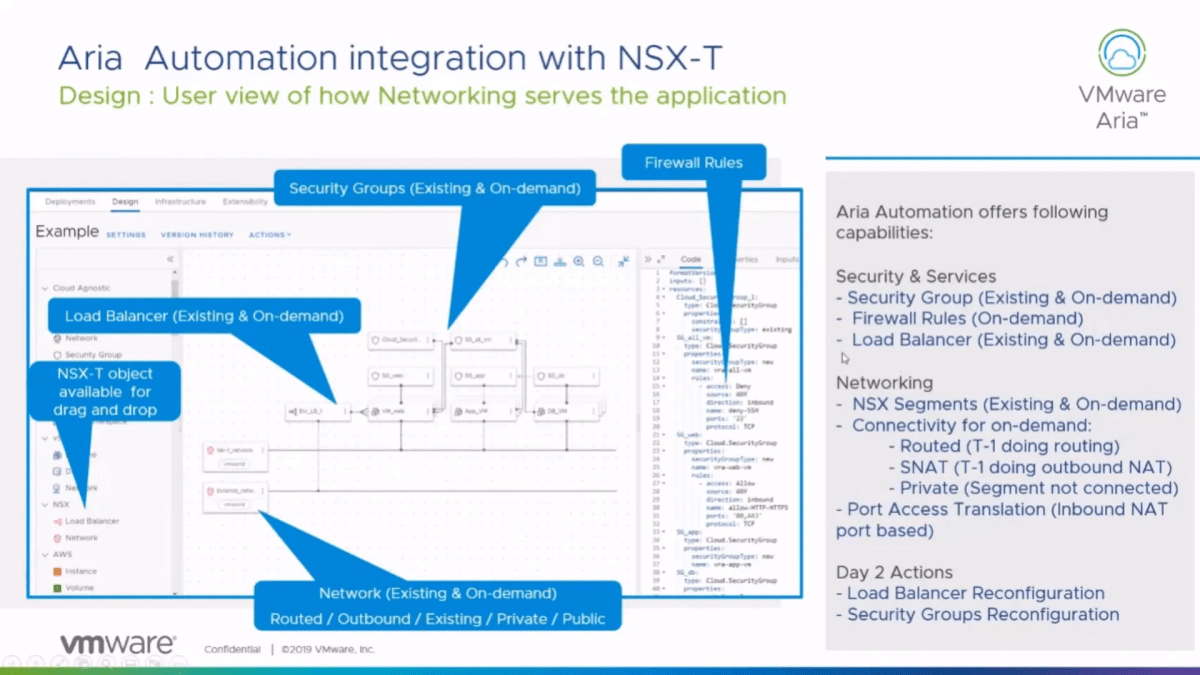
This flexibility allows you to drag and drop load balancers into your templates and connect them to specific networks, ensuring that the load balancer is provisioned correctly and is available for use in your deployments.

Network Types in NSX
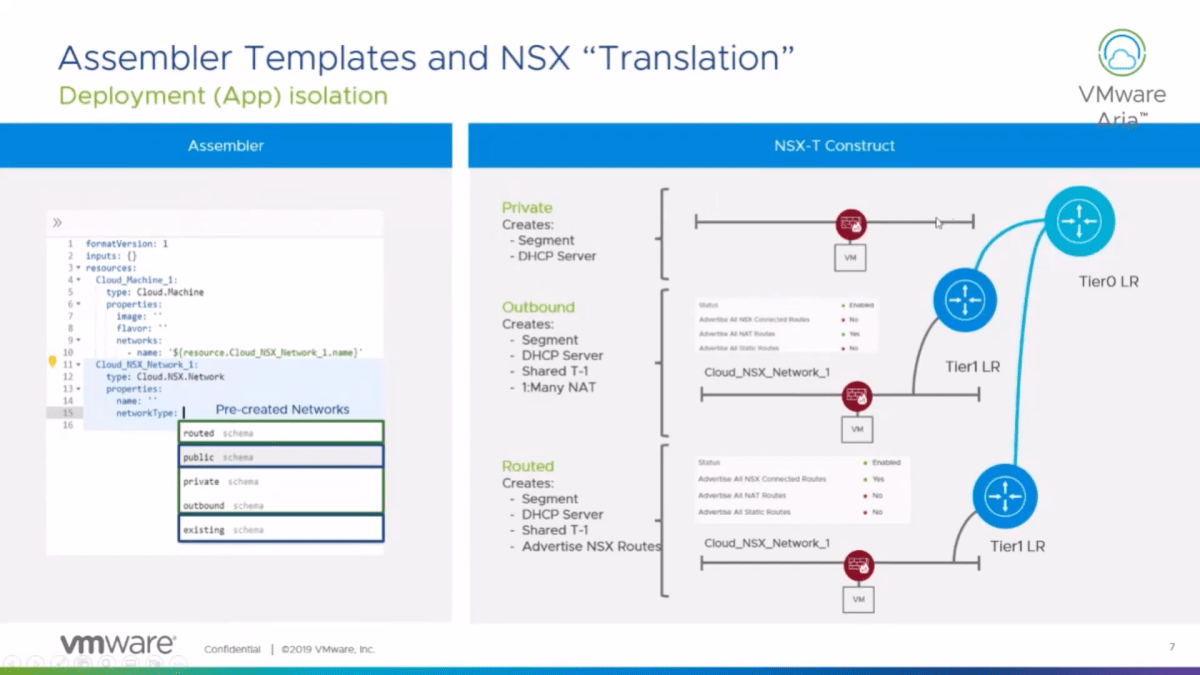
When working with NSX, understanding the different network types is crucial. The types of networks you can define include:
- Public: For internet-facing services.
- Private: For isolated workloads.
- Outbound: For workloads needing internet access.
- Routed: For workloads requiring routing capabilities.
- Existing: For using previously defined segments.
Each network type has specific configurations, such as enabling DHCP or connecting to tiered gateways. For instance, selecting a private network creates a segment that only allows communication among workloads within itself, while an outbound network allows traffic to flow out through a shared tier one (T1) gateway.
Security and Load Balancing
Security is paramount in VCF. VMware Aria Automation allows you to create security groups that can either be existing ones defined by your security team or dynamically created when applications are provisioned.
Load balancers can also be provisioned on-demand, ensuring they are created and deleted in tandem with the applications they serve. This keeps your infrastructure clean and organized, avoiding unnecessary clutter.
Day 2 Operations
Day 2 operations are critical for maintaining a cloud environment. Aria Automation enables you to perform various actions post-deployment, including:
- Reconfiguring load balancer rules
- Adjusting security group settings
- Managing logging levels
These operations can be gated for approval, ensuring that any changes adhere to governance policies.

vSAN Integration
While storage integration with vSAN is not an explicit integration, it allows users to expose storage policies and create storage profiles that reflect the workload domain in VCF. This integration ensures that your storage solutions align with the characteristics of the workloads you are provisioning.
By utilizing default vSAN storage policies, users can easily create and apply storage profiles that meet their specific needs, whether that involves RAID configurations or encryption requirements.

VCF SDDC Manager Integration
For those using VMware Cloud Foundation, the SDDC Manager integration simplifies the onboarding process for creating VCF cloud accounts. This integration allows for easy access to VCF components and streamlines the process of adding cloud accounts to your Aria Automation setup.
By connecting to the SDDC Manager, you can automatically expose workload domains and facilitate the provisioning of resources across your VCF environment.

Conclusion
VMware Aria Automation provides a powerful suite of tools for managing your VCF environments effectively. From automating NSX configurations to integrating storage solutions and managing lifecycle operations, the platform is designed to enhance your cloud experience.
Discover more from Cloud Blogger
Subscribe to get the latest posts sent to your email.









