

💀 The Incident: A Script That Brought Down Everything
It started as a routine task—running a simple script to test a small part of our workflow. But instead of gracefully failing with a StackOverflowError or a timeout, the script did something unexpected: it crashed the entire tool for over a minute, causing cascading failures across all active workflows.
This wasn’t just a minor hiccup. Other users were locked out, processes stalled, and critical operations failed, because I was in PROD env—all because of one unchecked script execution.
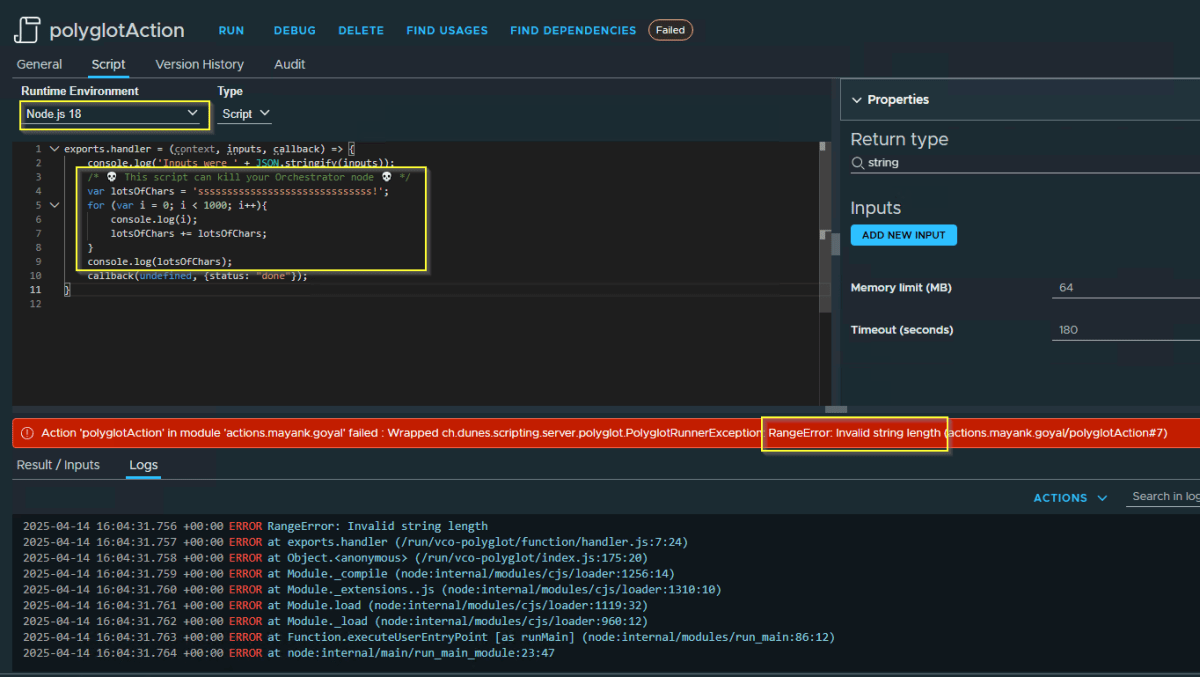
/* 💀 This script can kill your Orchestrator node 💀 */
var lotsOfChars = 'ssssssssssssssssssssssssssssss!';
for (var i = 0; i < 1000; i++){
 System.log(i);
 lotsOfChars += lotsOfChars;
}
System.log(lotsOfChars);
What Went Wrong?
While the exact root cause is still under investigation, here’s what we suspect happened:
- The script consumed excessive resources (CPU/memory) without safeguards.
- Instead of isolating the failure, JavaScript runtime allowed the script to affect the entire system.
- There was no proper sandboxing—scripts could impact shared resources.
- No rate-limiting or access control prevented a bad script from overloading the system.
Let me know if it’s the same behavior in your case and do you know of the core issue here.
What Should have Happened
The Orchestrator is equipped with fail-safe mechanisms such as sandboxing, early termination, and role-based access. I believe the distinction lies in the various runtimes employed.
☑️ Sandboxing & Resource Limits
- Scripts should run in isolated environments with strict CPU, memory, and execution time limits. Orchestrator do run the Polyglot scripts in a sandboxed environment.
See how running the same script in Node.js failed with RangeError.
☑️ Fail-Fast Mechanisms
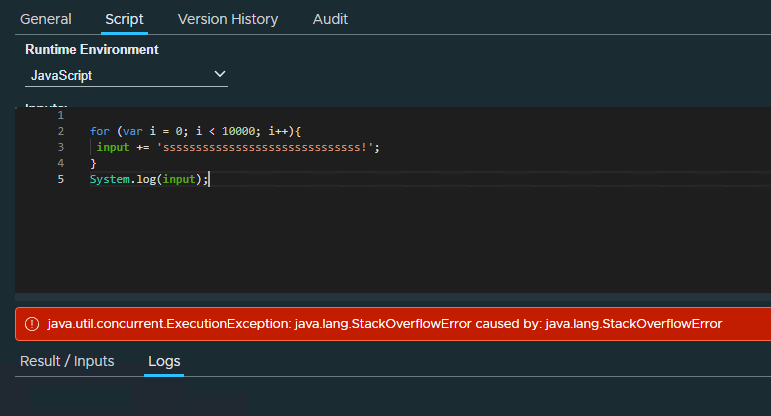
Instead of crashing the whole system, scripts should:
- Terminate early if they exceed resource thresholds like throwing StackOverFlowError in below case.
Final Thought
This wasn’t just a bug—it seems to be a design flaw in how the VCF Orchestrator handled untrusted code or faulty code. Now you know when to keep a check because one unchecked script can bring down far more than you’d expect.
Discover more from Cloud Blogger
Subscribe to get the latest posts sent to your email.













