What is a SCSI Controller in VMware?
A SCSI controller in VMware is a virtual hardware device that presents virtual disks to guest operating systems using the SCSI protocol. It emulates or paravirtualizes SCSI bus hardware, allowing VMs to connect storage devices efficiently. Each VM can have several SCSI controllers, and each controller can attach multiple virtual disks.
Support 64 disks on Paravirtual SCSI (PVSCSI) controller | Release Notes
VMware Aria Automation had a limitation when attempting to deploy certain application types that need a large number of disks or add disks. This is because VMware Aria Automation only supports up to 14 disks per controller, while Virtual Center supports up to 64 disks.
Now VMware Aria Automation 8.18.1 supports up to 64 disks per controller at the deployment phase and for adding disks.
Common SCSI Controller Types in VMware
- BusLogic
- LSI Logic Parallel
- LSI Logic SAS
- VMware Paravirtual SCSI (PVSCSI): A paravirtualized, high-performance controller designed by VMware for virtual environments.
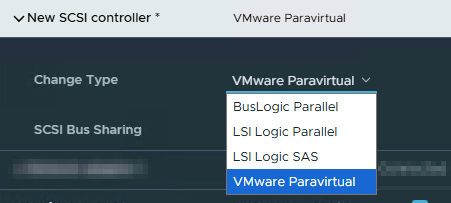
Other storage controllers exist (such as AHCI SATA and NVMe), but SCSI controllers remain the standard for most enterprise VM deployments due to broad OS support and flexibility.
Why PVSCSI Is Best Suited for Modern VMware VMs
PVSCSI (Paravirtual SCSI) is currently the best-suited SCSI controller for most modern VMware virtual machines, especially for the following reasons:
- Performance: PVSCSI provides significantly higher throughput and lower CPU usage compared to legacy SCSI controllers. It is optimized for virtualized storage I/O, delivering better scalability for workloads with high disk activity.
- Scalability: With hardware version 14+ and vSphere 6.7+, each PVSCSI controller supports up to 64 device slots (addresses 0–63, except 7), and up to four PVSCSI controllers per VM, allowing for up to 252 disks per VM.
- Efficiency: Reduces I/O overhead by eliminating emulation layers present in other controllers, allowing direct, faster communication between VM and hypervisor.
- Wide OS Support: Modern Windows and Linux OS versions include PVSCSI drivers out-of-the-box (Linux kernel 2.6.33+ for Linux, VMware Tools for Windows).
- Ideal Use Cases: Suited for database servers, file servers, Exchange servers, and other VMs requiring high disk IOPS and throughput.
Legacy SCSI Controllers (such as LSI Logic SAS and LSI Logic Parallel) are not “unsupported” in VMware; they are still available for compatibility reasons, especially for OSes or workloads that require them, but vSphere Client throws a warning on modern OSes.

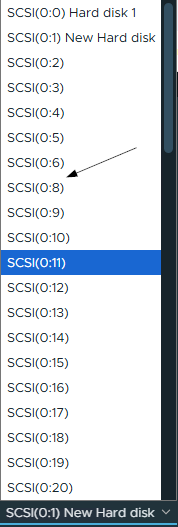
You can add virtual hard disks to a VM using an LSI Logic SAS SCSI Controller, as shown below. VMware still supports this scenario.

Supported Maximums
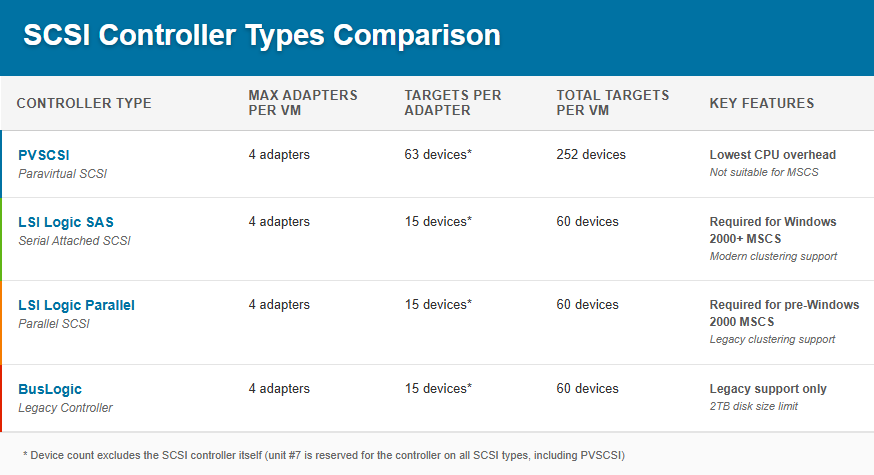
VMware globally caps the number of disks (regardless of controller mix) to 252 per VM technically (though 256 is mentioned in Config Maximums portal as a soft limit, I believe it is not possible with just SCSI Controllers), though the maximum per-controller is constrained by the controller’s capabilities.
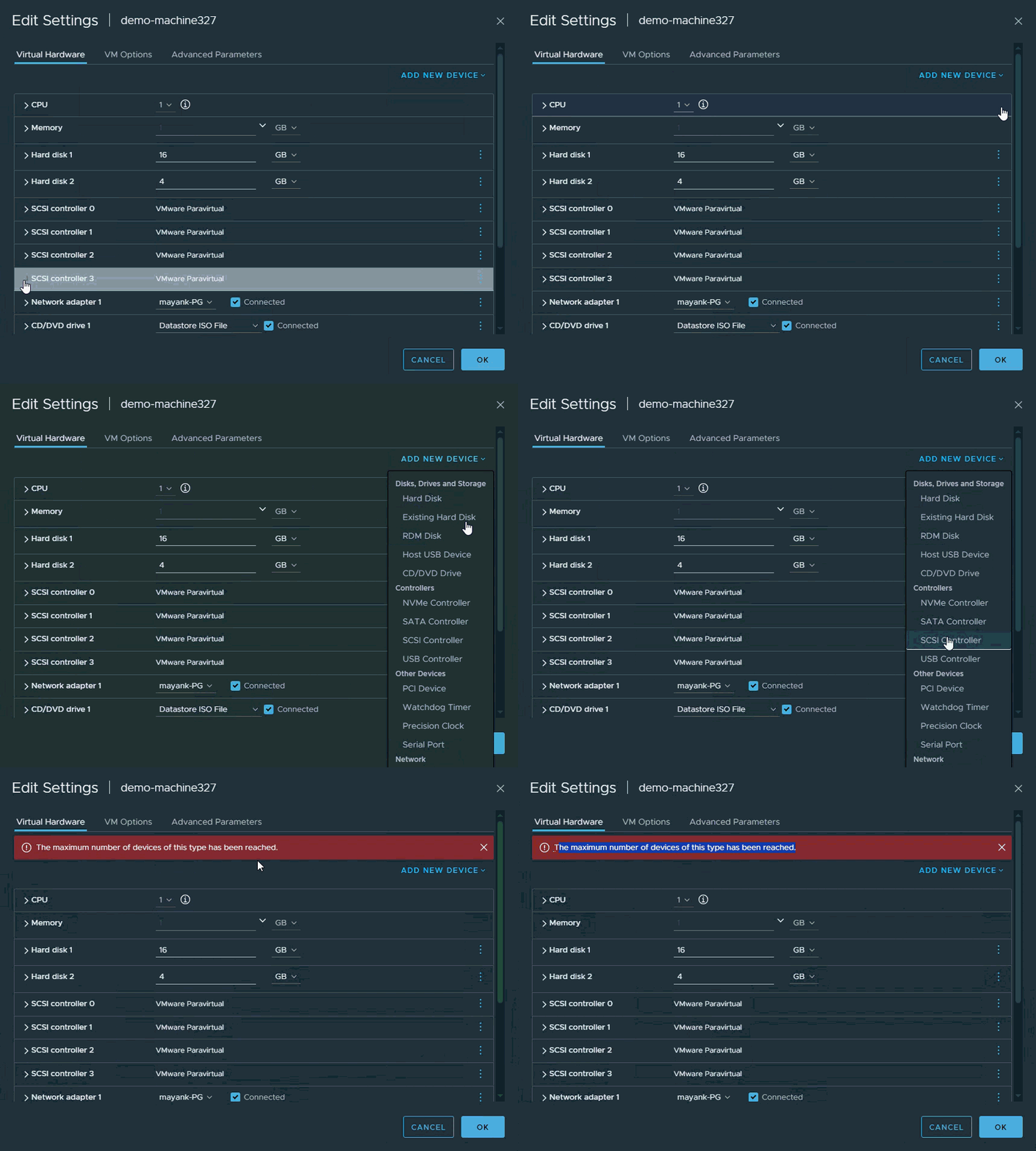
All SCSI controllers, regardless of type, allow a VM to have up to 4 adapters. Each adapter can support multiple devices (disks), though the maximum differs by controller type. vSphere Client will throw an error when you try to add a 5th SCSI Controller.
Older controller types (BusLogic, LSI Logic) exist primarily for legacy operating system support—these support up to 15 devices per adapter (excluding #7).
There’s always one SCSI ID (controller unit #7) per adapter reserved for the controller itself and unavailable for disks.

Talk Code now
You can access all your devices in your VM of type Vc:VirtualMachine like this.
var devices = vm.config.hardware.device;To get the SCSI controllers from the list of devices, we can compare their types like this.
(devices[i] instanceof VcParaVirtualSCSIController ||  /*PVSCSI*/
 devices[i] instanceof VcVirtualBusLogicController ||  /*Bus Logic*/
 devices[i] instanceof VcVirtualLsiLogicController ||  /*LSI Logic Parallel*/
devices[i] instanceof VcVirtualLsiLogicSASController) /*LSI Logic SAS*/Also, understand the attributes of a SCSI Controller object.
devices[i].key // 1000-1003
devices[i].busNumber; // 0-3
devices[i].scsiCtlrUnitNumber // always 7
devices[i].unitNumber // 0-63 for PVSCSI and 0-15 for otherskey and busNumber may be used interchangeably sometimes. Make sure to check what code needs.
To create and add a fresh harddisk or add an existing harddisk, you will need to a mix of class objects to pass relevant data like VcVirtualDiskFlatVer2BackingInfo, VcVirtualDisk, VcVirtualDeviceConfigSpec like this.
function createVirtualDiskConfigSpec(sizeInGB, datastore, controllerKey, unitNumber, diskMode, thinProvisioned) {
    var diskBackingInfo = new VcVirtualDiskFlatVer2BackingInfo();
    diskBackingInfo.diskMode = VcVirtualDiskMode.fromString(diskMode);
    diskBackingInfo.fileName = '['+datastore.info.name +']';
    diskBackingInfo.thinProvisioned = thinProvisioned;

    var disk = new VcVirtualDisk();
    disk.backing = diskBackingInfo;
    disk.controllerKey = controllerKey;
    disk.key = -1; // Auto-assign
    disk.unitNumber = unitNumber;
    disk.capacityInKB = sizeInGB * 1024 * 1024; // GB → KB

    var spec = new VcVirtualDeviceConfigSpec();
    spec.device = disk;
    spec.fileOperation = VcVirtualDeviceConfigSpecFileOperation.create;
    spec.operation = VcVirtualDeviceConfigSpecOperation.add;

    return spec;
}and finally VcVirtualMachineConfigSpec to apply those changes to a VM.
var configSpec = new VcVirtualMachineConfigSpec();
var deviceConfigSpecs = [];
var deviceConfigSpec = createVirtualDiskConfigSpec(); //your implemented method
deviceConfigSpecs.push(deviceConfigSpec);
configSpec.deviceChange = deviceConfigSpecs;
vm.reconfigVM_Task(configSpec);Code Snippets
Add a new SCSI Controller
var vm = VcPlugin.getAllVirtualMachines(null, "xpath:matches(name, 'demo-machine-name')")[0]; //just edit the machine name to test this code quickly
addSingleController(vm); // Adds one controller
/**
* Creates a SCSI controller configuration for a VM
* @param {string} controllerType - Type: "pvscsi", "lsilogic", "lsilogicsas", "buslogic"
* @param {number} busNumber - SCSI bus number (0-3)
* @param {number} sharingMode - 0:noSharing, 1:physicalSharing, 2:virtualSharing
* @param {number} controllerKey - Unique negative key (e.g., -102, -103)
* @returns {VcVirtualDeviceConfigSpec} Configured controller spec
*/
function createScsiController(controllerType, busNumber, sharingMode, controllerKey) {
var spec = new VcVirtualDeviceConfigSpec();
spec.operation = VcVirtualDeviceConfigSpecOperation.add;
// Initialize the appropriate controller type
switch(controllerType.toLowerCase()) {
case "pvscsi":
spec.device = new VcParaVirtualSCSIController();
break;
case "lsilogic":
spec.device = new VcVirtualLsiLogicController();
break;
case "lsilogicsas":
spec.device = new VcVirtualLsiLogicSASController();
break;
case "buslogic":
spec.device = new VcVirtualBusLogicController();
break;
default:
throw "Invalid controller type: " + controllerType;
}
// Common configuration for all controller types
spec.device.sharedBus = VcVirtualSCSISharing.fromString(
sharingMode === 1 ? "physicalSharing" :
sharingMode === 2 ? "virtualSharing" : "noSharing"
);
//spec.device.scsiCtlrUnitNumber = 7;
spec.device.deviceInfo = new VcDescription();
spec.device.deviceInfo.summary = 'New ' + controllerType + ' controller';
spec.device.deviceInfo.label = 'New ' + controllerType + ' controller';
spec.device.key = controllerKey;
spec.device.busNumber = busNumber;
spec.device.hotAddRemove = true;
return spec;
}
// Single controller example
function addSingleController(vm) {
var configSpec = new VcVirtualMachineConfigSpec();
configSpec.deviceChange = [createScsiController("pvscsi", 1, 1, -100)]; // won't fail if controller already exists on the provided busNumber
// Apply changes
try {
var task = vm.reconfigVM_Task(configSpec);
System.getModule("com.vmware.library.vc.basic").vim3WaitTaskEnd(task, true, 1);
System.log("Successfully added SCSI controller");
} catch (e) {
System.error("Failed to add controller: " + e);
}
}Get Free SCSI Controller slots or unit numbers (64 for PVSCSI & 16 for others)
var vm = VcPlugin.getAllVirtualMachines(null, "xpath:matches(name, 'demo-machine-name')")[0]; //just edit the machine name to test this code quickly
getFreeScsiSlots(
vm,
0
);
function getFreeScsiSlots(vm, scsiController) {
var devices = vm.config.hardware.device;
var controllerKey;
var controllerUnit;
var freeSlots = [];
var isPVSCSI = false;
var maxUnits = 15; // Default for most controllers
// Default to SCSI 0 if not specified
if (scsiController == null) scsiController = 0;
// Step 1: Find the target SCSI controller and determine type
for (var i = 0; i < devices.length; i++) {
var hba = devices[i];
if ((hba instanceof VcParaVirtualSCSIController ||
hba instanceof VcVirtualBusLogicController ||
hba instanceof VcVirtualLsiLogicController ||
hba instanceof VcVirtualLsiLogicSASController) &&
hba.busNumber == scsiController) {
System.log("Found SCSI Controller " + scsiController +
" (Key: " + hba.key + ", Type: " + System.getObjectClassName(hba) + ")");
controllerKey = hba.key;
controllerUnit = hba.scsiCtlrUnitNumber; // Reserved unit (usually 7)
// Check if this is a PVSCSI controller
if (hba instanceof VcParaVirtualSCSIController) {
isPVSCSI = true;
maxUnits = 64; // PVSCSI supports up to 64 devices
System.log("PVSCSI controller detected - checking up to unit 63");
}
break;
}
}
if (controllerKey == null) {
throw "SCSI Controller " + scsiController + " not found!";
}
// Step 2: Check all units for availability
for (var u = 0; u < maxUnits; u++) {
if (u == controllerUnit) {
System.log("Unit " + u + ": Reserved for controller");
continue;
}
var isUnitFree = true;
for (var j = 0; j < devices.length; j++) {
var device = devices[j];
if (device.controllerKey == controllerKey && device.unitNumber == u) {
System.log("Unit " + u + ": Used by " +
(device.deviceInfo ? device.deviceInfo.label : "Unknown Device"));
isUnitFree = false;
break;
}
}
if (isUnitFree) {
System.log("Unit " + u + ": FREE");
freeSlots.push(u);
}
}
// Return results
if (freeSlots.length > 0) {
System.log("Free slots on SCSI " + scsiController + ": " + freeSlots.join(", "));
return freeSlots;
} else {
throw "No free slots on SCSI Controller " + scsiController;
}
}Add a Harddisk to VM
var vm = VcPlugin.getAllVirtualMachines(null, "xpath:matches(name, 'demo-machine-name')")[0]; //Just edit the machine name to test this code quickly
var datastore = vm.datastore[0];
addVirtualDisk(
vm,
datastore,
46, // diskIndex
50, // diskSize (GB)
"persistent",
1, // scsiBusNumber
true // thinProvisioned
);
function addVirtualDisk(vm, datastore, diskIndex, diskSize, diskMode, scsiBusNumber, thinProvisioned) {
var configSpec = new VcVirtualMachineConfigSpec();
var deviceConfigSpecs = [];
// Validate inputs
if (diskSize <= 0) throw new Error("Disk size must be > 0");
if (!datastore || !datastore.info || !datastore.info.name) {
throw new Error("Invalid datastore: Missing required properties (info.name)");
}
// Get SCSI controller type to determine max disk index
var controller = getScsiController(vm, scsiBusNumber);
var isPVSCSI = controller instanceof VcParaVirtualSCSIController;
var maxDiskIndex = isPVSCSI ? 63 : 15;
// Validate diskIndex based on controller type
if (diskIndex < 0 || diskIndex > maxDiskIndex || diskIndex === 7) {
var errorMsg = "Invalid diskIndex " + diskIndex;
if (diskIndex > maxDiskIndex) {
var controllerType = isPVSCSI ? "PVSCSI" :
(controller instanceof VcVirtualLsiLogicController ? "LSI Logic" :
(controller instanceof VcVirtualLsiLogicSASController ? "LSI Logic SAS" :
(controller instanceof VcVirtualBusLogicController ? "BusLogic" : "Unknown")));
errorMsg += ". Maximum allowed for " + controllerType + " controller is " + maxDiskIndex;
} else if (diskIndex === 7) {
errorMsg += " (unit 7 is reserved for the controller)";
} else {
errorMsg += " (must be 0-" + maxDiskIndex + ")";
}
throw new Error(errorMsg);
}
// Create disk config
var deviceConfigSpec = createVirtualDiskConfigSpec(
diskSize,
datastore,
controller.key, // Use actual controller key instead of bus number
diskIndex,
diskMode,
thinProvisioned
);
deviceConfigSpecs.push(deviceConfigSpec);
configSpec.deviceChange = deviceConfigSpecs;
// Execute task
try {
var task = vm.reconfigVM_Task(configSpec);
System.getModule("com.vmware.library.vc.basic").vim3WaitTaskEnd(task, true, 1);
} catch (e) {
throw new Error("Failed to add disk: " + e);
}
}
// Helper function to get SCSI controller by bus number
function getScsiController(vm, busNumber) {
var devices = vm.config.hardware.device;
for (var i = 0; i < devices.length; i++) {
var device = devices[i];
if ((device instanceof VcParaVirtualSCSIController ||
device instanceof VcVirtualBusLogicController ||
device instanceof VcVirtualLsiLogicController ||
device instanceof VcVirtualLsiLogicSASController) &&
device.busNumber == busNumber) {
return device;
}
}
throw new Error("SCSI controller with busNumber " + busNumber + " not found");
}
function createVirtualDiskConfigSpec(sizeInGB, datastore, controllerKey, unitNumber, diskMode, thinProvisioned) {
    var diskBackingInfo = new VcVirtualDiskFlatVer2BackingInfo();
    diskBackingInfo.diskMode = VcVirtualDiskMode.fromString(diskMode);
    diskBackingInfo.fileName = '['+datastore.info.name +']';
    diskBackingInfo.thinProvisioned = thinProvisioned;

    var disk = new VcVirtualDisk();
    disk.backing = diskBackingInfo;
    disk.controllerKey = controllerKey;
    disk.key = -1; // Auto-assign
    disk.unitNumber = unitNumber;
    disk.capacityInKB = sizeInGB * 1024 * 1024; // GB → KB

    var spec = new VcVirtualDeviceConfigSpec();
    spec.device = disk;
    spec.fileOperation = VcVirtualDeviceConfigSpecFileOperation.create;
    spec.operation = VcVirtualDeviceConfigSpecOperation.add;

    return spec;
}Once you understand this, you will easily be able to do things like remove a SCSI Controller from VM or removing a harddisk from VM.
Available Disk modes in vRO (VcVirtualDiskMode)
nonpersistent: legacy disk modes (non-usable)undoable: legacy disk modes (non-usable)independent_nonpersistent: Multi-Writer Independent Non-Persistent Disk*persistent: Dependent (normal mode)append: legacy disk modes (non-usable)independent_persistent: Multi-Writer Independent Persistent Disk*
* I will talk about the Multi-Writer Disks and how to create them using Orchestrator in my next blog.
References
- https://knowledge.broadcom.com/external/article/311427/adding-a-scsi-controller-to-the-virtual.html
- https://configmax.broadcom.com/guest?vmwareproduct=vCenter&release=9.0.0&categories=1-0
- https://cloudblogger.co.in/2022/09/23/find-object-types-in-vrealize-orchestrator-cb10100/#code-examples
- VCF Operations Orchestrator API Explorer
Discover more from Cloud Blogger
Subscribe to get the latest posts sent to your email.