There is currently no method to transfer your Aria Automation content back to Git, making the backup of my work a cumbersome task unless you want to try the Aria Suite Lifecycle Release Management system which I never made to work. As many of you are aware, pushing Orchestrator data is considerably less challenging once you have git configured.
In my daily workflow, upon completing my tasks in vRA and vRO, I prioritize ensuring that my work is backed up at least to an external repository. While there are numerous critical elements we handle in Aria Automation that warrant backup, the most significant among them are the templates, ABX actions, and Subscriptions.
Prerequisites
- Aria Automation 8.18.1 (should work with older versions)
- Python 3.10 (should work with other versions)
Steps
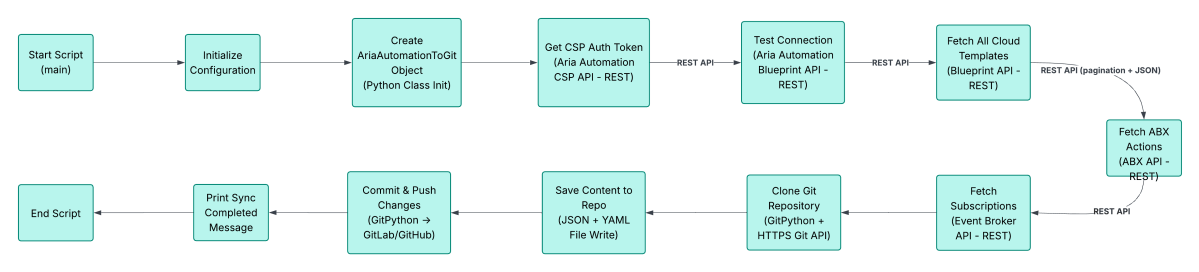
Here is a Python script that would let me backup those components fairly on a click of a button.
- Get the script from https://gist.github.com/imtrinity94/33f11e56b269a01253405b41e88500f7
#!/usr/bin/env python3
"""
Script to fetch content from Aria Automation REST API and push to Git repository
Saves both JSON and extracted content in same directories
Adds subscription support
"""

import requests
import json
import os
import git

. # find complete script here
. # https://gist.github.com/imtrinity94/33f11e56b269a01253405b41e88500f7
.
.
.
.
.
.
        except Exception as e:
            print(f"Unexpected error during sync: {e}")
            import traceback
            traceback.print_exc()

def main():
    # Configuration - Replace with your actual values
    CONFIG = {
        'api_base_url': 'https://vra-fqdn.lab',
        'username': 'configadmin',
        'password': 'your-password',
        'git_repo_url': 'https://gitlab.com/user-name/your-git-repo-name.git',
        'git_branch': 'main',
        'project_id': '1e4d579c-784f-4084-bdd7-a295ac0e623d',
        'verify_ssl': False
    }

    # Initialize and run
    sync = AriaAutomationToGit(
        api_base_url=CONFIG['api_base_url'],
        username=CONFIG['username'],
        password=CONFIG['password'],
        git_repo_url=CONFIG['git_repo_url'],
        git_branch=CONFIG['git_branch'],
        verify_ssl=CONFIG['verify_ssl']
.
.
.- Save it locally and make sure the name is AriaAutomation2Git.py
- Update these variables as per your environment at the end of the script
- ‘api_base_url’: ‘https://vra-fqdn.lab’,
- ‘username’: ‘configadmin’,
- ‘password’: ‘your-password’,
- ‘git_repo_url’: ‘https://gitlab.com/user-name/your-git-repo-name.git’,
- ‘git_branch’: ‘main’,
- ‘project_id’: ‘1e4d579c-784f-4084-bdd7-a295ac0e623d’,
- ‘verify_ssl’: False
- Run the script using
python AriaAutomation2Git.py
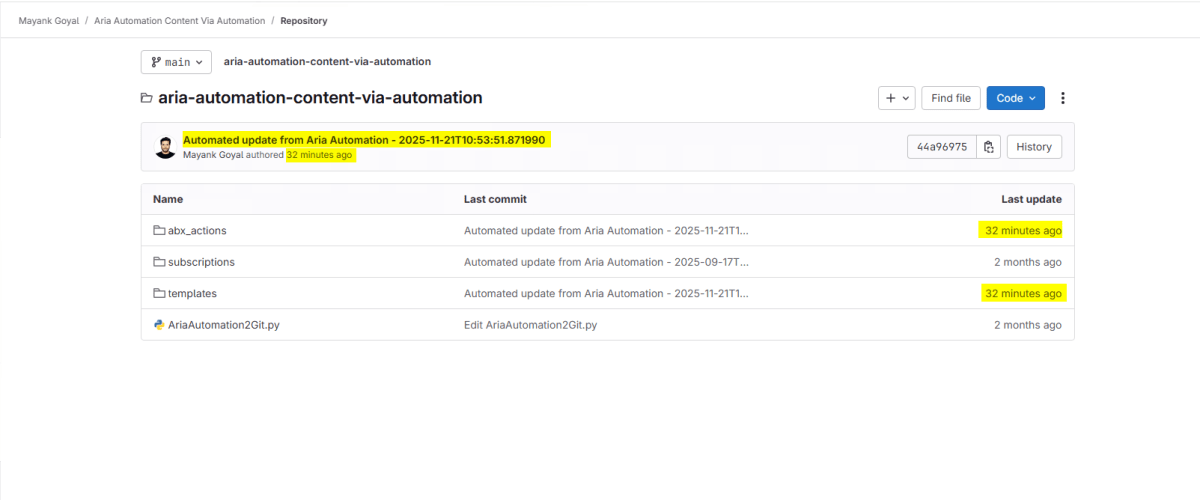
- If everything goes right, you should see latest commit in your git repo as well as the new changes.



This concludes the post. Kindly note that this script has proven effective for my purposes. However, you may require implementing several modifications tailored to your specific needs and environments prior to utilizing it, particularly in production settings.
Discover more from Cloud Blogger
Subscribe to get the latest posts sent to your email.