Running Python polyglot code as an Action (not in a Scriptable Task) is the correct and supported way to return structured outputs like Properties into an Aria Automation Orchestrator workflow.
Version tested: Aria Automation Orchestrator 8.18.1
Background
When working with polyglot runtimes (Python, Node.js, PowerShell) in Aria Automation Orchestrator, it is natural to try running the code directly inside a Scriptable Task. However, Scriptable Tasks execution seems to does not host the polyglot container or its handler(context, inputs) contract. This difference is exactly what explained why a Python script returning a Properties object worked in an Action but produced empty output when used inside a Scriptable Task.

The working pattern
In the successful setup, the Python logic is implemented as a dedicated Action with a Python runtime and a Properties return type. The action code follows the expected handler signature and returns a JSON‑serializable dictionary:
import json

def handler(context, inputs):
    jsonOut = json.dumps(inputs, separators=(',', ':'))
    print("Inputs were {0}".format(jsonOut))
    print("Context is: {0}".format(context))

    myToken = context["getToken"]()
    outputs = {
        "status": "done",
        "token": myToken
    }
    print("outputs: {0}".format(outputs))
    return outputs
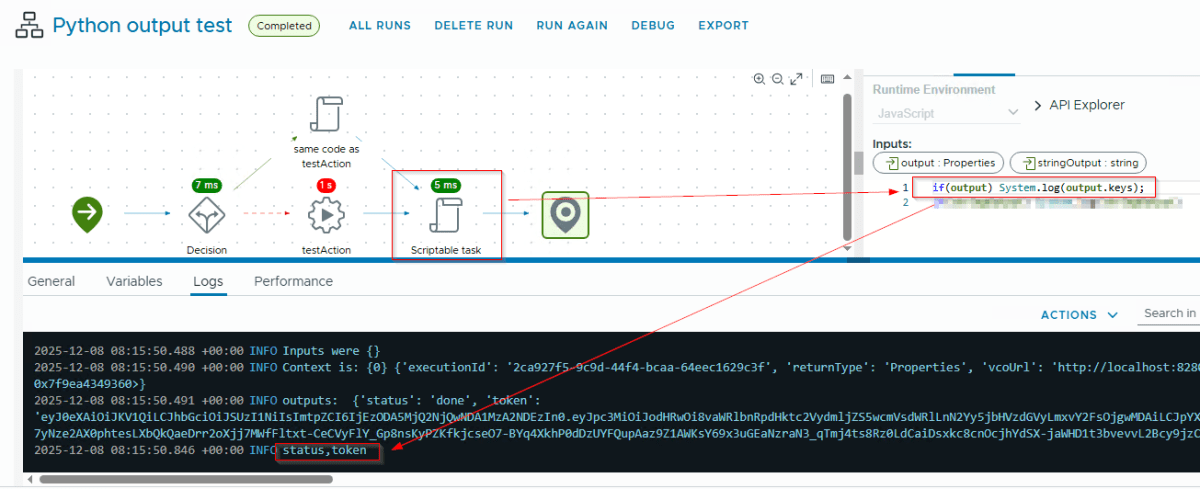
The Action is defined with annotations that select the Python runtime and declare the output type as Properties. In the workflow schema, this Action is dropped as an action element (testAction in the screenshot), and its output is bound to a workflow variable named outputs of type Properties. The subsequent Scriptable Task sees outputs as a JavaScript object and can read outputs.status and outputs.token directly.
Why Scriptable Task alone fails
Possible cause could be that the Scriptable Task does not know about the handler(context, inputs) contract and does not automatically serialize the returned value back into a workflow output. As a result, returning a Python dictionary from such ad‑hoc execution yields no bound output, which matches the “empty output” behaviour that was observed before switching to an Action and this behavior is consistent with other supported types as well:
- String
- Number
- Boolean
- Date
- Composite Type
Recommended design for Python outputs
The screenshot shows the correct and recommended design pattern: build all Python logic as Actions and use Scriptable Tasks only as orchestrating JavaScript glue. In practice, this looks like:
- Define a Python Action with
@runtime python:…and@outputType Properties(or another supported type). - Implement the logic in
handler(context, inputs)and return basic types or dictionaries/lists composed of basic types so that Orchestrator can serialize them. - Place that Action element on the workflow schema, bind its output to a
Propertiesvariable, and consume it in follow‑up Scriptable Tasks or as workflow outputs.
This pattern ensures the data coming from Polyglot runtimes are passable across tasks inside workflow or a across workflows.
Discover more from Cloud Blogger
Subscribe to get the latest posts sent to your email.