

Introduction
For VMware VCF Operations Orchestrator (vRO) developers, maintaining clean documentation has historically been challenging after the removal of Workflow Documentation feature. vRODoc script revolutionizes this process by automatically converting vRO actions into searchable JSDoc HTML documentation. While early versions laid the foundation, the latest iteration (GitHub repository) has matured and introduces significant improvements in usability, logging and credibility of this script.
🔄 Shift to Actions
Even Broadcom emphasizes on utilizing more actions than workflows as it offers various advantages already:
- Workflows are provided in XML format, which can be more challenging to read and maintain outside of Orchestrator.
- Actions enable modular and reusable code, lowering technical debt.
- Actions focus on single-purpose logic, making them ideal for unit testing.
- Repeated Action calls are cached internally for faster execution.
- Actions have a uniform XML structure that is easier to maintain.
- Actions approach aligns better with Broadcom’s Build Tools framework principles.
- Actions are lightweight and portable for effortless export and sharing.

📚 What is vRODoc?
vRODoc is a PowerShell-based script that:
- Parses vRealize Orchestrator package and JavaScript actions inside it.
- Extracts metadata embedded inside your actions via XML parsing.
- Intelligently adds JSDoc annotations to your already written code.
- Generates easy-to-read, automated documentation in HTML format.
It’s like JSDoc for vRO, but streamlined for a scripting-heavy, automation-driven audience.
So much powerful things you can you when you explore the content of vRO packages! Great job! 👍
Ludovic Rivallain, Cloud Solution Architect @ Microsoft
✨What’s New in vRODoc 2.0
The current GitHub version represents a major evolution from initial implementations, offering:
- Enhanced Usability
- Improved error validation
- Improved terminal logging
- No manual package export required
- Progress indicators
- Self-Healing Automation
.\vroDoc.ps1 -autoFix $true # Automatically installs Node.js/JSDoc if missing- Automatic prerequisite checks
- One-click dependency resolution
- Progress indicators during execution
⚙️How It Works: Technical Breakdown
vRODoc’s PowerShell engine executes a sophisticated pipeline:
- Secure Connection
Establishes encrypted sessions with embedded vRO server - Package Extraction
Retrieves specified packages while preserving action relationships - JSDoc Transformation
Converts vRO’s XML-based actions to JavaScript with intelligent JSDoc annotation - HTML Generation
Produces professional documentation including:- Input parameters with type
- Return type
- Action name & description
- Action current version
📋Getting Started Guide
Installation
git clone https://github.com/imtrinity94/vRODoc.gitExecution
.\vroDoc.ps1 -vroHost "vro.company.com" `
             -vroPort "443" `
             -user "admin@vsphere.local" `
             -pass "yourpassword" `
             -exportPath "C:\Documentation" `
             -packageName "com.vmware.library.http-rest" `
             -autoFix $true `
             -skipChecks $false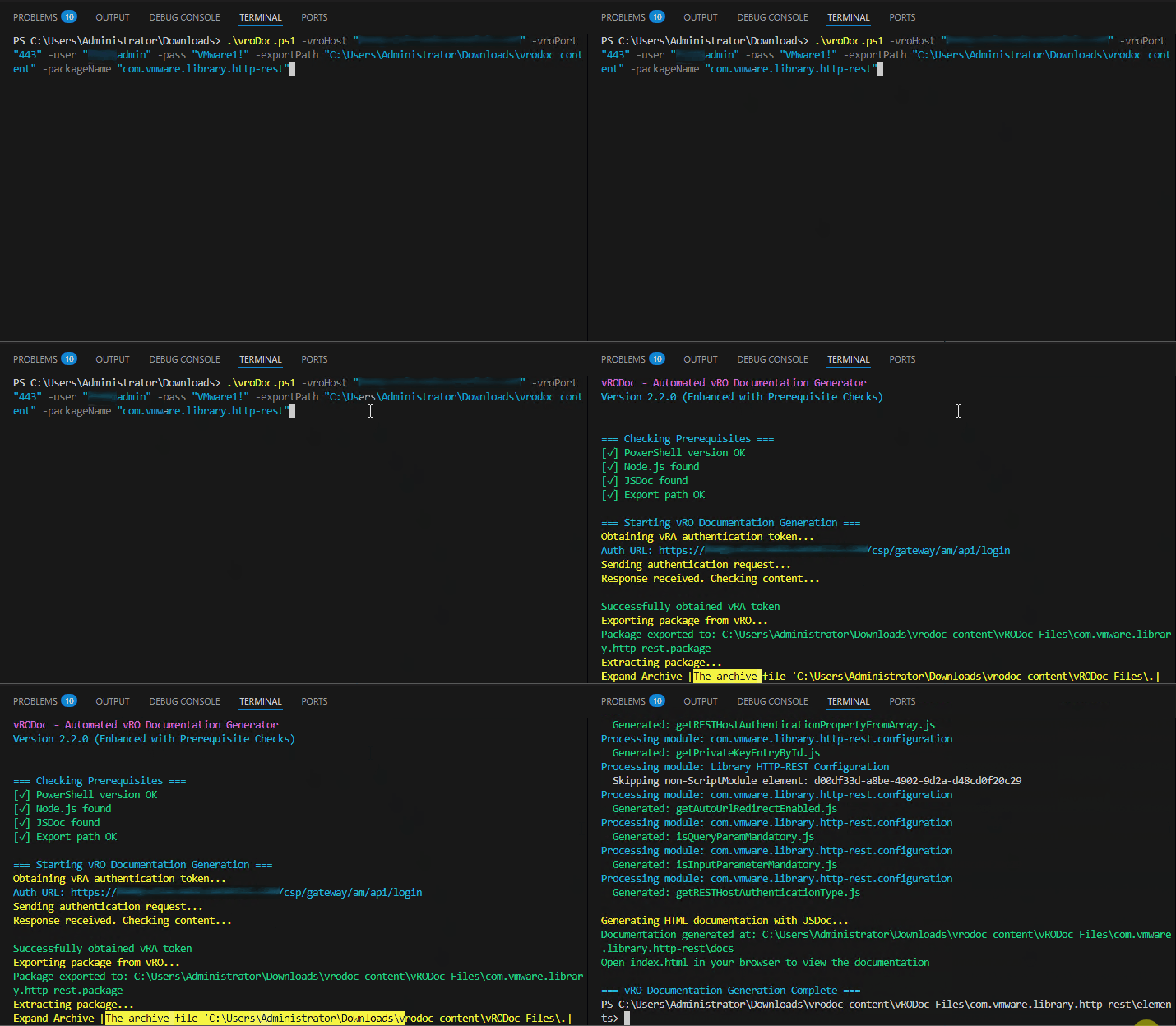
| Parameter | Description | Default |
|---|---|---|
| vroHost | vRA FQDN (as it’s embedded vRO) | vro.domain |
| vroPort | vRO port (443 for 8.x) | 443 |
| user | Username for vRA authentication (with admin access to vRO) | user@domain |
| pass | Password for vRA authentication | pa$$W0rd |
| exportPath | Output directory for documentation | C:\Users\user\ |
| packageName | vRO package name to document (eg. com.vmware.utilities) | your package name |
| autoFix | Automatically fix missing prerequisites (don’t touch) | true |
| skipChecks | Skip prerequisite checks (don’t touch) | false |
Output Structure
Documentation/
└── vRODoc Files/
    ├── Actions/
    │   └── [Category]/action.js
    └── docs/
        └── index.html  # Start here
✅Real-World Applications
- API Documentation: Generate developer portals for custom vRO actions/functions
- Team Onboarding: Create searchable knowledge bases
- CI/CD Integration: Documentation as part of deployment pipelines.
Good stuff. 👏
Maciej Losek, Senior Consultant @Broadcom
💡Pro Tips
- GitHub/GitLab Pages Hosting: Push
docs/folder to enable automatic web publishing - Scheduled Updates: Run nightly via Windows Task Scheduler
- Custom Templates: Modify JSDoc templates for brand consistency
- Use JSDoc Theme like clean-jsdoc-theme
🛣️Future Roadmap
I am working on further possibilities:
- GitHub Actions Integration (experimental)
- vRO Workflow Support (under development)
- Multi-Package Processing (batch documentation)
- Support for Polyglot Node.js actions
- Adding Dark theme to generated HTML pages
- Branding of HTML pages
🧠 Final Thoughts
Documentation shouldn’t be a bottleneck — it should empower your team to build, troubleshoot, and evolve faster. By leveraging vRODoc, JSDoc annotations, and a simple PowerShell automation, you bring best practices into your vRealize Orchestrator environment without adding friction.
Start using vRODoc today, and let your documentation write itself!
Citations:
- https://github.com/imtrinity94/vRODoc
- https://www.linkedin.com/pulse/vrodoc-convert-vro-actions-js-annotated-javascript-post-goyal/?trackingId=iJF1FwpYSCyRuoQN6e%2FL%2Bg%3D%3D
Discover more from Cloud Blogger
Subscribe to get the latest posts sent to your email.













[…] you’re not using the Build Tools, Mayank Goyal has created a tool called VRODoc that can connect to Orchestrator and document Actions in a […]