Creating cloud templates or blueprints in the All-Apps Organization within VCF Automation often confuses new users. While it appears complex at first, there’s a simple, built-in way to leverage available Kubernetes manifests and build fully customized blueprints on top of them.
Understanding Manifests in All-Apps Organization
In an All-Apps Organization, which operates entirely within a Kubernetes-based realm, resources are defined and managed using manifests. These are YAML or JSON files that represent the desired state of Kubernetes objects. A manifest can describe deployments, services, persistent volumes, secrets, and many other constructs — effectively serving as Kubernetes’ instruction sheet for resource deployment and management.
The Bloated YAMLs
If you have existing resources in your environment, you can explore existing Kubernetes related YAMLs for all the resources. For e.g., in case of an existing VM:
- Navigate to Build & Deploy → Services → Virtual Machine.
- Select any deployed VM and click View YAML or look for the YAML pane on the side panel.
This displays the YAML manifest associated with that resource. You’ll notice it’s quite extensive — containing metadata and internal definitions that VMware inserts during deployment.
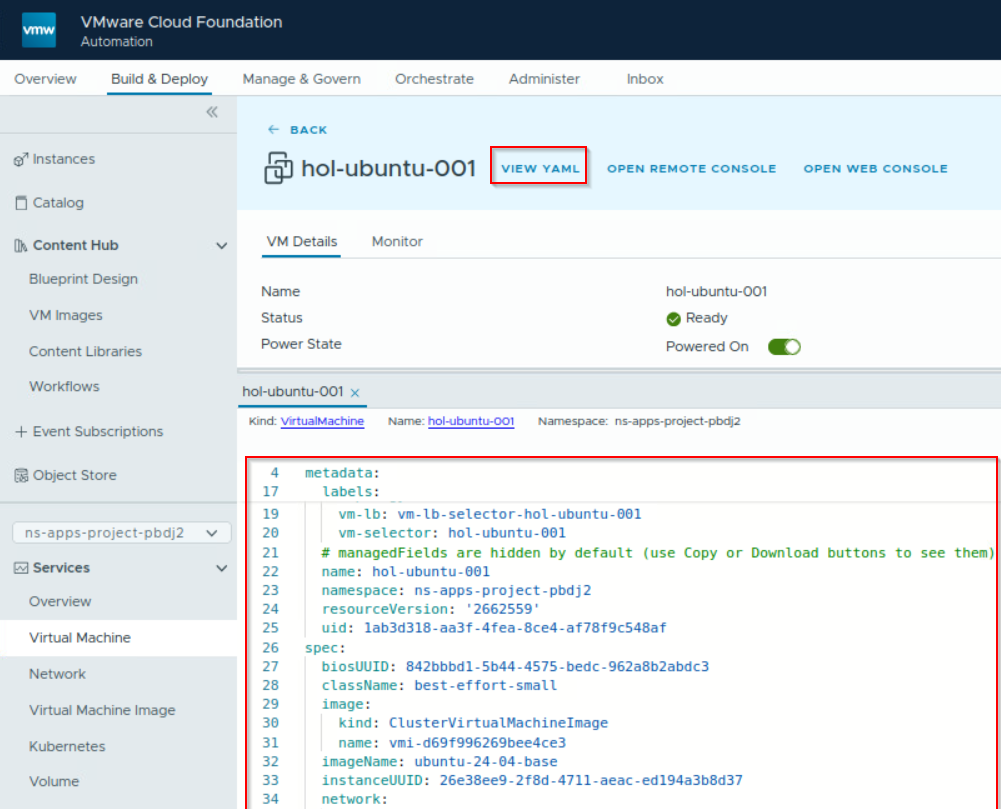
However, these “bloated” YAMLs are not directly usable for developing custom blueprint YAMLs – so we can safely pass this step.
Extracting YAML from the Wizard
VCF Automation 9 provides Tanzu Mission Control like capabilities in the UI itself. There are wizards to create resources such as Virtual Machines, K8s Clusters, Load Balancers, etc. These wizards auto-generate Manifest YAMLs which can be copied and customized – even usable while operating with CLI and APIs.
To create a usable YAML snippets:
- Go to Services and pick a resource type such as Virtual Machine, K8s Cluster, or Volume.
- Click Create for your desired resource.
- Fill in configuration details as required.
- The right-hand panel auto-generates the corresponding YAML manifest.
- Once satisfied, copy the YAML to a notepad.
You can now repurpose this manifest in a custom cloud blueprint.

Building a Custom Blueprint
Follow these steps to construct a blueprint using the YAML you generated:
- Go to Content Hub → Blueprint Design.
- Create a new blueprint with Blank Canvas option. Put details like name and select project.
- In the canvas, drag & drop a Supervisor Namespace as everything else resides under this namespace object.
- Assign it a name like
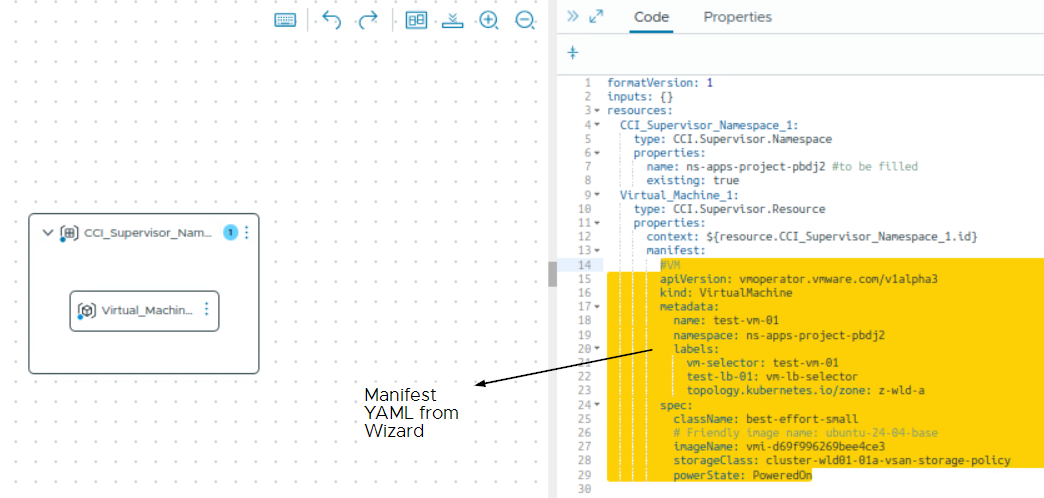
ns-apps-project-xxxxin the properties.name field. - In the resources section, after the namespace object, paste this supporting code.
# <------- Mandatory ---------->
formatVersion: 1 # or 2 based on your requirement for additional features
inputs: {}
resources:
  CCI_Supervisor_Namespace_1:
  type: CCI.Supervisor.Namespace
  properties:
    name: ns-apps-project-xxxx # UPDATE THIS Get this name from Namespaces section
    existing: true # false will create a new one, may have to provde more details
  Object_Name_1: # name of the resource like Virtual_Machine_1
    type: CCI.Supervisor.Resource
    properties:
      context: ${resource.CCI_Supervisor_Namespace_1.id}
      manifest:
        # <- Paste your generated manifest YAML here
        #  ___  ___            _  __          _
        # |  \/  |           (_)/ _|        | |
        # | .  . | __ _ _ __  _| |_ ___  ___| |_
        # | |\/| |/ _` | '_ \| |  _/ _ \/ __| __|
        # | |  | | (_| | | | | | ||  __/\__ \ |_
        # \_|  |_/\__,_|_| |_|_|_| \___||___/\__|

# <------- Optional ---------->
  Object_Name_X: # name of the resource like Load_Balancer_1 or Persistent_Volume_1
    type: CCI.Supervisor.Resource
    properties:
      context: ${resource.CCI_Supervisor_Namespace_1.id}
      manifest:
        # <- Paste your generated
        # manifest YAML here
# for any resource- Add any other resources (VM, Service, Secret, PVC, etc.) and paste the manifest YAML under the manifest section.
Type of Resources available
- Supervisor Namespace
- Supervisor Resource
- Virtual Machine
- Virtual Machine Service
- Secret
- Persistent Volume Claim
- Kubernetes Cluster
Except for the Supervisor Namespace, which is categorized as CCI.Supervisor.Namespace, all other resources fall under the classification of CCI.Supervisor.Resource, thereby simplifying our operations.
This is a video showing how to publish a simple and quick K8s cluster blueprint to the catalog.
Production-Ready
Now once you have the basic framework ready, it’s always better and more of a requirement to make it dynamic and user-friendly. So here are some usual things that you can do to make them more flexible:
- Use input fields to let users customize deployment details like OS, size, or environment.
- Utilize
formatVersion: 2to unlock variables, outputs, deployment overview, etc. - Build Service Broker forms to add conditional logic, validation, and dynamic user flows.
- Parameterize manifest content to render YAML dynamically based on inputs or conditions.
- Configure event subscriptions to extend blueprint automation before, during, or after deployment.
Discover more from Cloud Blogger
Subscribe to get the latest posts sent to your email.