
In this article
🚀 Try converting cURL commands to vRO JavaScript Code online at https://curl2vro.vercel.app
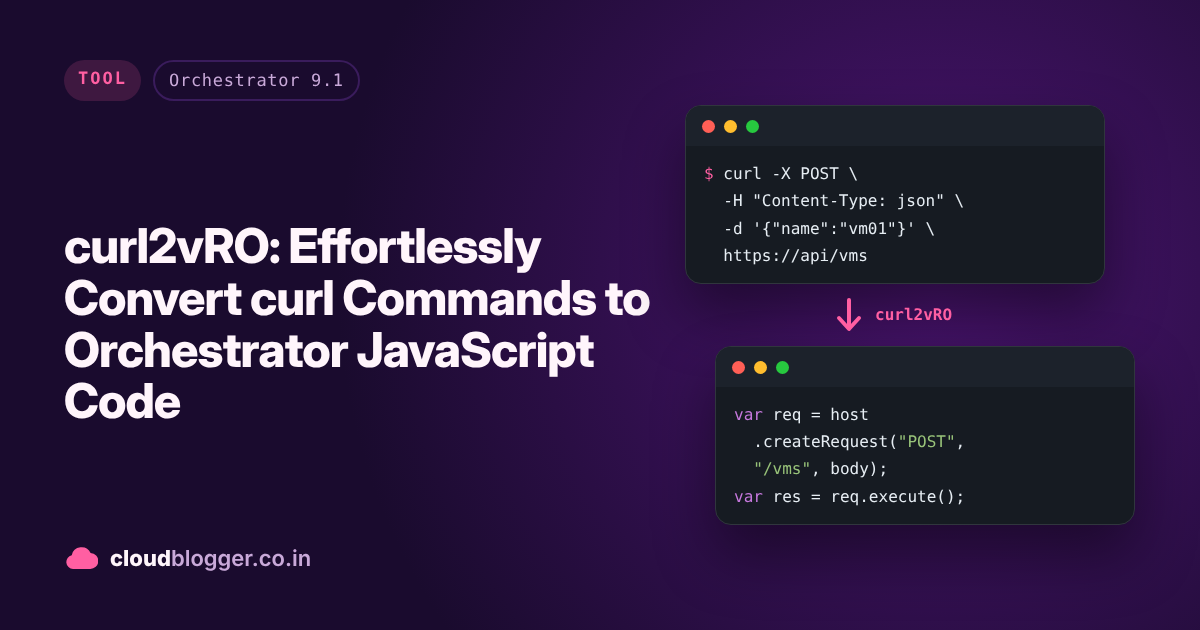
If you work with VCF Orchestrator (vRO) and REST APIs, you know how handy curl is for testing and prototyping API calls. But translating those curl commands into vRO JavaScript code can be tedious and error-prone. Enter curl2vRO – a powerful Node.js utility that automates this conversion, saving you time and headaches.
In this blog, we’ll explore what curl2vRO is, how it works, and why it’s a must-have for vRO developers. We’ll also walk through installation, usage, and real-world examples. All information is based on the official npm package and GitHub repository.
What Is curl2vRO?
curl2vRO is an open-source tool that converts curl commands directly into vRO-compatible JavaScript boilerplate code which can be copy-pasted into vRO to run a REST call inside vRO without any developer intervention. This means you can take a working curl command and instantly generate the corresponding code to use inside your vRO workflows and actions.
Key Features:
- Converts curl commands to vRO JavaScript
- Supports all major HTTP methods (GET, POST, PUT, DELETE, PATCH, etc.)
- Handles headers, authentication, and request bodies (JSON, form data)
- Adds JSDoc documentation and includes the original curl as a comment
- Generates output files with meaningful names
- Easy to use and extend
Why Use curl2vRO?
Curl is everywhere: Be it Postman, Swagger Pages or your Chrome Network Inspector.
- Saves time: No more manual translation of curl to vRO code.
- Reduces errors: Automated conversion ensures consistency and accuracy.
- Boosts productivity: Quickly prototype and integrate new REST APIs into vRO.
- Great for learning: See exactly how a curl command maps to vRO’s REST API scripting.
Installation
You’ll need Node.js 12.x or higher. To install curl2vRO, simply run:
npm install curl2vroUsage
Here’s how easy it is to use curl2vRO in your Node.js project:
const curl2vRO = require('curl2vro');

// Your curl command
const curlCommand = `curl https://api.example.com/data`;

// Convert to vRO code
const vroCode = curl2vRO.convertCurlToVRO(curlCommand);

console.log(vroCode);
The tool also saves the generated JavaScript file in your current directory, named based on the hostname, path, and HTTP method.
Demo
Real-World Examples
Let’s see how curl2vRO handles different types of API requests.
1. Basic GET Request
Input:
curl -X GET https://api.sampleapis.com/coffee/hotGenerated vRO JavaScript:
/**
 * @description Curl to vRO JavaScript converted code
 * @author curl2vRO
 * @version 1.0.0
 * @date 2025-05-15
 */

// Accept SSL certificate
var ld = Config.getKeystores().getImportCAFromUrlAction();
var model = ld.getModel();
model.value = "https://api.sampleapis.com/coffee/hot";
var error = ld.execute();
if (error) {
  throw new Error("Failed to accept certificate for URL: " + "https://api.sampleapis.com/coffee/hot" + ". Error: " + error);
}

// Create transient REST host
var restHost = RESTHostManager.createHost("dynamicRequest");
var httpRestHost = RESTHostManager.createTransientHostFrom(restHost);
httpRestHost.operationTimeout = 600;
httpRestHost.url = "https://api.sampleapis.com";

// Create REST request
var request = httpRestHost.createRequest("GET", "/coffee/hot", null);

// Execute REST request
var response = request.execute();

// Handle response
if (response.statusCode == 200) {
  System.log("Request successful");
  var responseContent = JSON.parse(response.contentAsString);
  System.log(JSON.stringify(responseContent));
} else {
  throw "Request failed with status: " + response.statusCode;
}

/* Original curl command:
curl -X GET https://api.sampleapis.com/coffee/hot
*/
2. POST Request with JSON Body
Input:
curl -X POST https://api.example.com/users \
  -H "Content-Type: application/json" \
  -H "Authorization: Bearer token123" \
  -d '{"name": "John Doe", "email": "john@example.com"}'
Generated vRO JavaScript:
(See the npm page for the full code)
How to use curl2vRO inside vRO?
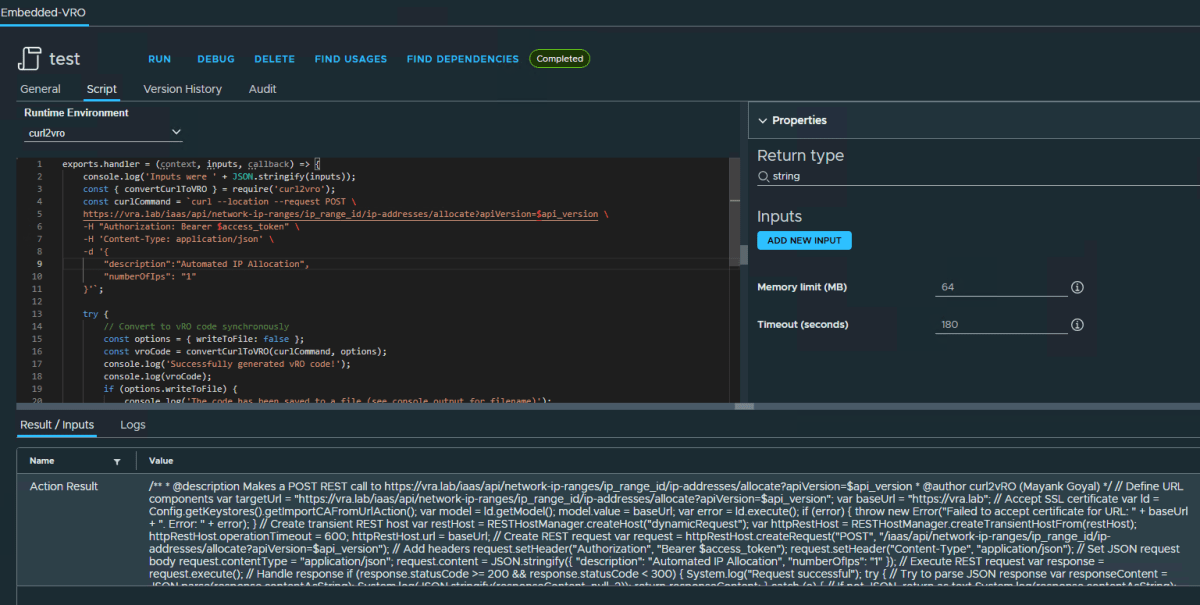
Just create an action environment of Runtime = Node.js 20 and add curl2vRO module (get last version from here). Once created, create a new action and select your environment as Runtime and paste this code into your action. Don’t forget to add input curlCommand.
exports.handler = (context, inputs, callback) => {
    console.log('Inputs were ' + JSON.stringify(inputs));
    const { convertCurlToVRO } = require('curl2vro');
    const curlCommand = `curl --location --request POST \
    https://vra.lab/iaas/api/network-ip-ranges/ip_range_id/ip-addresses/allocate?apiVersion=$api_version \
    -H "Authorization: Bearer $access_token" \
    -H 'Content-Type: application/json' \
    -d '{
        "description":"Automated IP Allocation",
        "numberOfIps": "1"
    }'`;

    try {
        // Convert to vRO code synchronously
        const options = { writeToFile: false };
        const vroCode = convertCurlToVRO(curlCommand, options);
        console.log('Successfully generated vRO code!');
        console.log(vroCode);
        if (options.writeToFile) {
            console.log('The code has been saved to a file (see console output for filename)');
        }
        return vroCode;

    } catch (error) {
        console.error('Error:', error.message);
    }
}
Supported curl Features
- HTTP methods: GET, POST, PUT, DELETE, PATCH, etc.
- Request headers (
-H,--header) - Request body data (
-d,--data,--data-raw,--data-binary) - URL with or without quotes
- Basic authentication
- Form data
API Reference
- convertCurlToVRO(curlCommand): Converts a curl command to vRO JavaScript and saves to a file.
- parseCurlCommand(curlCommand): Parses a curl command and extracts components.
- generateVROCode(parsedCurl, originalCurlCommand): Generates vRO JavaScript from parsed curl components.
Getting Involved
curl2vRO is open source under the MIT License. Contributions are welcome! Check out the GitHub repo for details.
Conclusion
curl2vRO bridges the gap between quick API prototyping in curl and robust automation in VMware vRealize Orchestrator. Whether you’re a vRO veteran or just getting started, this tool will supercharge your REST API integrations.
Ready to try it?
Happy automating! 🚀
Citations:
Discover more from Cloud Blogger
Subscribe to get the latest posts sent to your email.
Enjoyed this post?
Was this helpful?
























Leave a Reply