Introduction
Monitoring long-running tasks in VCF Orchestrator (vRO) can be challenging, especially when users need visual feedback. In this blog post, we’ll explore how to use a custom progress bar in vRO using JavaScript and update vSphere VM custom attributes in real-time.
This technique is useful for:
✔ VM provisioning workflows
✔ Software deployment tracking
✔ Migration progress monitoring
✔ Any long-running automation task
Solution Overview
Before we start, just a note that I will share the complete code package at the end. But, I will go sequentially to explain what we are doing. I will cover one important use case which is to update the vSphere with VM Provisioning progress.
ProgressBar Class
We have this code as a vRO Action which is our psuedo-class ProgressBar.
/**
 * @function ProgressBar
 * @description Creates text-based progress bars for Orchestrator workflows
 *
 * @param {number} [defaultLength=50] - Default length of progress bar
 * @return {Any} A new ProgressBar instance
 */
function ProgressBar(defaultLength) {
    // Constants
    this.FILLED_CHAR = "█";
    this.EMPTY_CHAR = "░";
    this.DEFAULT_LENGTH = defaultLength || 50;

    // Style definitions
    this.styles = {
        "basic": { filled: "#", empty: "-" },
        "block": { filled: "█", empty: "░" },
        "arrow": { filled: ">", empty: " " },
        "equals": { filled: "=", empty: " " }
    };
}

/**
 * Generate a progress bar
 * @param {number} percentage - Progress percentage (0-100)
 * @param {number} [length] - Length of progress bar
 * @return {string} Formatted progress bar
 */
ProgressBar.prototype.generate = function(percentage, length) {
    var barLength = length || this.DEFAULT_LENGTH;
    var percent = Math.max(0, Math.min(100, percentage));

    var filledCount = Math.round(barLength * percent / 100);
    var emptyCount = barLength - filledCount;

    var filled = this._repeatChar(this.FILLED_CHAR, filledCount);
    var empty = this._repeatChar(this.EMPTY_CHAR, emptyCount);

    return '[' + filled + empty + '] ' + percent + '%';
};

/**
 * Generate progress bar with custom style
 * @param {number} percentage - Progress percentage (0-100)
 * @param {number} [length] - Length of progress bar
 * @param {string} [style="block"] - Style name (basic, block, arrow, equals)
 * @return {string} Formatted progress bar
 */
ProgressBar.prototype.generateWithStyle = function(percentage, length, style) {
    var selectedStyle = this.styles[style] || this.styles["block"];
    return this.generate(percentage, length)
        .replace(new RegExp(this.FILLED_CHAR, 'g'), selectedStyle.filled)
        .replace(new RegExp(this.EMPTY_CHAR, 'g'), selectedStyle.empty);
};

/**
 * Private method to repeat characters
 * @private
 */
ProgressBar.prototype._repeatChar = function(char, count) {
    return Array(count + 1).join(char);
};

return ProgressBar;Execution (testing ProgressBar class)
// Import the ProgressBar class
var ProgressBar = System.getModule("in.co.cloudblogger.customclasses").ProgressBar();

// Create an instance (with optional default length)
var progressBar = new ProgressBar(); // Default length 50

// Example usage:
System.log(progressBar.generate(0));
System.log(progressBar.generate(25));
System.log(progressBar.generate(27));
System.log(progressBar.generate(75));
System.log(progressBar.generate(100));

// Other options
// System.log(progressBar.generateWithStyle(33, 15, "basic"));  // [#####----------] 33%
// System.log(progressBar.generateWithStyle(66, 15, "arrow"));  // [>>>>>>>>>      ] 66%
// System.log(progressBar.generateWithStyle(10, 50, "equals")); // [=============  ] 99%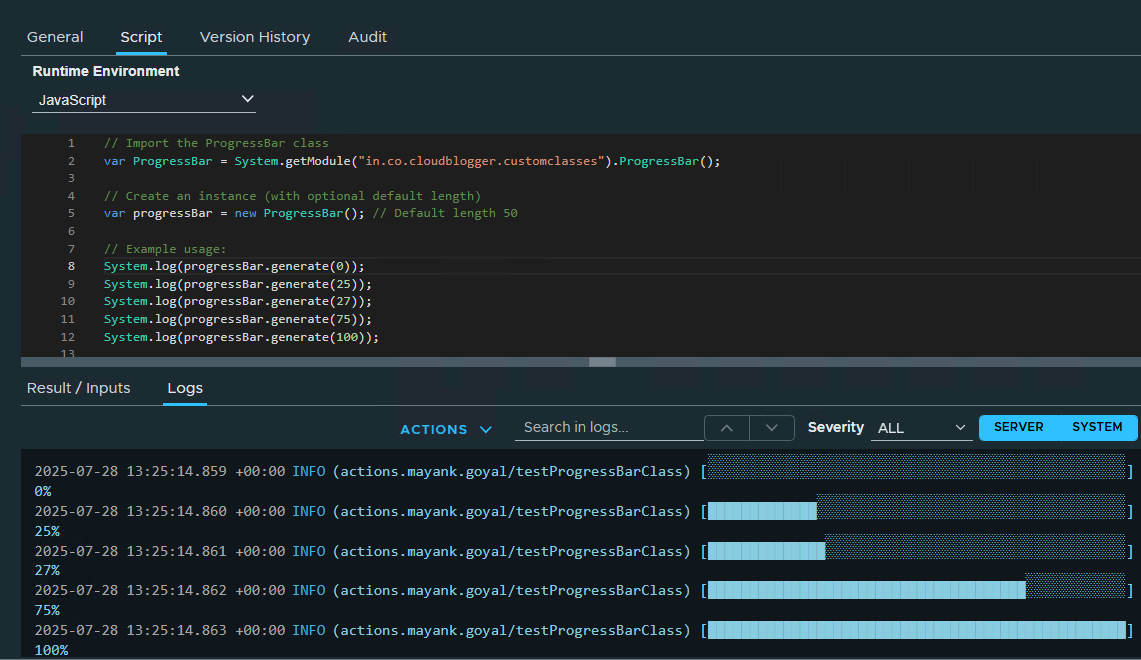
Use-case: Simulating VM Provisioning Progress
This script updates a VM’s custom attribute (provisioning_progress) with a live progress bar:
/**
 * @description Using ProgressBar class to simulate VM provisioning progress in vSphere Custom Attributes
 * @param {VC:VirtualMachine} vm
 * @outputType string
 */

function simulateVmProvisioningProgress(vm) {
    var PROGRESS_ATTRIBUTE_NAME = "provisioning_progress";
    var DURATION_MINUTES = 1;
    var UPDATE_INTERVAL_MS = 1000; // Update every second

    // Get or create ProgressBar class
    var progressBar = new (System.getModule("in.co.cloudblogger.customclasses").ProgressBar(30));
    var startTime = new Date().getTime();
    var endTime = startTime + (DURATION_MINUTES * 60 * 1000);

    System.log("Starting VM provisioning simulation for: " + vm.name);

    // Initial 0% state
    updateProgressAttribute(vm, PROGRESS_ATTRIBUTE_NAME, progressBar.generate(0));

    // Update progress in a loop
    while (true) {
        var currentTime = new Date().getTime();
        var elapsed = currentTime - startTime;
        var totalDuration = endTime - startTime;
        var progress = Math.min(100, Math.round((elapsed / totalDuration) * 100));

        // Update the custom attribute
        updateProgressAttribute(vm, PROGRESS_ATTRIBUTE_NAME, progressBar.generate(progress));

        if (progress >= 100) {
            System.log("Provisioning simulation completed for: " + vm.name);
            break;
        }

        System.sleep(UPDATE_INTERVAL_MS);
    }

    // Final 100% state
    updateProgressAttribute(vm, PROGRESS_ATTRIBUTE_NAME, progressBar.generate(100));
}

// Helper function to update the custom attribute
function updateProgressAttribute(vm, attributeName, value) {
    try {
        System.getModule("com.vmware.library.vc.customattribute")
              .setOrCreateCustomField(vm, attributeName, value);
        System.log("Updated progress: " + value);
    } catch (e) {
        System.warn("Failed to update custom attribute: " + e);
    }
}

// Example usage:
// var vm = VcPlugin.findByInventoryPath("path/to/your/vm");
simulateVmProvisioningProgress(vm);Once executed:
- Open vSphere Client → Navigate to your VM.
- Under Configure → Custom Attributes, you’ll see
provisioning_progress: [███████████░░░░░░░░] 60% - The bar updates every second until completion.
- You can customize it as per your requirement in your VCF Automation environment.
Other Usecases
✅ Long Workflow executions – Logging progress at end of each item
✅ More visual feedback – Add progress bar where ever it is missing in UI using REST APIs
✅ Multi-stage processes – (e.g., “Cloning: 50% | Configuring: 0%”).
Found this useful? Share your feedback in the comments!
📌 Subscribe for more VCF Automation guides!
📌 Download the full code from [GitHub Link].
Inspiration for this blog post
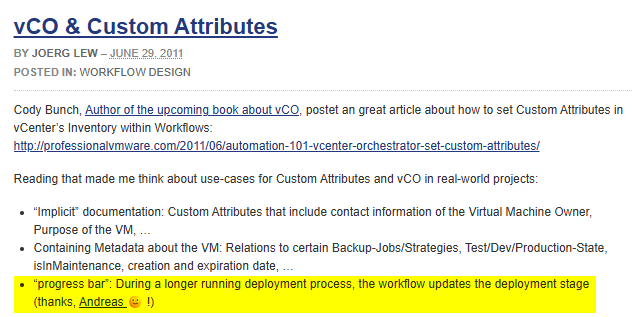
The OG vRO blog: https://www.vcoportal.de/2011/06/vco-custom-attributes
Discover more from Cloud Blogger
Subscribe to get the latest posts sent to your email.