

With every major VMware Cloud Foundation release, the feature list gets longer, the architectural possibilities get broader, and the challenge for practitioners becomes separating genuinely meaningful improvements from incremental platform refinements. VCF 9.1 is no exception. There is a substantial amount packed into this release across infrastructure, networking, automation, Kubernetes operations, and workload lifecycle management. Rather than attempting to cover every single enhancement, this article focuses on a curated set of updates around VCF Automation and VMware Kubernetes Service (VKS) that stand out from a practical architecture and operations perspective. These are not necessarily the only important additions in the release, but they are the ones that immediately caught my attention because they address real-world operational friction, improve platform consumption, and make modernization journeys significantly more practical for infrastructure and platform teams.
Note Almost all the improvements are made towards All Apps Constructs (VCFA with VKS) as part of VCF 9.1. Do let me know in the comments if you find any new improvements for VM Apps.
Mature Blueprinting for All Apps

One subtle but meaningful usability improvement in VCF Automation 9.1 is how resource consumption has evolved from a flat object listing into a far more structured and scalable experience. In VCF Automation 9.0, consumers interacted with a relatively simple list of resources such as Virtual Machines, Kubernetes Clusters, Secrets, and Persistent Volume Claims. While functional, this model became harder to navigate as environments scaled and platform services expanded. With 9.1, resources are now logically grouped into domain-aware categories such as VPC and Workload, making the experience significantly more intuitive for both platform teams and consumers. Networking constructs, security controls, workload objects, and infrastructure resources now feel intentionally organized rather than simply accumulated. This may seem like a UI refinement at first glance, but it reflects a broader platform maturity shift—moving from basic self-service consumption toward a cleaner multi-tenant cloud operating model where discoverability, governance, and operational efficiency matter just as much as feature depth.
VM Fast Deploy

VM Fast Deploy accelerates workload delivery by utilizing per-datastore image caching and delta-disk technology to minimize deployment latency. By optimizing the way the VM Service handles images, Broadcom has removed the biggest bottleneck in provisioning. Instead of waiting for a full image to copy across the network, it uses a local image cache on every datastore.
For standard VMs, it uses Linked Mode, which functions like a linked clone. It creates a delta disk referencing that local cache, allowing the VM to power on almost instantly. Because VKS clusters are built on these very same VMs, this optimization is exactly what allows us to slash cluster deployment times so dramatically. For encrypted workloads where delta disks aren’t an option, it uses Direct Mode to ensure data is moving as efficiently as possible. It’s this underlying VM-level speed that ultimately powers the agility of the entire platform.
- Foundation for VKS: VM-level “Fast Deploy” optimizations are the primary driver behind faster VKS cluster provisioning.
- Linked Mode (Unencrypted): Creates a delta disk for near-instant power-on, followed by a background disk promotion.
- Direct Mode (Encrypted): A dedicated path for encrypted workloads that ensures speed without using delta disks.
Day-2 Network Mutability
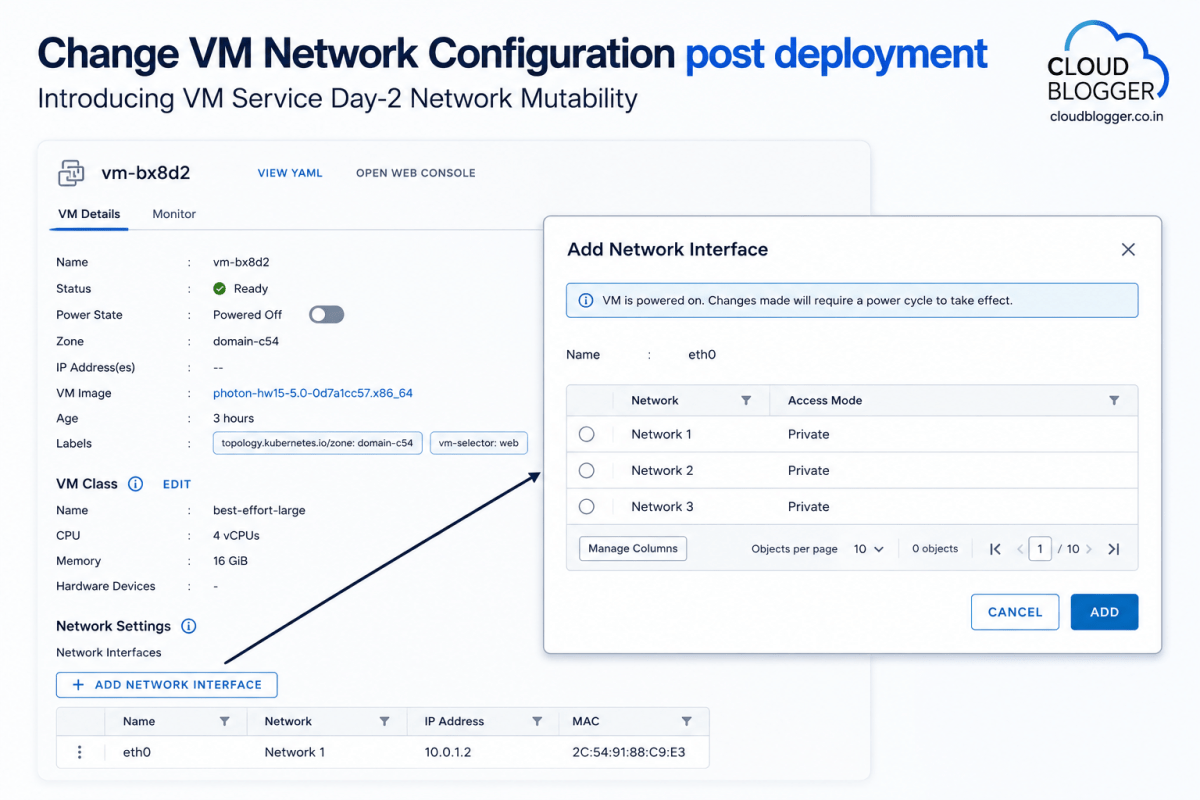
VM Service Day-2 Network Mutability enhances infrastructure agility by allowing users to modify network configurations post-deployment, providing the flexibility to adapt VM connectivity as application requirements evolve.
Previously, network configurations were typically defined at the point of provisioning. Now, Broadcom has made it possible to add, remove, or edit network interfaces directly through the consumption interface for existing VMs. This means you can easily adjust connectivity or scale out multi-homed applications without having to redeploy the entire workload. While these changes require a simple power cycle to take effect within the guest, it provides a much more streamlined path for managing the long-term lifecycle of your virtual machines.
- Enhanced Flexibility: Enables post-deployment network modifications (Add/Remove/Edit) on existing VMs.
- Lifecycle Management: Supports evolving application needs without requiring a full redeployment of the workload.
- Operational Step: A power cycle is necessary to finalize network changes within the VM hardware configuration.
- User Experience: Managed via a simple, intuitive “Add Network Interface” workflow in the UI.
vSphere VM to VM Service Import

Non-disruptive VM Import allows you to bring existing vSphere workloads into a Supervisor namespace and under VCF Automation control without downtime or network changes. As you look to modernize your operations, you shouldn’t have to choose between keeping your existing workloads and moving to a Supervisor-based model. Broadcom has updated our VM import process to be completely non-disruptive.
In the past, moving a VM into a namespace often required a change in network identity or a re-IP, which naturally meant downtime for the application. Now, you can migrate VMs from traditional vSphere environments into a Supervisor namespace while maintaining their current state. This allows you to bring those “non-VM Service” VMs under the centralized control of VCF Automation in batches, ensuring consistent lifecycle management across your entire fleet of containers and VMs without interrupting the business.
I am personally very interested in this one. It could mean that customers can migrate from VM Apps to All Apps using this feature subject to testing, which would significantly enhance the flexibility and scalability of their application environments. I have heard Broadcom is working on a VM Apps to All Apps Migration Tool, I guess this is what lays the foundation for that tool, providing users with a seamless transition process, minimizing downtime, and allowing businesses to leverage the full potential of All Apps to improve their operational efficiency and performance.
Import Multiple VMs into VM Service Using ImportOperationBatch
Tested ✅: Imported VMs can be managed by VCF Automation if the namespace they are imported to is also created by VCF Automation itself.
LCI as Main Portal

The Local Consumption Interface (LCI) is now a core Supervisor Service, providing a seamless, out-of-the-box UI for consumers to manage VMs, Containers, and Kubernetes clusters.
Broadcom wanted to make it as easy as possible for consumers to interact with their resources. Previously, setting up the Local Consumption Interface required manual installation and configuration. In VCF 9.1, they have made LCI a core Supervisor Service, meaning it is deployed and enabled by default.
This service automatically creates a plugin within the vSphere Client, allowing users to access it directly from the “Resources” tab of their namespace. It provides a clean, focused dashboard for managing Virtual Machines, Kubernetes clusters, and the new Container Service. Furthermore, for teams that don’t need full access to the vSphere Client, you can launch LCI as a standalone external interface, making it easy to provide developers with exactly the level of access they need to manage their VKS environment.
DTGW finally introduced

Supervisor deployments now support Virtual Private Clouds (VPC) with the Distributed Transit Gateway (DTGW), removing networking bottlenecks and simplifying connectivity to the physical fabric.
To further streamline networking, Broadcom has introduced the Distributed Transit Gateway (DTGW). This is a game-changer for how ESXi hosts connect to the physical network. By allowing the host to connect directly to the switch fabric, it eliminate the need for a centralized transit gateway.
This architectural shift removes a significant bottleneck in connectivity. Because you are no longer hair-pinning traffic through a centralized point, you’ll see immediate improvements in latency, scalability, and overall network performance. Operationally, it’s much simpler: you no longer need a full NSX Edge cluster or complex BGP configurations to get your workloads online. This delivers a more consistent workflow and faster onboarding for new workloads, even if you don’t have deep expertise in advanced virtual networking appliances.
More OS Options for Nodes (All Apps Orgs)
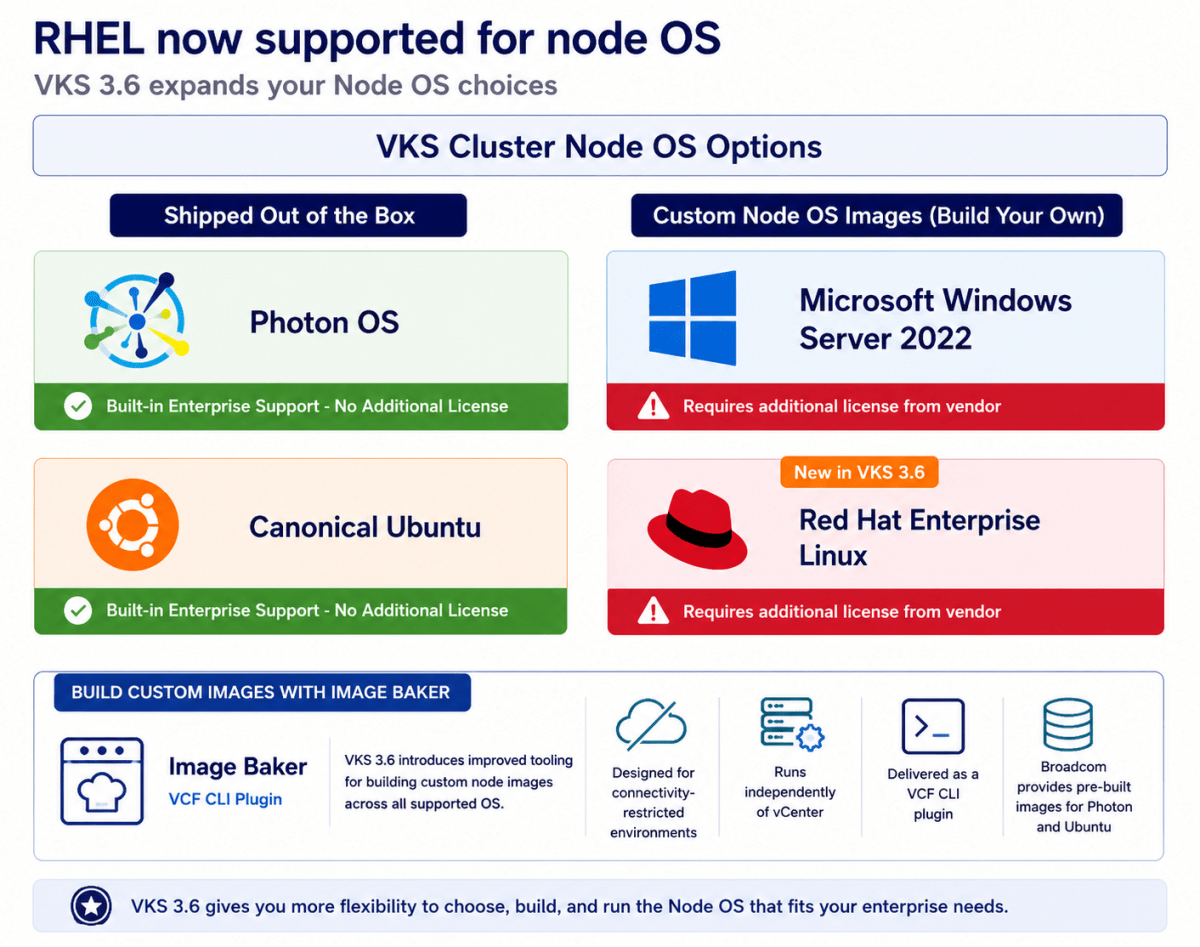
Red Hat Enterprise Linux (RHEL) 9 joins Photon OS 5, Ubuntu 22.04 and 24.04, and Windows Server 2022 as supported operating systems for VKS cluster nodes. RHEL can be used for both control plane and worker nodes.
To support diverse application requirements within a single cluster, VKS continues to allow different node pools to run different operating systems. RHEL node pools can exist alongside Windows, Ubuntu, and Photon nodes, enabling heterogeneous clusters and gradual OS migration over time.
VKS 3.6 as part of VCF 9.1 also introduces improved tooling for building custom node images across all supported operating systems. Image Baker is designed for connectivity-restricted environments, runs independently of vCenter to reduce infrastructure dependencies, and is delivered as a VMware Cloud Foundation (VCF) CLI plugin. Broadcom continues to provide pre-built images for Photon and Ubuntu.
Multi-Cluster Supervisor Zones

VCF 9.1 introduces Multi-cluster Zones, allowing up to three ESXi clusters per zone to increase scale and enable non-disruptive hardware maintenance.
As our customers scale their Supervisor environments, managing zone sprawl has become a top priority. In prior releases, we were restricted to a single vSphere cluster per zone. With VCF 9.1, we can break that barrier by supporting up to three clusters per zone.
This shift is about more than just raw capacity; it’s about operational continuity. By having multiple clusters in a single zone, you can now perform major hardware upgrades, replacements, or retirements with zero workload disruption. For example, if you need to update a GPU driver for an AI workload, you can simply migrate those workloads to another cluster within the same zone. This allows you to maintain your namespaces and services without a redesign, effectively eliminating the manual toil and downtime usually associated with hardware lifecycle management.
Flexible CNI Selection

While Antrea and Calico remain fully supported out of the box, Broadcom has introduced a new extensible framework to support alternative CNIs. They have officially released Cilium add-on with 9.1. This is enabled by installing the standard package repository before the cluster creation. From there, you simply create the addon install manually.
During the cluster creation process, the addon controller will take over to automatically create the cluster addon for Cilium and seamlessly install the Cilium CNI. The ultimate benefit is that this framework aligns with your corporate networking strategies without breaking the VKS managed cluster lifecycle and supportability boundaries.
Avi Support in All Apps Construct

Avi integration with VCF fundamentally transforms load balancing from a traditional, complex, ticket-based IT task into an agile, self-service, code-driven capability. This shift empowers developers and application teams to directly provision and manage services via service catalogs and Infrastructure as Code (IaC), reducing bottlenecks and accelerating the software development.
- Self-Service Application Delivery: The VCF integration introduces a cloud-like consumption model for load balancing, enabling greater agility and operational efficiency through two distinct approaches:
- DevOps-Delegated Workflows: Empower development teams with controlled self-service capabilities by leveraging the VCF Automation UI. Platform teams can define guardrails while allowing DevOps users to customize and deploy load balancing services tailored for pre-production and development environments.
- Catalog-Based Deployment: Teams can publish pre-configured load balancing services to a self-service catalog, enabling end users to deploy approved, compliant resources on demand with consistency and speed in production environments.
IPAM\Infoblox for Cloud Consumption (All Apps)

VCF 9.1 will include enhanced IPAM allocation, usage and visibility. VCF administrators will be able to consume these capabilities within though their console of choice – VCF Automation, vCenter, and NSX. The VCF 9.1 implementation will allow one IP Block to support up to 10 CIDRs, 10 IP ranges, and to exclude specific Ips, minimizing any disruption to the existing VPC consumers. Refer to the VCF 9.1 release notes for more details.
Furthermore, new integration with Infoblox will provide a “single source of truth” for IPAM and DNS, preventing IP conflicts automatically across your entire environment. This native support for Infoblox IPAM for VPC deployments in VCF 9.1 will allow the user to:
- Discover Infoblox Network Views, DNS Views and Network Containers
- Use Infoblox Network Containers to create Subnets and update VM IP/FQDN information
- Configure the IPAM integration in VCF Automation (IP block definition) or NSX (Infoblox pairing, IP block definition)
Secondary Networks for VKS Clusters
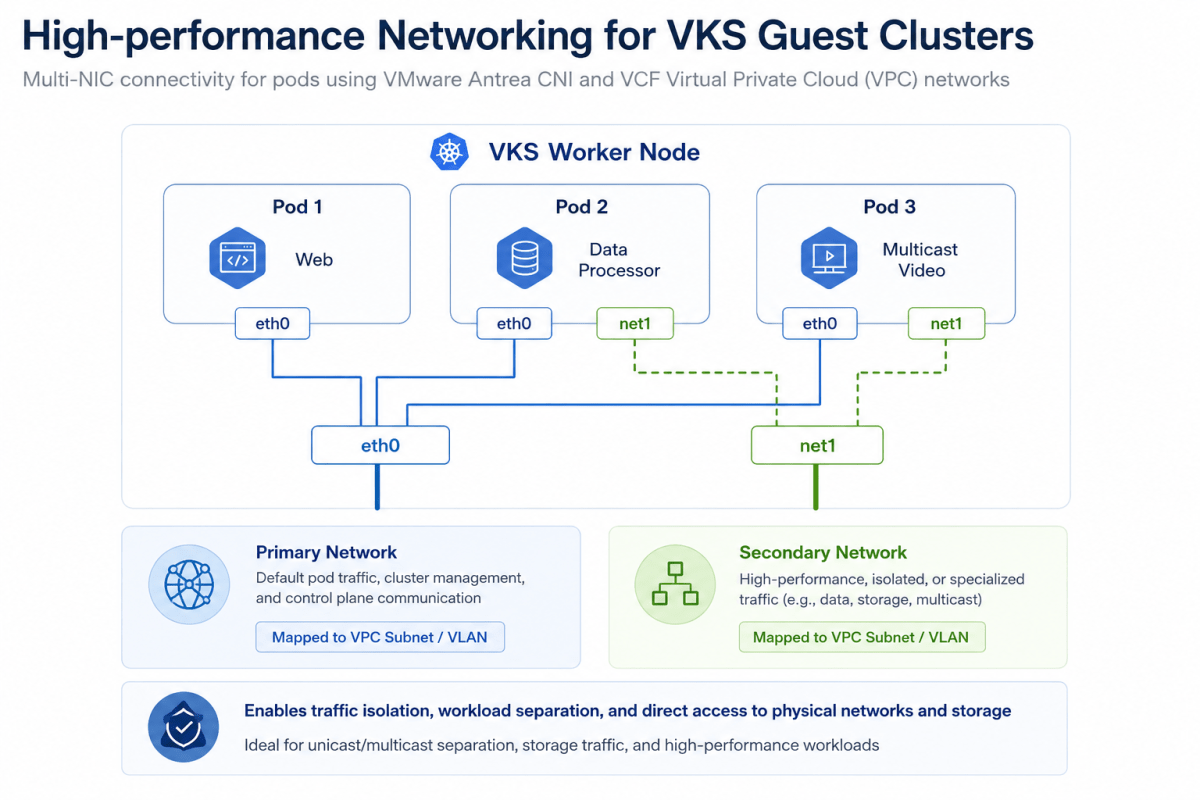
High-performance Networking for VKS Clusters As containerized workloads grow, so does the need for enterprise-grade networking within vSphere Kubernetes Service (VKS). With VCF 9.1, you will be able to deploy Kubernetes clusters in VKS with a secondary network interface. This capability will enable any VKS cluster, as well as pods within, to be deployed with a secondary network interface (vNIC) using the VMware Antrea CNI. Both VKS Cluster nodes and pods’ secondary NICs will then be mapped to VLANs or network subnets in the VCF Virtual Private Cloud (VPC).
This is critical for container-based applications that need to separate different types of traffic such as isolating traffic from primary networks, isolating unicast traffic from multicast traffic to/from container workloads, or direct access to physical systems such as high-performance NFS storage.
Container as a Service in VCF Automation

VCF 9.1 will introduce Container Service runtime delivered through VCF Automation with complete lifecycle management. This simplified container runtime will execute directly on ESX without cluster overhead, delivering workload isolation and resource efficiency. The VCF platform will fully automate scheduling, isolation, performance optimization, and upgrades. When the application architecture evolves, the UI will generate consistent YAML for a smooth transition to VKS clusters – offering a gentle on-ramp from simple container deployments to full Kubernetes capabilities.
App Stack Formation
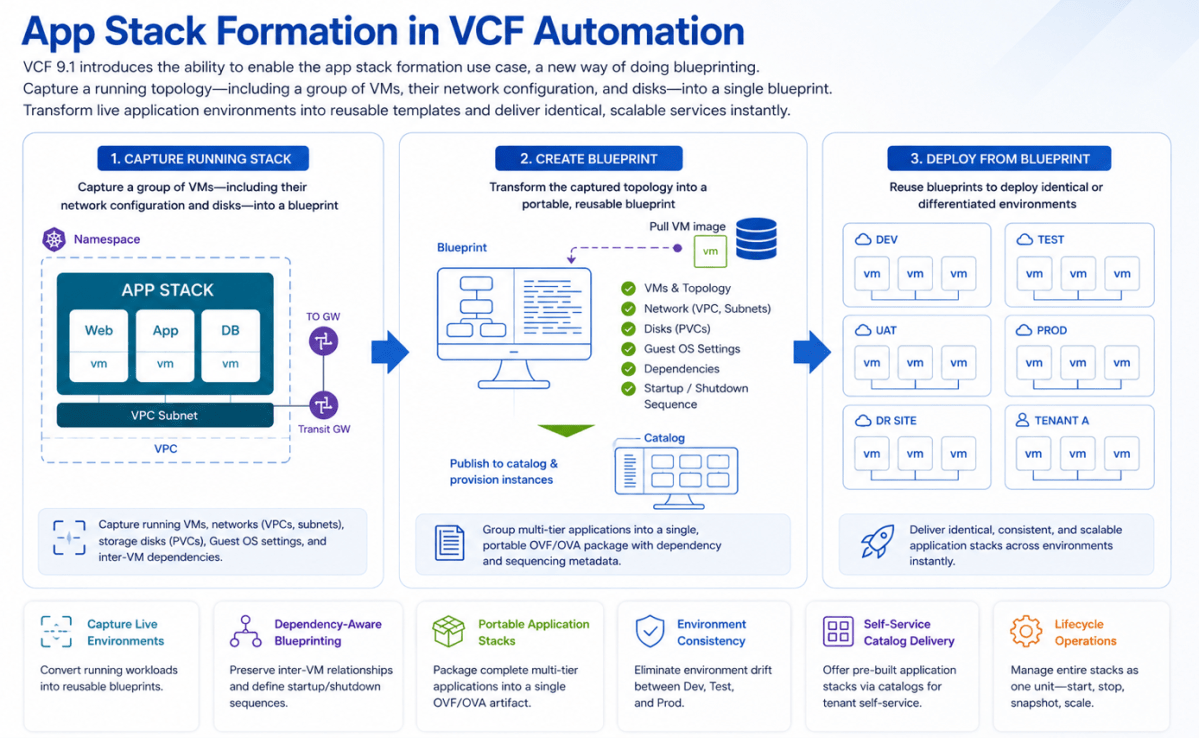
VCF 9.1 will introduce the ability to enable the app stack formation use case, which represents a new way of doing blueprinting. This will allow users to capture a running topology—including a group of VMs, their network configuration, and disks—into a single blueprint. This capability will transform live application environments into reusable templates, enabling the immediate, identical, and scalable delivery of services.
Rather than rebuilding environments from scratch, platform engineers will be able to capture running VMs along with their network configurations (VPCs, subnets), storage disks (PVCs), Guest OS settings, and inter-VM dependencies. Users will be able to define startup and shutdown sequences for VMs within the stack, ensuring multi-tier applications boot in the correct order.
This will group multi-tier applications into a single, portable OVF/OVA package, eliminating environment drift between Dev, Test, and Prod. It will manage entire application stacks as one unit, streamlining start/stop and snapshot operations while supporting defined power-on sequencing. Providers will be able to offer pre-built application stacks via catalogs, fostering self-service for tenants and accelerating time-to-market for new services.
Infrastructure Policies (Workload Placement for All Apps)
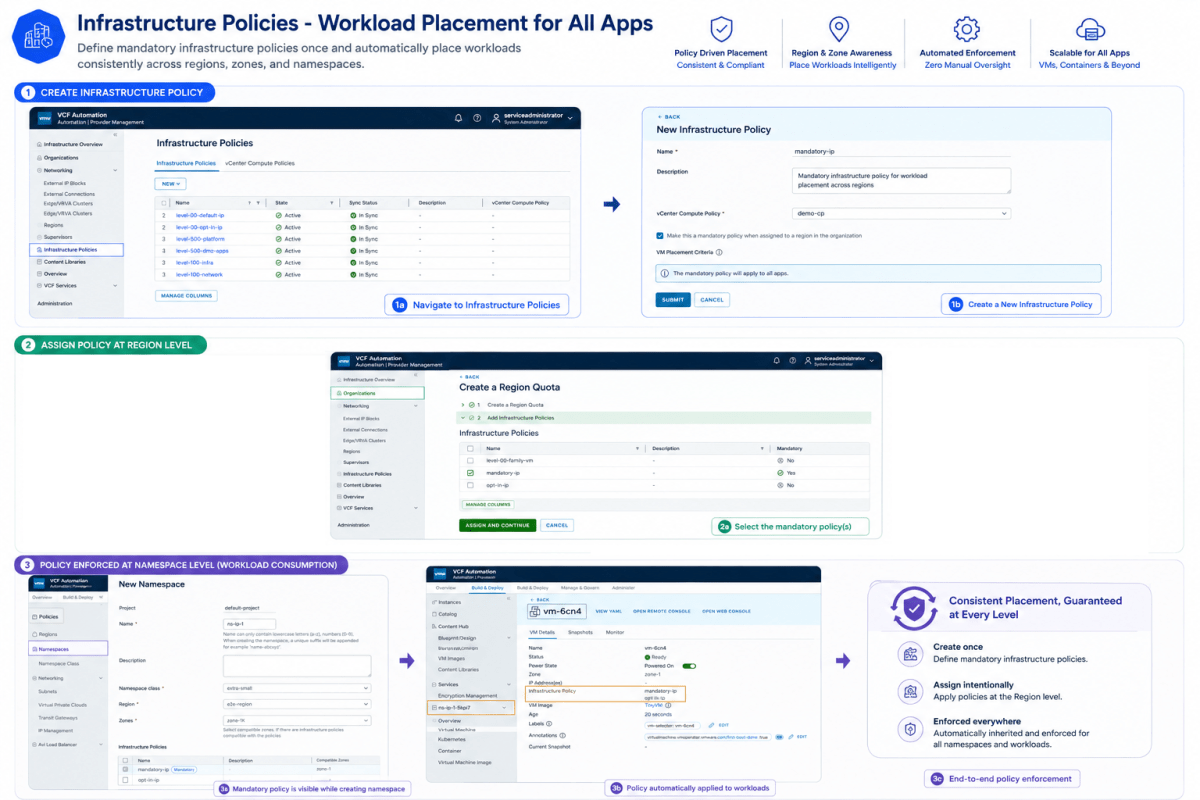
Infrastructure Policies enables administrators to define VM-to-host and other types of affinities by creating policies that map to vCenter compute policies. These policies can be assigned to Region Quotas and subsequently to namespaces, providing control over workload placement and resource allocation.
The above diagram presents a high-level architectural overview of the Infrastructure Policies creation workflow.
An Infrastructure Policy (IP) is comprised of two parts:
- The matching criteria that define which workloads that IP would apply to. For example, apply this IP to all VMs that have Linux as their Guest OS family.
- A reference to the underlying vCenter compute-policy that would be applied to the workloads which match the criteria defined for this IP. For example, all VMs with Linux guest OS will be part of the underlying compute-policy “xyz” (where “xyz” is the name of a compute-policy in the underlying vCenters of a VCF Automation instance).
References
Discover more from Cloud Blogger
Subscribe to get the latest posts sent to your email.















Excellent and very well summarized
Glad it helped.
[…] VCF 9.1 improvements: VCF Automation and VKS (Cloud Blogger) […]
[…] VCF 9.1 improvements: VCF Automation and VKS (Cloud Blogger) […]
[…] VCF 9.1 improvements: VCF Automation and VKS (Cloud Blogger) […]