

I am excited to release version 2.0.0 of the vRO Code Editor Resizer Chrome extension — a major update driven by feedback from the community. After focused development over the past two days, this release resolves the key issues that users have been facing and enhances usability across the board. You can read my earlier release blog here.
Download here
👉 Google Chrome Webstore link
What’s New in v2.0.0
1. Movable Button
The resizer button can now be repositioned freely, ensuring it no longer overlaps important UI elements or interferes with your workspace. Your last button location will be saved for lesser cognitive load.
2. Seamless Compatibility with vRO Actions ☝️
The extension now works smoothly within the Actions view — no more layout conflicts or display problems while navigating your vRO Actions.
3. Context-Aware Display
The resizer control only appears when relevant, reducing visual clutter and improving focus. It won’t show up on screens where it isn’t needed. No more showing up on other webpages.
4. Continued Workflow Support
All existing capabilities for vRO Workflows remain intact and continue to function as expected — retaining the workflow resizing behavior users rely on.
Plugin Stats
Seems like people are trying it but due to earlier issues, people have uninstalled it. I hope version 2.0.0 will solve all of those issues for you and you can continue using the extension.
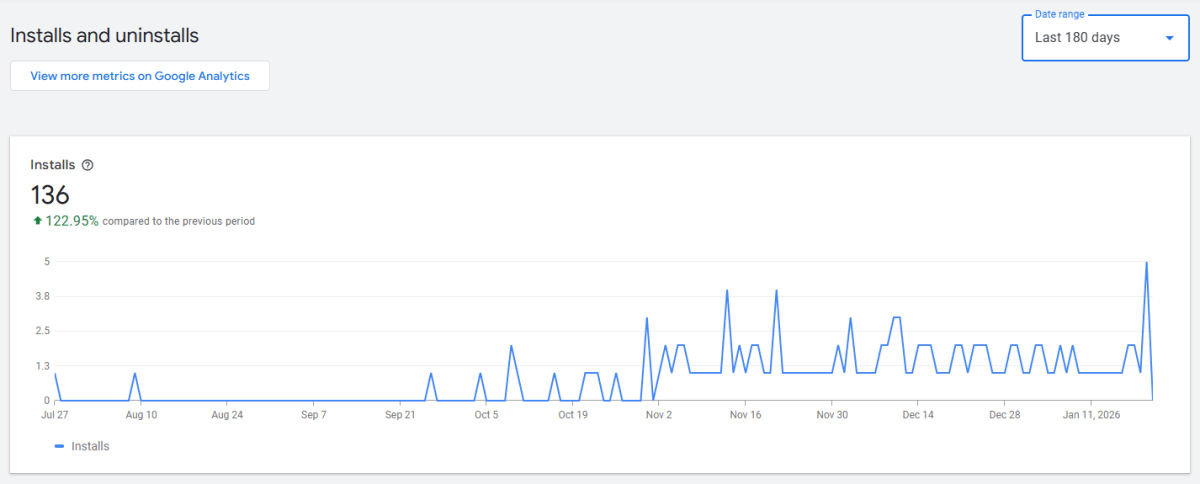
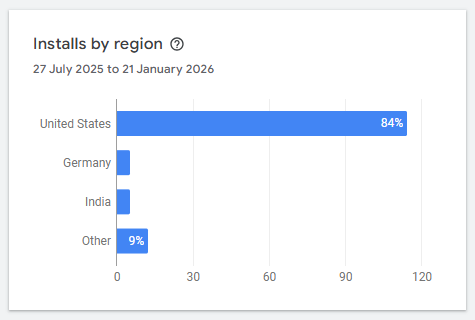
And much love to US folks. 🙏
Discover more from Cloud Blogger
Subscribe to get the latest posts sent to your email.













[…] Check version 2.0.0 here with fixed […]
Thank you so much. The new enhancements are so great. Now it can be used in all situations it failed before (action script was buggy, Restore button overlay with page features, …)
I liked v1 but this will be love now!
Thanks for your comments, means a lot. Glad that the work is being watched and is being used as intended. Thanks again.