When working with cloud templates in VMware Aria Automation Assembler, you’ll notice various types of lines connecting resources on the design canvas. These visual indicators represent different relationship types between infrastructure components. Understanding these connection types is critical for proper template design and successful deployments.
Explicit Dependencies: Solid Arrows
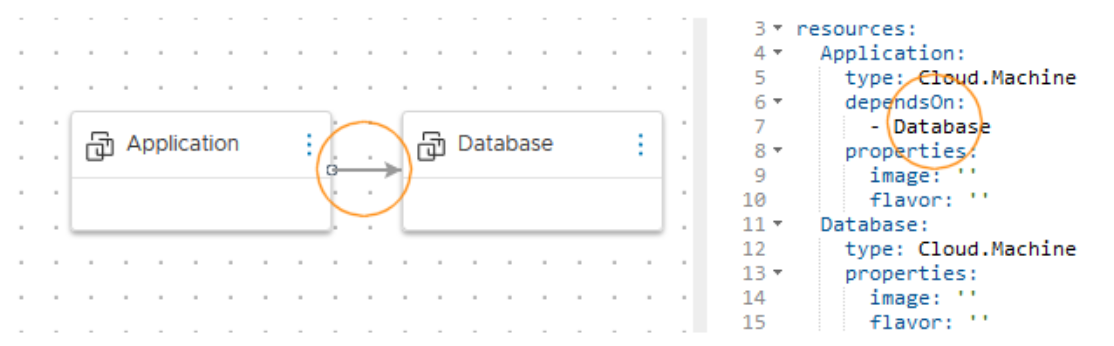
Explicit dependencies define the deployment sequence when one resource must be provisioned before another. These relationships are represented by solid arrows on the canvas.
Use Case: Consider a scenario where an application server requires an existing database instance. The database must be fully provisioned before the application server can be configured with the appropriate connection parameters.
Implementation Methods:
Code-Based Approach: In the YAML editor, add a dependsOn property to the dependent resource specification:
formatVersion: 1
inputs: {}
resources:
  Cloud_Machine_1:
    type: Cloud.Machine
    properties:
      image: ubuntu
      flavor: small
  Cloud_Machine_2:
    type: Cloud.Machine
    dependsOn:
      - Cloud_Machine_1
    properties:
      image: ubuntu
flavor: smallExplicit dependencies control not only initial deployment sequencing but also scale-in and scale-out operations, ensuring resources are created or destroyed in the correct order.
Implicit Dependencies: Dashed Arrows
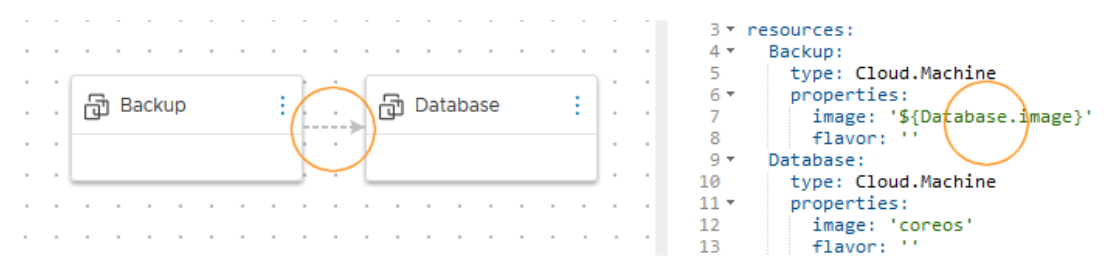
Implicit dependencies, also known as property bindings, occur when a resource requires property values from another resource. These are visualized as dashed arrows on the canvas.
Use Case: A backup server that needs to replicate the operating system image from a production database server creates an implicit dependency. The database server must exist and have its image property populated before the backup server can reference it.
Implementation:
Property bindings are defined exclusively through the code editor by referencing properties from other resources:
formatVersion: 1
inputs: {}
resources:
  Cloud_Machine_1:
    type: Cloud.Machine
    properties:
      image: ubuntu
      flavor: small
  Cloud_Machine_2:
    type: Cloud.Machine
    properties:
      image: ${resource.Cloud_Machine_1.image}
flavor: smallThe deployment engine automatically determines the build order by analyzing these property references, ensuring that resources are created only after their required property values become available.
Fun fact: You can have multiple arrows/lines shared between resources based on YAML code or resource connectivity.

Resource Connections: Solid Lines
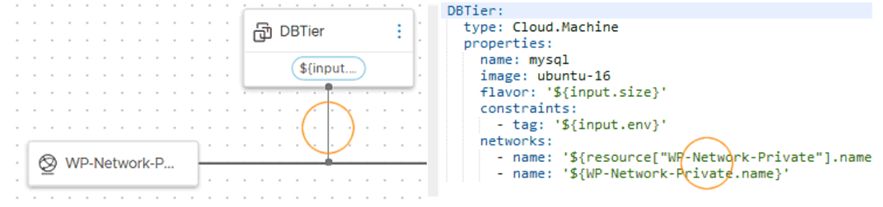
Unlike dependency arrows, solid lines represent actual logical connections between compatible resources. These connections establish runtime relationships rather than deployment ordering or property sharing.
Compatible Connection Types:
- Load Balancer to Machine Cluster: Distributing traffic across multiple compute instances
- Machine to Network: Attaching a virtual machine to a specific network segment
- Storage to Machine: Mounting external storage volumes to compute resources
Critical Constraint: Connected resources must be deployed within the same cloud zone. The Assembler enforces this requirement at deployment time.
Deployment Consideration: Conflicting placement constraints will cause deployment failures. For example, if constraint tags force one resource to aws/us-west-1 and a connected resource to aws/us-east-1, the deployment cannot succeed since the resources cannot maintain their connection across zones.
Implementation
formatVersion: 1
inputs: {}
resources:
  Cloud_Machine_1:
    type: Cloud.Machine
    properties:
      image: ubuntu
      flavor: small
    networks:
      - network: ${resource.Cloud_Network_1}
  Cloud_Network_1:
    type: Cloud.Network
    properties:
networkType: existingKey Distinctions
Arrows (Solid or Dashed) ≠ Connections
- Arrows indicate deployment dependencies or property relationships
- Arrows do not create runtime connections between resources
- Solid lines create actual network or logical connections
- Solid lines impose co-location requirements
Differences
| Aspect | Solid Arrow (Explicit Dependency) | Dashed Arrow (Implicit Dependency) | Solid Line (Connection) |
|---|---|---|---|
| Visual Representation | Solid arrow (→) | Dashed arrow (⤏) | Solid line (—) |
| Primary Purpose | Define deployment sequence | Property value binding between resources | Establish runtime network/logical connection |
| When to Use | When Resource A must exist before Resource B can be created | When Resource A needs property values from Resource B | When resources need to communicate or interact at runtime |
| Implementation Method | Code editor (dependsOn property) | Code editor only (property reference using ${} syntax) | Code editor or Design canvas |
| Code Example | dependsOn: - ${resource.DatabaseServer.id} | image: ${resource.DatabaseServer.image} | - network: ${resource.Cloud_Network_1.id} |
| Controls Deployment Order | Yes – explicitly defined | ? | No – but resources must be in same zone |
| Creates real world Connection | No | No | Yes |
| Cloud Zone Requirement | No co-location requirement | No co-location requirement | Must be in same cloud zone |
| Common Use Cases | – Database before app server – Network before VM – Security groups before instances | – Copy OS image from source – Reference IP addresses – Inherit configuration values | – Load balancer to VM cluster – VM to network – Storage to VM |
| Direction Significance | Arrow points to resource created first | Arrow points to resource providing the property value | No directional meaning |
| Deployment Failure Risk | Circular dependencies | Missing or unavailable properties | Conflicting zone constraints |
| Can Be Removed | Yes – deployment will proceed without ordering | No – property reference must resolve | Yes – but runtime functionality may be lost |
| Visible in Code | Yes (dependsOn section) | Yes (property references with ${}) | Yes |
Discover more from Cloud Blogger
Subscribe to get the latest posts sent to your email.