

There are three main approaches for using Polyglot scripts in vRealize Orchestrator (vRO):
- Native Libraries: Using Runtimes and their native libraries which will be see in this post.
- Zip bundles: Using external libraries with your code as a zip package. Tutorial here.
- Action Environments: Using npm, pip or PSGallery packages or even internally hosted packages as a external library to your code. Tutorial here.
Introduction
The most challenging part while writing a polyglot script in Orchestrator is to decide what modules, tools or libraries are provided out-of-the-box in the polyglot environment and how to work with them to get the job done.
If we are using recent versions of Orchestrators, you find that there are basically 3 ways to write Polyglot scripts in Orchestrator:
- Using Script bundles: Bundling 3rd party modules externally and developed scripts and importing them in Orchestrator
- Using Script Environments: Installing3rd party modules in Orchestrator directly and develop scripts right inside.
- Using out-of-the-box modules: Using the native modules available as part of the languages and develop scripts. Get the list of preinstalled modules for Python here.
Depending on the language you choose, there would be N number of ways to get the same job done. For eg: If you choose Python, you can choose among various libraries to execute REST operations.
However, my personal emphasis is always on going NATIVE but it is not as easy as it might think.
In this post, we will see how to work with a Python based action in Orchestrator to make REST calls.
For this one, we will try to generate a access token from VMware Chargeback (formerly vRealize Operations Tenant App (TA)) as an example.
Without further adieu, let’s see what are the steps involved in making a simple REST call using a native Python script in Orchestrator.
Steps
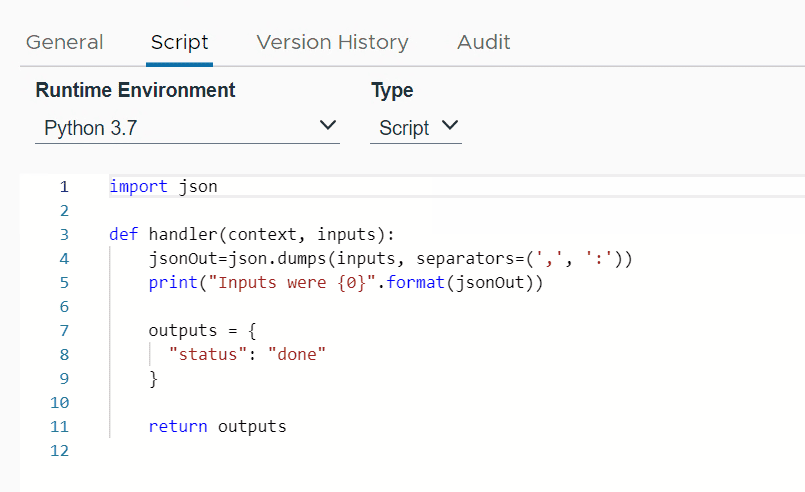
- Start fresh: Create a new action in Orchestrator with Runtime = Python 3.7. A default breadboard script will show up.
- Consideration: You have to decide what native libraries are available to do the job. After careful consideration from this list, I thought
httpmodule should work for REST operations.

- Take reference: Start writing script using this module. You can refer internet for example scripts or use Postman script generator (if working with Web APIs).

- Code Placement: Copy-paste the script carefully into the Orchestrator with proper indentation. Placement of script should be correct. it should be inside the handler function. Also, remove
import jsonif it exists in the copied code.

- Replace input variables: In case of Python, replace variables with
inputs["variable-name"].
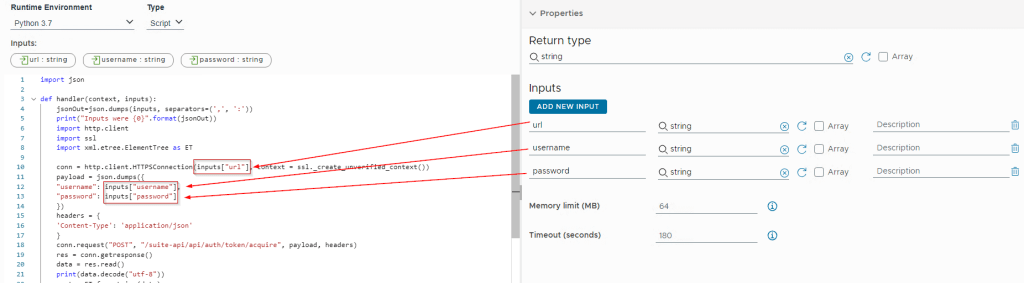
- Fix Errors: Executing the code resulted in Certificate error. To avoid this, I figured out that if we can import ssl module, then the error can be supressed.

import ssl
.
.
conn = http.client.HTTPSConnection(inputs["url"], context = ssl._create_unverified_context())
.
.- Return it: Now, we have to figure out how to return only the token out of that action. The REST call in action returned XML. But, Orchestrator Python luckily comes with a module
xmlfor all the XML related jobs. Just import xml and parse the string.

import xml.etree.ElementTree as ET
.
.
.
print(data.decode("utf-8"))
    root = ET.fromstring(data)
    #print(root.tag)
    for child in root:
        print(child.tag, child.text)
    print(root[0].text)
    token = root[0].text
.
.
ProTip The following steps should also be valid for Aria Automation ABX actions.
Final Script
Here is the concluding script for your reference. The steps can be different if you are working on automating a different task or using a different language but should follow almost similar approach.
import json

def handler(context, inputs):
    jsonOut=json.dumps(inputs, separators=(',', ':'))
    print("Inputs were {0}".format(jsonOut))
    import http.client
    import ssl
    import xml.etree.ElementTree as ET

    conn = http.client.HTTPSConnection(inputs["chargeback_url"], context = ssl._create_unverified_context())
    payload = json.dumps({
    "username": inputs["username"],
    "password": inputs["password"]
    })
    headers = {
    'Content-Type': 'application/json'
    }
    conn.request("POST", "/suite-api/api/auth/token/acquire", payload, headers)
    res = conn.getresponse()
    data = res.read()
    print(data.decode("utf-8"))
    root = ET.fromstring(data)
    #print(root.tag)
    for child in root:
        print(child.tag, child.text)
    print(root[0].text)
    token = root[0].text

    return token
I hope it would be of some insight if you start working with Python actions in Orchestrator. Thanks for reading. See you.
Discover more from Cloud Blogger
Subscribe to get the latest posts sent to your email.














[…] Native Libraries: Python Native Modules Example. […]
[…] Native Libraries: Using Runtimes and their native libraries. Tutorial here. […]
[…] Native Libraries: Using Runtimes and their native libraries. Tutorial here. […]