

👉 Check version 2.0.0 here with fixed bugs.
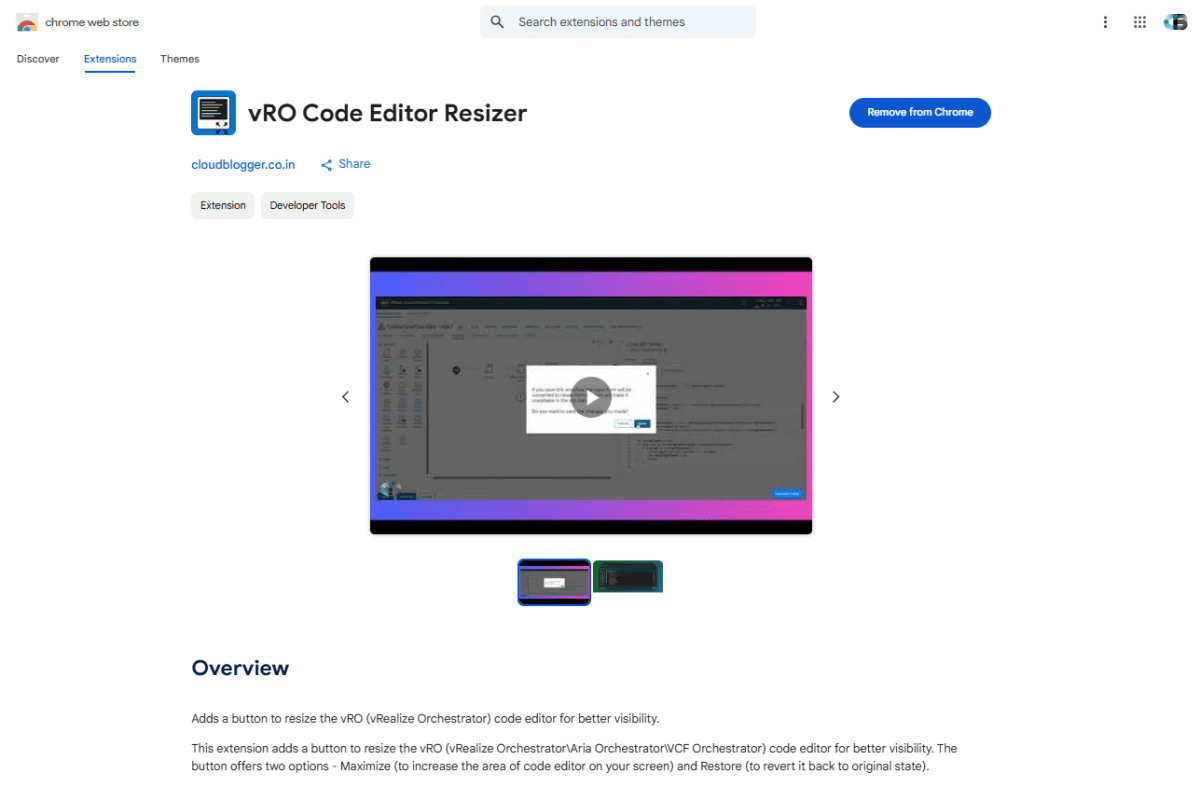
Are you a vRealize Orchestrator (vRO) or VCF Orchestrator developer struggling with the cramped script editor? Say goodbye to tiny code windows and hello to a more productive workflow with the new vRO Code Editor Resizer Chrome Extension!
This was very much needed. At least a bigger scripting pane will make debugging easy as well as this will save time, I can stop using VS code for this and go back and forth with the orchestrator and Vscode.
Prithwijit Bhattacharjee, Principal Engineer on LinkedIn
🔍 What Does This Plugin Do?
The vRO Code Editor Resizer is a lightweight Chrome extension that expands the vRO script editor, giving you more screen space to write, debug, and manage your automation scripts efficiently by integrating a button to maximize and restore the code editor area.
✨ Key Benefits:
✔ Larger Code Area – No more squinting! Get a full-width editor for better readability.
✔ Simple & Lightweight – No complex setup—just install and enjoy.
✔ Better Productivity – Spend less time scrolling and more time scripting!
👉 Watch the Demo: YouTube Demo
👉 Download Now: Chrome Web Store
This is a total game changer. I was literally copying all the text, and pasting into vi editor. But then again, I’m old school like that. But the primary reason was trying to see all the code. This maximize editor extension resolves that. Thanks for sharing.
Damion Terrell, Specialist in Infrastructure Administration on LinkedIn
🛠 How to Install the Extension in Chrome
- Open Chrome Web Store – Visit the extension page.
- Click “Add to Chrome” – A pop-up will appear; confirm by clicking “Add Extension”.
- Pin the Extension (Optional) – Click the puzzle icon (🧩) in Chrome’s toolbar and pin the extension for easy access.
- Open vRO/VCF Orchestrator – Navigate to your vRO workflow in edit mode, your will notice a blue button Maximize Editor on the bottom right. Click there and the script editor will automatically expand!
⚠️ Note: This is Version 1.0!
As this is the first release, you might encounter minor bugs. Your feedback is highly appreciated—report any issues, and I’ll work on improvements in future updates!
Awesome, great tool.
Matthias Eisner, Partner at comdivision alps GmbH on LinkedIn
🚀 Who Should Use This?
This extension is a must-have for:
- vRO Developers working on automation scripts
- VCF Orchestrator users who need a better coding experience
- Anyone tired of the default tiny editor!
Give it a try and let me know what you think in the comments! Happy coding! 🎉
Today @mayank_goyal you are my hero! Why this isn’t already built into the app I’ll never know. AWESOME and thanks for sharing!

Discover more from Cloud Blogger
Subscribe to get the latest posts sent to your email.













HI Mayank Goyal, your Chrome extension works like a charm in a Vro Workflow! But in a Vro Action it work the other side….
If you have a chance to make this Chrome extension also compatible for editing Vro Action too, it will be very cool !
Thanks in advance !
Dominic
I really appreciate that you tried and it helped you in some way. Regarding the action, yes I find that bug too a little later. Will definitely fix it in next release. ❤️
Hey Dominic, thanks for your support. I have released version 2.0.0. And I would like you to test it. Hope it solves your issue
Hi,
Love the extension! Can it be used in Edge as well?
Yes you can because Edge is Chromium based. Follow this link to know more https://www.linkedin.com/posts/mayankgoyal1994_vro-code-editor-resizer-on-extpose-activity-7322525310401347585-9yJJ?utm_source=share&utm_medium=member_ios&rcm=ACoAAArxUGsB6TPigSLKITPbO8ok6zLnKmzMYOo
Check out the landing page of vROESIZER – https://app–v-roesizer-6c8c5330.base44.app/
[…] I am excited to release version 2.0.0 of the vRO Code Editor Resizer Chrome extension — a major update driven by feedback from the community. After focused development over the past two days, this release resolves the key issues that users have been facing and enhances usability across the board. Read my earlier release blog here. […]