So I give up on the LogMarker method which I have explored years ago (link) due to some implementation issues that I couldn’t pass through. Sometimes, it behaved nasty. When I was looking for other options, I immediately went back to Gavin’s Logger module which is still the best custom implementation in my opinion. However, I was looking for something more. In this post, I will discuss about my perfect logging solution for VCF Orchestrator with some nice emoji support.
First of all, here is the original Logger module if you want to look at (link).
Lets see what I have changed in its implementation and then we will talk about how to use it in a very streamlined way.
1. My Implementation Changes
- No error if nothing is passed in the method. You can use now
Logger.info(); //empty


- Fixed undefined when nothing is passed to the method. You can use now
Logger.info(); //empty

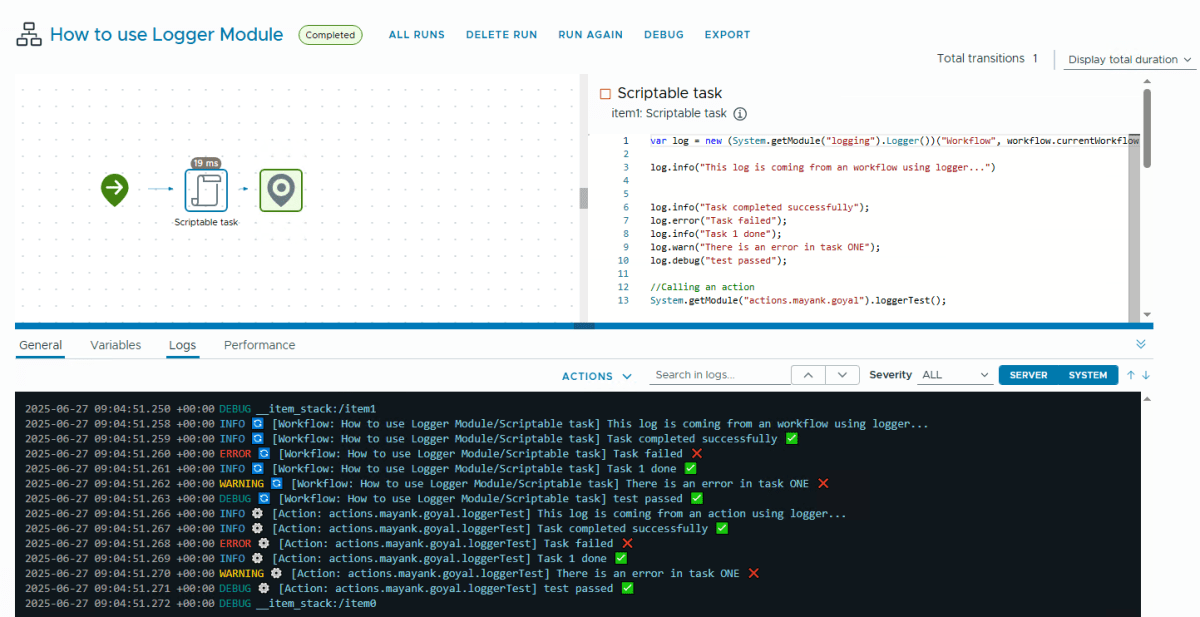
- Support for identifier emojis for workflows (🔄) and actions (⚙️).

- Support for enhanced emojis for success (✅) and failure scenarios (❌). Works based on message pattern automatically.

If you want to change the emojis to your personalized look or want to completely disable emojis, you can toggle the global variables.

2. Streamlined Usage
If you find it interesting already, here is how to implement it in your environment. It is production-ready.
Before that, follow this article to enable the visibility of debug logs in VCF Orchestrator.
- Create a new action Logger in logging module.

Copy the enhanced Logger class from Gist here. Paste it into that action and save it. We are ready to use it.
During a workflow execution, we can get the workflow name, workflow item name, action module name and action name in this way.
- Workflow name:
workflow.currentWorkflow.name - Workflow Item name:
System.currentWorkflowItem().getDisplayName() - Action module name:
this.name - Action name:
arguments.callee.name.substr(6))
- For Workflows: Copy-paste this code in the beginning of a scriptable task or scripts inside decisions etc.
// 👇 Just add this line to use Logger in workflows 👇
var log = new (System.getModule("logging").Logger())("Workflow", workflow.currentWorkflow.name+"/"+System.currentWorkflowItem().getDisplayName());- For actions:
// 👇 Just add this line to use Logger in actions 👇
var log = arguments.callee.name.substr(6) ? new (System.getModule("logging").Logger())("Action", this.name + "." + arguments.callee.name.substr(6)) : new (System.getModule("logging").Logger())("Action","self");Execution
If you run the action alone, it will add a prefix to all logs [Action: self] -> due to a limitation in Rhino Engine. But thats OK because the main use of Logger would be to provide clarity during big workflow runs.

3. Enhanced Logger Class
/**
 * Enhanced Logger Module by Mayank Goyal (https://cloudblogger.co.in)
 *
 * This logging module is an enhanced version of the original Logger implementation.
 * It provides additional features such as emoji support and improved error handling.
 *
 * Original Source:
 * https://github.com/simplygeekuk/vcf-automation-maven/blob/main/source/vro-actions/src/main/resources/com/simplygeek/vcf/orchestrator/logging/Logger.js
 *
 * To toggle emojis in log messages:
 * Set the global variable 'showEmoji' to true or false
 * Example: showEmoji = true; // Enable emojis
 * Example: showEmoji = false; // Disable emojis
 *
 * @class Logger
 * @param {string} logSource - The log source. Valid sources are Action or Workflow.
 * @param {string} logName - The name of the Action or Workflow sending the log message.
 */

// Global emoji toggle variable
// Set to true to enable emojis in log messages
// Set to false to disable emojis
var showEmoji = false;

// Set to true to enable enhanced emojis (✅ for success, ❌ for errors/failures)
// Set to false to disable enhanced emojis
var enhancedEmojis = true;

// Base emojis
var workflowEmoji = '🔄';
var actionEmoji = '⚙️';

// Enhanced emojis
var successEmoji = '✅';
var errorEmoji = '❌';

function Logger(
    logSource,
    logName
) {
    var validSources = [
        "action",
        "workflow"
    ];

    if (logSource && typeof logSource !== "string") {
        throw new TypeError("logSource not of type 'string'");
    } else if (logSource && validSources.indexOf(logSource.toLowerCase()) < 0) {
        throw new ReferenceError("Unsupported source '" + logSource + "'." +
                                 " Supported sources: " + validSources.join(", "));
    }
    this.type = logSource;
    this.name = logName;
}

/**
 * Prints INFO messages to the console.
 * @method
 * @public
 */

Logger.prototype.info = function (
    message
) {
    // Default to empty string if message is undefined or null
    var displayMessage = message || '';
    var baseEmoji = showEmoji ? (this.type.toLowerCase() === 'workflow' ? workflowEmoji : actionEmoji) : '';
    var enhancedEmoji = '';

    if (enhancedEmojis && message) {
        // Check for success keywords
        if (message.toLowerCase().indexOf('success') !== -1 || message.toLowerCase().indexOf('pass') !== -1 || message.toLowerCase().indexOf('done') !== -1 || message.toLowerCase().indexOf('complete') !== -1) {
            enhancedEmoji = successEmoji;
        }
        // Check for error/failure keywords
        else if (message.toLowerCase().indexOf('fail') !== -1 || message.toLowerCase().indexOf('error') !== -1) {
            enhancedEmoji = errorEmoji;
        }
    }

    var emoji = baseEmoji;
    System.log(emoji + " [" + this.type + ": " + this.name + "] " + displayMessage + (enhancedEmoji ? " " + enhancedEmoji : ""));
};

/**
 * Prints WARNING messages to the console.
 * @method
 * @public
 */

Logger.prototype.warn = function (
    message
) {
    // Default to empty string if message is undefined or null
    var displayMessage = message || '';
    var baseEmoji = showEmoji ? (this.type.toLowerCase() === 'workflow' ? workflowEmoji : actionEmoji) : '';
    var enhancedEmoji = '';

    if (enhancedEmojis && message) {
        // Check for success keywords
        if (message.toLowerCase().indexOf('success') !== -1 || message.toLowerCase().indexOf('pass') !== -1) {
            enhancedEmoji = successEmoji;
        }
        // Check for error/failure keywords
        else if (message.toLowerCase().indexOf('fail') !== -1 || message.toLowerCase().indexOf('error') !== -1) {
            enhancedEmoji = errorEmoji;
        }
    }

    var emoji = baseEmoji;
    System.warn(emoji + " [" + this.type + ": " + this.name + "] " + displayMessage + (enhancedEmoji ? " " + enhancedEmoji : ""));
};

/**
 * Prints ERROR messages to the console.
 * @method
 * @public
 */

Logger.prototype.error = function (
    message
) {
    // Default to empty string if message is undefined or null
    var displayMessage = message || '';
    var baseEmoji = showEmoji ? (this.type.toLowerCase() === 'workflow' ? workflowEmoji : actionEmoji) : '';
    var enhancedEmoji = '';

    if (enhancedEmojis && message) {
        // Check for success keywords
        if (message.toLowerCase().indexOf('success') !== -1 || message.toLowerCase().indexOf('pass') !== -1) {
            enhancedEmoji = successEmoji;
        }
        // Check for error/failure keywords
        else if (message.toLowerCase().indexOf('fail') !== -1 || message.toLowerCase().indexOf('error') !== -1) {
            enhancedEmoji = errorEmoji;
        }
    }

    var emoji = baseEmoji;
    System.error(emoji + " [" + this.type + ": " + this.name + "] " + displayMessage + (enhancedEmoji ? " " + enhancedEmoji : ""));
};

/**
 * Prints DEBUG messages to the console.
 * @method
 * @public
 */

Logger.prototype.debug = function (
    message
) {
    // Default to empty string if message is undefined or null
    var displayMessage = message || '';
    var baseEmoji = showEmoji ? (this.type.toLowerCase() === 'workflow' ? workflowEmoji : actionEmoji) : '';
    var enhancedEmoji = '';

    if (enhancedEmojis && message) {
        // Check for success keywords
        if (message.toLowerCase().indexOf('success') !== -1 || message.toLowerCase().indexOf('pass') !== -1) {
            enhancedEmoji = successEmoji;
        }
        // Check for error/failure keywords
        else if (message.toLowerCase().indexOf('fail') !== -1 || message.toLowerCase().indexOf('error') !== -1) {
            enhancedEmoji = errorEmoji;
        }
    }

    var emoji = baseEmoji;
    System.debug(emoji + " [" + this.type + ": " + this.name + "] " + displayMessage + (enhancedEmoji ? " " + enhancedEmoji : ""));
};

return Logger;References
https://blogs.thecloudstop.co.uk/?p=862
https://automationpro.co.uk/logmanager-yet-another-vmware-vro-logging-action
https://community.broadcom.com/vmware-cloud-foundation/discussion/tip-using-vro-logmarker
Discover more from Cloud Blogger
Subscribe to get the latest posts sent to your email.