When building automation workflows in VMware Aria Automation Orchestrator (vRO), sending email notifications is a common requirement. But what if your environment lacks an internal SMTP server, or you’re experimenting in a homelab where enterprise mail infrastructure isn’t available? In such scenarios, Google’s SMTP service (Gmail) is a reliable, secure, and accessible alternative.
Below, you’ll find a practical guide to configuring Gmail SMTP in vRO, complete with a reusable script and key use cases.
Why Use Google SMTP with vRO\vRA?
- No Internal SMTP Server: Perfect for environments where a corporate mail server isn’t available or accessible.
- Homelab and Testing: Ideal for homelab enthusiasts or anyone learning vRO automation who wants a quick, free, and secure way to send emails.
- Rapid Prototyping: Useful for proof-of-concept projects or temporary setups where setting up dedicated mail infrastructure isn’t justified.
Prerequisites
- A Gmail account.
- Internet access from your vRO appliance.
Input variables
| Parameter | Example / Description |
| smtpHost | smtp.gmail.com |
| smtpPort | 587 (for TLS/STARTTLS) |
| username | username@gmail.com |
| password | Your Gmail password (if you have 2-Step Verification enabled, use an App Password instead)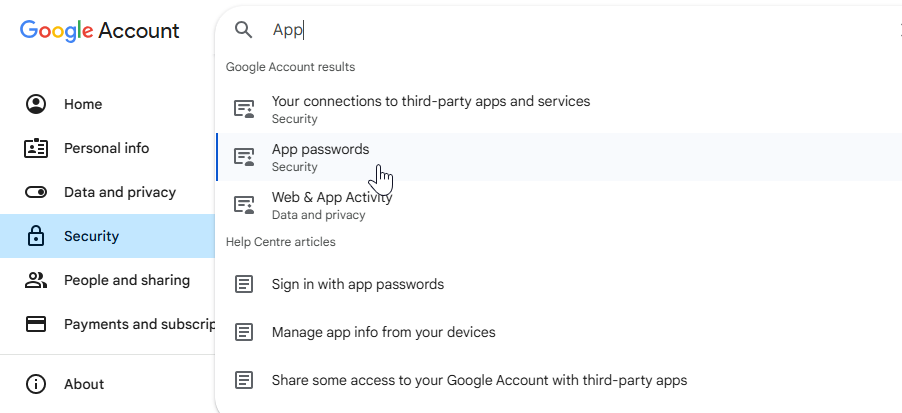 |
| fromName | “vRO Notification” (Display name of the sender) |
| fromAddress | dev-vro@<domain.local> (Sender’s email address) |
| toAddress | Recipient email address, e.g., ops-team@<domain.local> or an Ops Team DL |
| subject | Email subject, e.g., “Workflow Success” or “Generated Report” |
| content | Email body content, can be in HTML or plain text |
| useStartTls | true (Enables STARTTLS encryption for the connection) |
Sending Email via Gmail SMTP in Orchestrator
Go to Library Workflows in Orchestrator -> Mail -> Run Send notification (TLSv1.2) and fill in the values. For Email content, you can simply put “test message” initially.

✅ Once you run it, you will see a new mail in destination addressee’s mailbox.
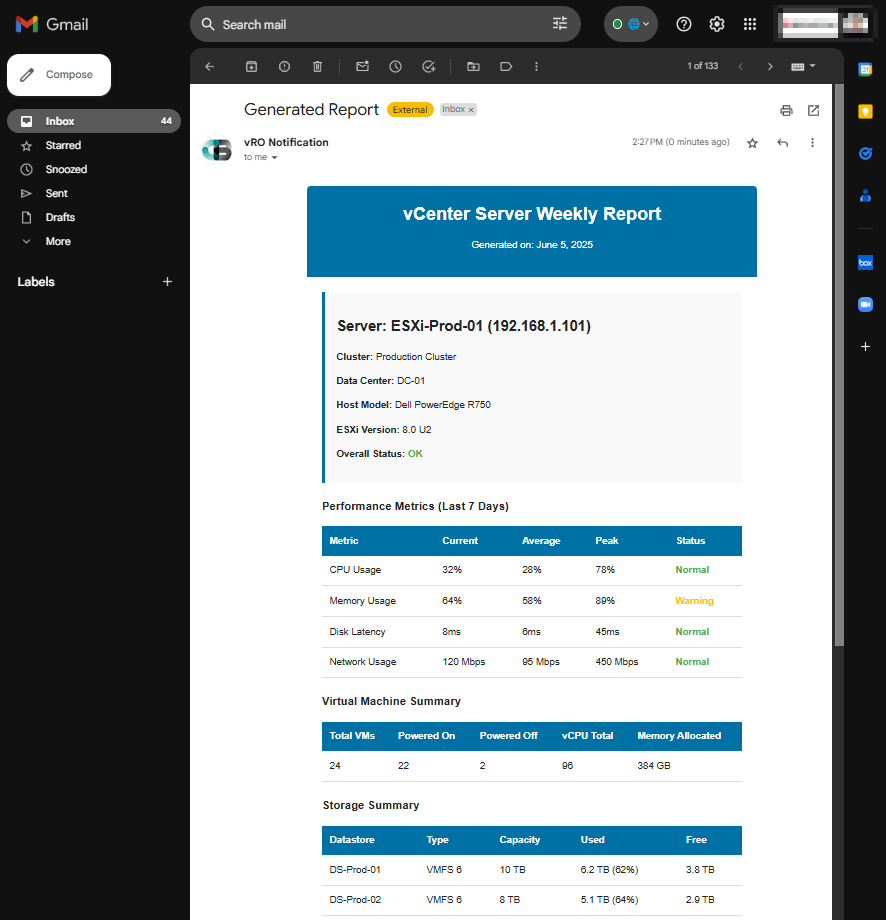
Here is the script for your reference. Make sure to define the required input parameters in your workflow:
/**
 * Sends an email using the EmailMessage class.
 *
 * @param {string} smtpHost - The SMTP server host.
 * @param {number} smtpPort - The SMTP server port.
 * @param {string} username - The username for SMTP authentication.
 * @param {string} password - The password for SMTP authentication.
 * @param {string} fromName - The display name of the sender.
 * @param {string} fromAddress - The email address of the sender.
 * @param {string} toAddress - The recipient's email address.
 * @param {string} subject - The subject line of the email.
 * @param {string} content - The HTML content of the email body.
 */

// Create a new EmailMessage object with TLS version 1.2
var message = new EmailMessage("TLSv1.2");

// Configure SMTP settings and email metadata
message.smtpHost = smtpHost;
message.smtpPort = smtpPort;
message.username = username;
message.password = password;
message.fromName = fromName;
message.fromAddress = fromAddress;
message.useStartTls = true;
message.toAddress = toAddress;
message.subject = subject;

// Add the HTML content to the message
message.addMimePart(content, "text/html; charset=UTF-8");

// Log the message details for debugging purposes
System.log("sending mail to host: " + message.smtpHost + ":" + message.smtpPort + " with user:" + message.username
    + ", from:" + message.fromAddress + ", to:" + message.toAddress);

// Send the email
message.sendMessage();
You can also configure inside Orchestrator to avoid putting configuration inputs repeatedly by using Configure Mail workflow inside Mail folder.
Adding Email Server inside Aria Automation
Go to Service Broker -> Content and Policies -> Notifications -> Email Server and fill in these values.
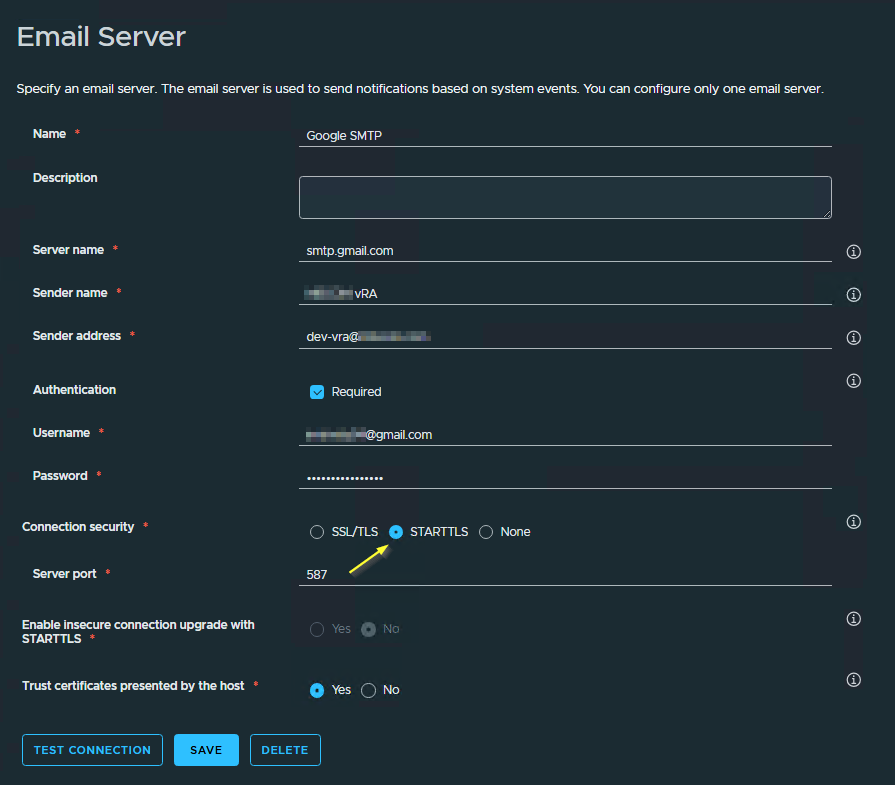
Summary
Using Gmail’s SMTP server in vRO or vRA is a straightforward way to enable email notifications—especially when internal mail servers are unavailable or you’re working in a homelab. With secure authentication and easy setup, you can keep your automation projects connected and responsive, no matter your environment.
- https://techdocs.broadcom.com/us/en/vmware-cis/aria/aria-automation/8-18/vro-using-plug-ins-8-18/using-the-mail-plug-in/define-the-default-smtp-connection-new.html
- https://techdocs.broadcom.com/us/en/vmware-cis/aria/aria-automation/8-18/consumption-on-prem-using-master-map-8-18/service-catalog-setting-up-service-catalog-for-your-organization/service-broker-notifications-scenarios/service-broker-notificaitons-email-server.html
Discover more from Cloud Blogger
Subscribe to get the latest posts sent to your email.