This blog also contains the use-case to parse YAMLs as native JSON objects in VCF Orchestrator.
VCF Orchestrator (vRO) is a powerful workflow automation platform that primarily uses JavaScript/ECMAScript for scripting. One of its most powerful features is the ability to integrate with third-party polyglot modules, allowing you to leverage code written in other languages like Python, Java, or even Node.js.
In this blog post, we’ll explore how to wrap these modules to work as native JavaScript classes in vRO, making them feel like first-class citizens in your automation workflows.
Why Use Polyglot Modules in vRO?
- Access to rich ecosystems: Tap into the vast libraries available in other languages
- Reuse existing code: Leverage your organization’s existing codebase
- Performance optimization: Use the right tool for specific tasks
- Specialized functionality: Access capabilities not natively available in JavaScript
Understanding my approach

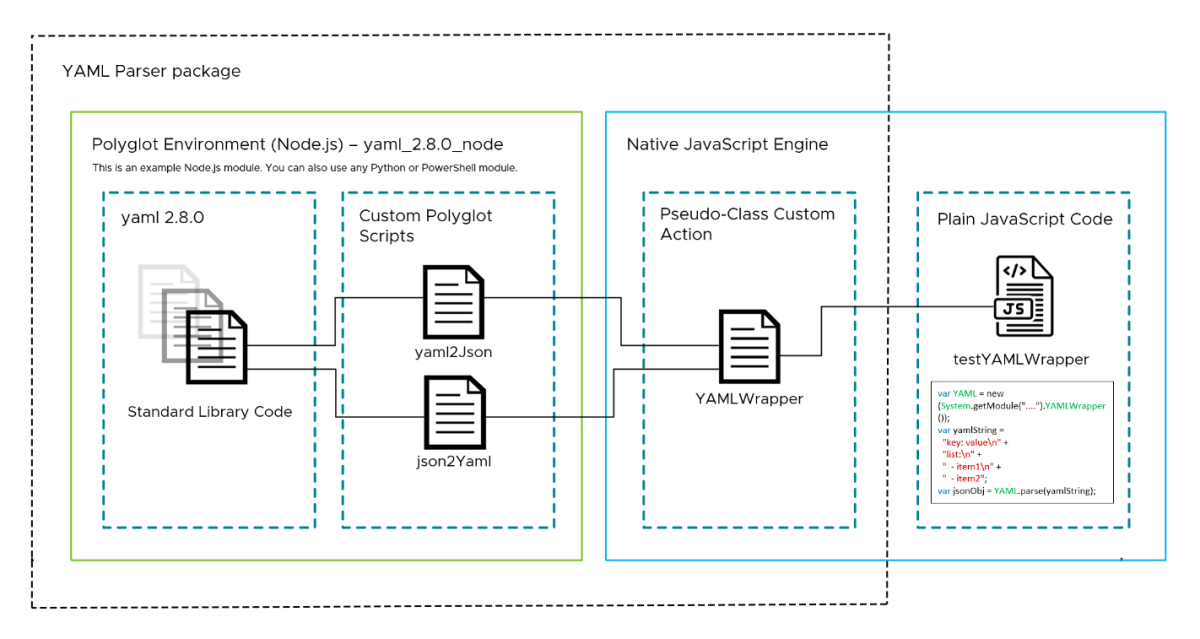
The image presents a clear architectural overview of how VCF Orchestrator (vRO) can integrate with polyglot modules to make module features available as first-class citizens. Let’s break it down:
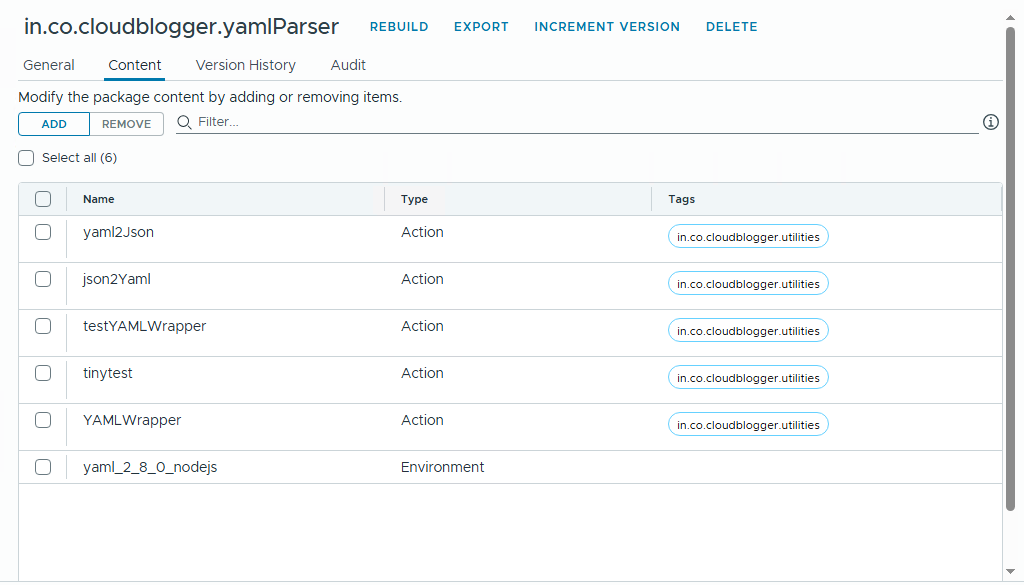
1. The Orchestrator Package with Action Environment – For Portability
This is the container that holds everything together in vRO. It’s where we define our modules as environment, custom polyglot actions and native JavaScript code that will interact with external code.
It’s cool to note that we can reuse environments via packages (migrating them), making zip-bundles less relevant. But you can always use zip bundles as well to achieve same results.
2. Polyglot Environment (Node.js/Python/PowerShell)
This section (outlined in green) represents where our non-JavaScript code executes:
3rd-party Module – For exposing external modules
Shown as stacked files, representing external libraries (like the yaml npm package in our example)
Custom Polyglot Scripts – For implementing a custom logic
Individual files that contain the actual custom implementation leveraging the action environment and 3rd-party modules.
3. Native JavaScript Engine
This section (outlined in blue) is where our native JS code runs:
Pseudo-Classes as Actions – For implementing first-class citizens
- These are vRO Actions that serve as the bridge between JavaScript and our polyglot code
- They’re called “pseudo-classes” because they implement the methods in such a way that we can call them as classes in other native JS code.
Plain JavaScript Code – Actual Usage of custom module implementation
- This represents the actual workflow or script code in vRO
- It calls our pseudo-classes as if they were native JavaScript objects. <- OUR END GOAL
This is not part of the package. Just import the package and you are good to go.
How It All Works Together
- Your vRO workflow code (Plain JavaScript Code) calls a method on what appears to be a native JavaScript object (Pseudo-Classes as Actions)
- The pseudo-class action executes the corresponding custom polyglot script in the appropriate runtime (Node.js/Python/PowerShell)
- The polyglot script can use any 3rd-party modules available in its environment
- Results are passed back through the same chain to your original JavaScript code
The YAML Parser Example
Let’s examine how we can take our YAML parser (implemented in Node.js) and make it feel like a native JavaScript class in vRO.
1. YAML to JSON Conversion (yaml2Json)
const YAML = require('yaml');
exports.handler = (context, inputs, callback) => {
    const inputYaml = `${inputs.yamlInput}`;

    try {
        let result;
        // Check for multiple documents
        const multiDoc = /^---\s*$/m.test(inputYaml.replace(/^---\s*\n?/, ''));

        if (multiDoc) {
            // Parse all YAML documents
            const docs = YAML.parseAllDocuments(inputYaml);
            result = docs.map(doc => doc.toJSON());
        } else {
            // Parse single YAML document
            result = YAML.parse(inputYaml);
        }

        const jsonString = JSON.stringify(result, null, 2);
        callback(undefined, jsonString);
    } catch (error) {
        console.error('Error:', error.message);
        callback(error);
    }
}Key Points:
- Uses the yaml npm package for parsing
- Handles both single and multi-document YAML files
- Converts YAML to a JavaScript object and then to a JSON string
- Uses vRO’s callback pattern for async operations
2. JSON to YAML Conversion (json2Yaml)
const YAML = require('yaml');
exports.handler = (context, inputs, callback) => {
    const input = `${inputs.jsonInput}`;

    try {
        // Parse JSON string if input is a string
        const obj = (typeof input === "string") ? JSON.parse(input) : input;
        // Convert to YAML
        const yamlStr = YAML.stringify(obj);
        callback(undefined, yamlStr);
    } catch (error) {
        console.error('Error:', error.message);
        callback(error);
    }
}Key Points:
- Converts JSON (as string or object) to YAML
- Handles both string and object inputs
- Uses the yaml package’s stringify method
3. JavaScript Wrapper (YAMLWrapper)
function YAMLWrapper() {
    // Constructor can be empty or initialize properties
}

// Convert YAML to JavaScript object
YAMLWrapper.prototype.parse = function(yamlString) {
    var jsonString = System.getModule("in.co.cloudblogger.utilities").yaml2JsonString(yamlString);
    return JSON.parse(jsonString);
};

// Convert JavaScript object to YAML
YAMLWrapper.prototype.stringify = function(jsonObj) {
    var jsonString = (typeof jsonObj === "string") ? jsonObj : JSON.stringify(jsonObj);
    return System.getModule("in.co.cloudblogger.utilities").json2Yaml(jsonString);
};

return YAMLWrapper;Key Points:
- Creates a pseudo-class that wraps the Node.js functionality
- Provides a clean, object-oriented interface
- Handles JSON serialization/deserialization
4. Example Usage (testYAMLWrapper.js)
/**
 * @name testYAMLWrapper
 * @description Test script for YAML parsing and stringification in vRO.
 * Takes YAML input and converts it to JSON, then back to YAML.
 * @param {string} yamlInput - The YAML string to parse
 */

// Get the YAML wrapper utility
var YAML = new (System.getModule("in.co.cloudblogger.utilities").YAMLWrapper());

// Ensure yamlInput is a string
var yamlString = String(yamlInput);

// Log the first 200 characters of the input for debugging
System.log("Input YAML (first 200 chars): " + yamlString.substring(0, 200) + "...");

try {
    // Parse the YAML string to a JavaScript object
    System.log("=== Parsing YAML to JavaScript Object ===");
    var parsedYaml = YAML.parse(yamlString);

    // Log basic information about the parsed object
    System.log("Successfully parsed YAML");
    System.log("Parsed object type: " + typeof parsedYaml);
    System.log("Equivalent JSON stringified object: \n"+JSON.stringify(parsedYaml))

    // Add a timestamp to the parsed object
    parsedYaml.modifiedAt = new Date().toISOString();

    // Convert the JavaScript object back to YAML string
    System.log("\n=== Converting JavaScript Object back to YAML ===");
    var yamlOutput = YAML.stringify(parsedYaml);
    System.log("Generated YAML string length: " + yamlOutput.length);

    // Save the YAML to a resource element
    try {
        var fileName = "parsed_yaml_" + new Date().getTime();
        var webAttachment = new MimeAttachment();
        webAttachment.content = yamlOutput; // Use the YAML string output
        webAttachment.mimeType = "text/yaml";
        webAttachment.version = 1;

        var resourceElement = Server.createResourceElement("Cloudblogger", fileName + ".yaml", webAttachment);

        if (resourceElement) {
            System.log("Successfully saved YAML as resource element: " + resourceElement.name);
        } else {
            System.warn("Resource element creation returned null/undefined");
        }

        // Return both the parsed object, YAML string, and resource element info
        return {
            success: true,
            parsedObject: parsedYaml,
            yamlString: yamlOutput,
            resourceElement: {
                name: resourceElement ? resourceElement.name : null
            }
        };
    } catch (saveError) {
        System.error("Error saving resource element: " + saveError);
        if (saveError.message) {
            System.error("Error details: " + saveError.message);
        }

        // Still return the parsed data even if saving failed
        return {
            success: true,
            parsedObject: parsedYaml,
            yamlString: yamlOutput,
            saveError: saveError.message || "Unknown error saving resource element"
        };
    }
} catch (error) {
    // Log detailed error information
    System.error("Error parsing YAML: " + error);
    if (error.message) {
        System.error("Error message: " + error.message);
    }
    if (error.line) {
        System.error("Error at line " + error.line + ", column " + (error.column || 'unknown'));
        // Log the problematic line if possible
        var lines = yamlString.split('\n');
        if (lines.length > error.line - 1) {
            System.error("Problematic line: " + lines[error.line - 1]);
            // Show context around the error
            var startLine = Math.max(0, error.line - 3);
            var endLine = Math.min(lines.length, error.line + 2);
            System.error("Context around the error:" + lines.slice(startLine, endLine).join('\n'));
        }
    }

    // Rethrow the error to fail the workflow
    throw error;
}How It Works as Native JavaScript Code
- Module Loading:
- The Node.js scripts use
require('yaml')to load the YAML parser - In vRO, these are executed in a Node.js runtime environment
- The Node.js scripts use
- vRO Integration:
- The
System.getModule()calls in YAMLwrapper which connect to the Node.js actions - This creates a bridge between vRO’s JavaScript and the Node.js runtime
- The
- Data Flow:
- YAML string →
YAML.parse()→ JavaScript object - JavaScript object →
YAML.stringify()→ YAML string
- YAML string →
- Error Handling:
- Both Node.js scripts use try-catch blocks
- Errors are propagated back to vRO through the callback
This implementation effectively makes the yaml npm module feel like native JavaScript code in vRO, abstracting away the underlying complexity of the polyglot integration.
Quick Demo
📦Download package from GitHub here.
Conclusion
By creating JavaScript wrapper classes for your polyglot modules, you can provide a clean, idiomatic interface that feels native to vRO developers. This approach combines the power of external libraries with the convenience of JavaScript’s object-oriented features.
The YAML parser example demonstrates how even complex operations can be abstracted behind a simple, intuitive API. Whether you’re working with data processing, specialized algorithms, or system integrations, this pattern can help you extend vRO’s capabilities while maintaining clean, maintainable code.
Remember to properly document your wrapper’s API and provide examples to help other developers in your organization leverage these powerful integrations.
Discover more from Cloud Blogger
Subscribe to get the latest posts sent to your email.