

Wonder how to decrypt and peek into the value that you put in a vRO EncryptedString and now you forgot what was it. Don’t worry, you can get it back. Just follow along with me.
Prerequisite
Allow vRO to execute system commands by adding this property in Control Center.
com.vmware.js.allow-local-process: true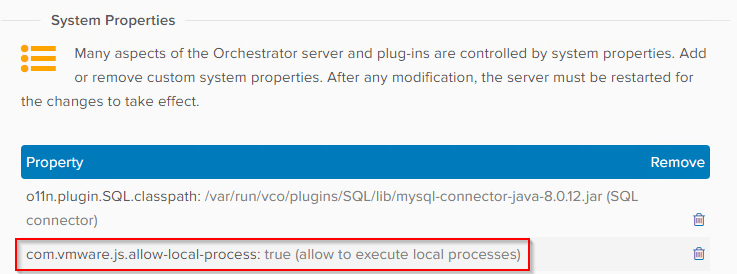
Expose the vro-configure-inner.sh shell script within the pod.
- SSH or PuTTy into one of the vRO nodes within the cluster.
- Isolate the vco-app pod ID as this value is generated upon pod creation:
kubectl get pods -n prelude - Run the following command to enter a bash shell within the vco-app:
kubectl -n prelude exec -it vco-app-xxxxxxxxx-xxxx -c vco-server-app -- bash - Run the following command to to expose the vro-configure-inner.sh shell script within the pod:
rpm -hiv --nodeps /vco-cfg-cli.rpm
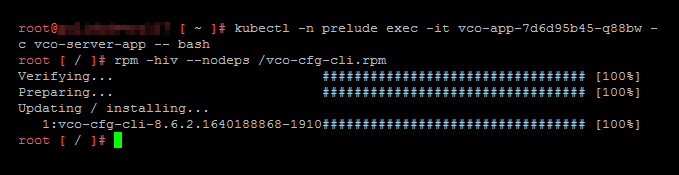
Download and import the workflow package from here.
Steps
- Run the Workflow Decrypt Encrypted String and enter the encrypted string and Click Run.
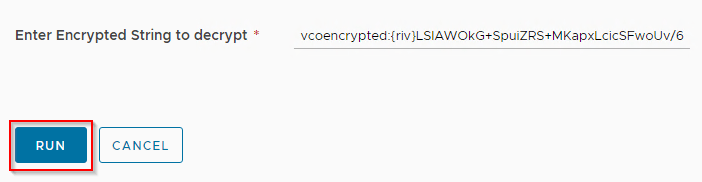
- That’s it. You will see your decrypted string in the logs.

Script
/*
 * stringToDecrypt string vcoencrypted:{riv}duMMyX5Bw6UfnbG7bH83HtiJDmqMeSqFhzEv5YN+UPbaucE=
 */
System.log(stringToDecrypt);
var command = new Command("/usr/lib/vco-cli/bin/vro-configure-inner.sh decrypt --value " + stringToDecrypt);
command.execute(true);
var cmdResult = command.result;
var cmdOutput = command.output;
if (cmdResult != 0){
  throw "Command output: " + cmdOutput;
}
var splittedResult = cmdOutput.split("\n");
var decryptedString = splittedResult[splittedResult.length -3];
System.log("Decrypted String:\n***************\n"+decryptedString+"\n***************");Download Package
Download Workflow at CloudBlogger GitHub repo.
vRO EncryptionService
An easy-to-use option is using in-built EncryptionService object in which you can create a one-time key to encrypt and decrypt plain text.
var key = EncryptionService.generateOneTimeKey();
System.log(key); //G75Ypi8PHD0zYeiXQ32PiA==
var encryptedString = EncryptionService.encrypt("abcd1234",key);
System.log(encryptedString); //vro:enc:v1:pzqwDVjvz4h7Qg8uEJNq/IKfXyCz7S+ht72sHLMvztlX4Geh
var decryptedString = EncryptionService.decrypt(encryptedString,key);
System.log(decryptedString); //abcd1234Missing vro-configure-inner.sh!
I have started to seeing this issue in version 8.18.1.
Action ‘decryptEncryptedStrings’ in module ‘actions.mayank.goyal’ failed : Wrapped java.io.IOException: Cannot run program “/usr/lib/vco-cli/bin/vro-configure-inner.sh”: error=2, No such file or directory (actions.mayank.goyal/decryptEncryptedStrings#6)
I could find the script exist inside the container but cant access it. Any one has any suggestion or solution here?

Reference
- KB Article: https://kb.vmware.com/s/article/83653
- VMTN Article: https://communities.vmware.com/t5/VMware-Aria-Automation/Decrypt-vRO-Endpoint-passwords/m-p/2960407#M26174
- SecureString vs EncryptedString by Michael Poore: https://medium.com/@mpoore/vro-securestring-vs-encryptedstring-e540e45e32c2
- AES Encryption Decryption online: https://www.devglan.com/online-tools/aes-encryption-decryption
Discover more from Cloud Blogger
Subscribe to get the latest posts sent to your email.














[…] Настроить vRO для расшифровки EncryptedString: https://cloudblogger.co.in/2023/04/14/decrypt-vro-encrypted-string-using-vro-workflow-cb10112/; […]
I wonder if these kind of pod operations are supported or guaranteed to continue to work after an upgrade. I have just created some actions to do encrypt/decrypt operations that mimic openssl
Honestly not. Take the example of Command class. It was there in 8.14 then removed in 8.17 then came back in 8.18.1 and then again removed in 9. I don’t even know how I am gonna run the commands now.
[…] Configure vRO to decrypt EncryptedString: https://cloudblogger.co.in/2023/04/14/decrypt-vro-encrypted-string-using-vro-workflow-cb10112/; […]