

In VCF Automation 9, the original Aria Automation VM Provisioning process, which included Resource Schema objects such as Cloud.vSphere.Machine and Event topics like Network.Configure and Compute.Post.Provisioning, is now referred to as VM Apps and being designated as Classic. It wont be too surprising to see in future that VM Apps may move into deprecation phase. We do have All Apps organization which is a modern IaaS Kubernetes based provisioning platform inside VCFA to take over the classic VM Apps provisioning process.
It is very important to be aware that the default experience for VCF Automation supports all types of apps, delivered via the “Org for All Apps” experience. This is the new model that VMware would like all customers to adopt and consume. It is the strategic direction of the VCF product.
– Broadcom
Our Problem
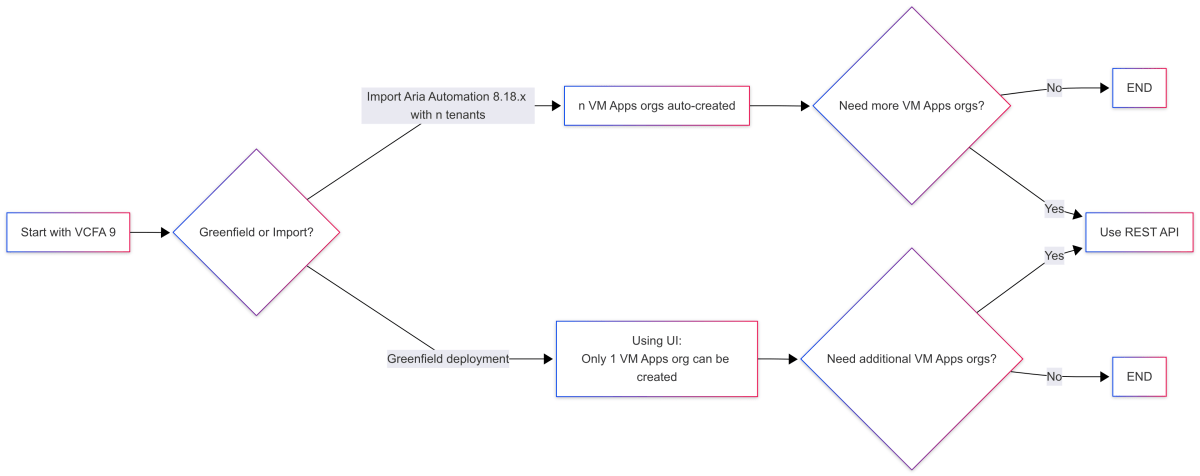
However, that’s not the worry today. The problem is that coming from Aria Automation 8.18.1 with multiple tenants, if you are deploying a greenfield VCF 9 and still want to use the classic VM Apps and not All Apps for its complex nature, there is no way from the UI that you can create more than 1 VM App.

Or If you are upgrading from Aria Automation to VCF Automation, you may seamlessly retain all your existing multiple tenants as VM Apps without concern, however, you wont be able to create any further.
Solution
Luckily, there is one way you can still create more VM Apps orgs in VCFA 9 – The Mighty REST API.
This is the Swagger Interface for VCFA 9 Provider – I know it says vCloud Director 😱.

What to do
To create a VM Apps org using the REST API, there are three to four steps.
- Create an API Token.

- Generate Bearer Token from API token.

curl --location --request POST 'https://auto-a.site-a.vcf.lab/oauth/provider/token' \
--header 'Accept: application/json' \
--header 'Content-Type: application/x-www-form-urlencoded' \
--data-raw 'grant_type=refresh_token&refresh_token=<API-Token>'- Create a VM Apps org by setting
isClassicTenant = true
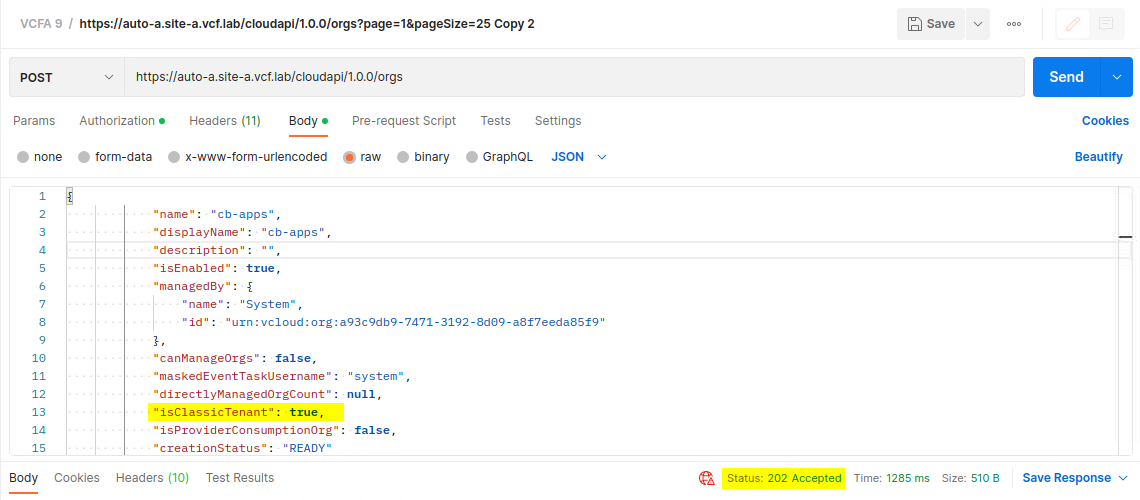
curl --location --request POST 'https://auto-a.site-a.vcf.lab/cloudapi/1.0.0/orgs' \
--header 'accept: application/json;version=40.0' \
--header 'Authorization: Bearer <generated-bearer-token>' \
--header 'Content-Type: application/json' \
--data-raw '{
  "name": "cb-apps",
  "displayName": "cb-apps",
  "description": "created using REST API",
  "isEnabled": true,
  "canManageOrgs": false,
  "maskedEventTaskUsername": "system",
  "directlyManagedOrgCount": null,
  "isClassicTenant": true,
  "isProviderConsumptionOrg": false,
  "creationStatus": "READY"
}'If everything goes OK, you will be able to see the new VM Apps org in the list of Organizations.

OPTIONAL:
“managedBy”: {
“name”: “System”,
“id”: “urn:vcloud:org:a93c9db9-7471-3192-8d69-a8f7eeda85f9”
}
If you are confused about the managedBy part. Make a GET call to /cloudapi/1.0.0/orgs to get the response body and copy-paste it here.
Make sure, for the name and displayName of the organization, don’t use spaces.
Feature Flag – Classic Tenant Creation
People are bit confused on the part that enabling Classic Tenant Creation Feature Flag would enable creating VM Apps as many as you want. It’s not true.
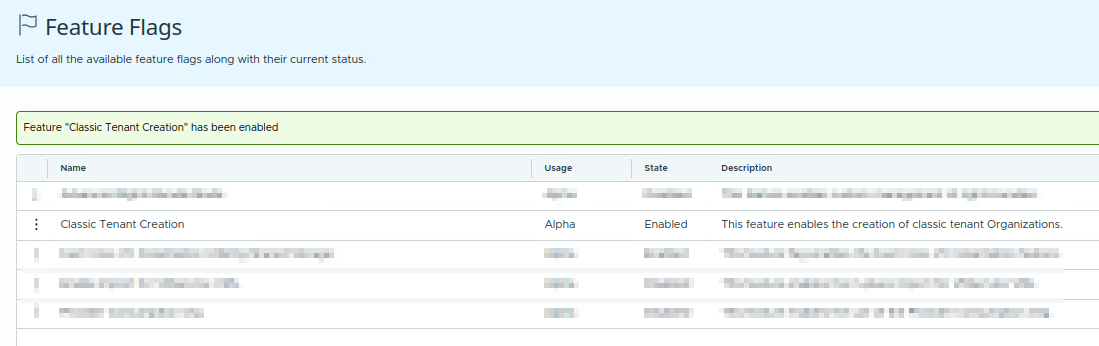
Enabling this flag allows you to create the single and only VM Apps Org in your VCF Automation environment. It means that disabling the flag would not allow you to create even that one VM Apps org from UI if there is none created already. However, this flag doesn’t apply creation restrictions on the REST API or if you already have one VM Apps in your environment.

References
- https://techdocs.broadcom.com/us/en/vmware-cis/cloud-director/vmware-cloud-director/10-5/generate-an-api-access-token-for-vcd.html
- https://techdocs.broadcom.com/us/en/vmware-cis/cloud-director/vmware-cloud-director/10-5/generate-an-api-access-token-for-vcd.html
- https://developer.broadcom.com/xapis/provider-infrastructure-apis/latest/cloudapi/1.0.0/orgs/post/
VCF Automation and Operations Orchestrator API Links
| VCF Automation 9 API Docs | /automation/api-docs/ |
| VCF Operations Orchestrator API Docs | /vco/api/docs/swagger-ui/index.html |
| Orchestrator Gateway API Docs | /vro/webjars/swagger-ui/index.html |
Discover more from Cloud Blogger
Subscribe to get the latest posts sent to your email.













Nice, this helped to clarify better than the VCF 9 Design guides.
Glad it helped.
Broadcom created their KB article on the same: https://knowledge.broadcom.com/external/article/419781/how-to-create-additional-vm-apps-organiz.html
[…] In VCF9 Automation GUI, we can only create one VM Apps organization, if we want to create additional VM Apps organizations, we can create using APIs, there is a blog on this, please refer it here. […]