

In addition to the name change, there are several underlying architectural and functional modifications worth highlighting in this release.
As Leonid has already covered many of the new UI features in his insightful article — VCF Operations Orchestrator 9.0 First Insight — I will refrain from repeating those points. Instead, this post focuses on what truly changed under the hood.
🦏New Rhino Engine (JavaScript Execution Engine)
There is a new Rhino JavaScript Execution Engine that supports newer features of JavaScript language.

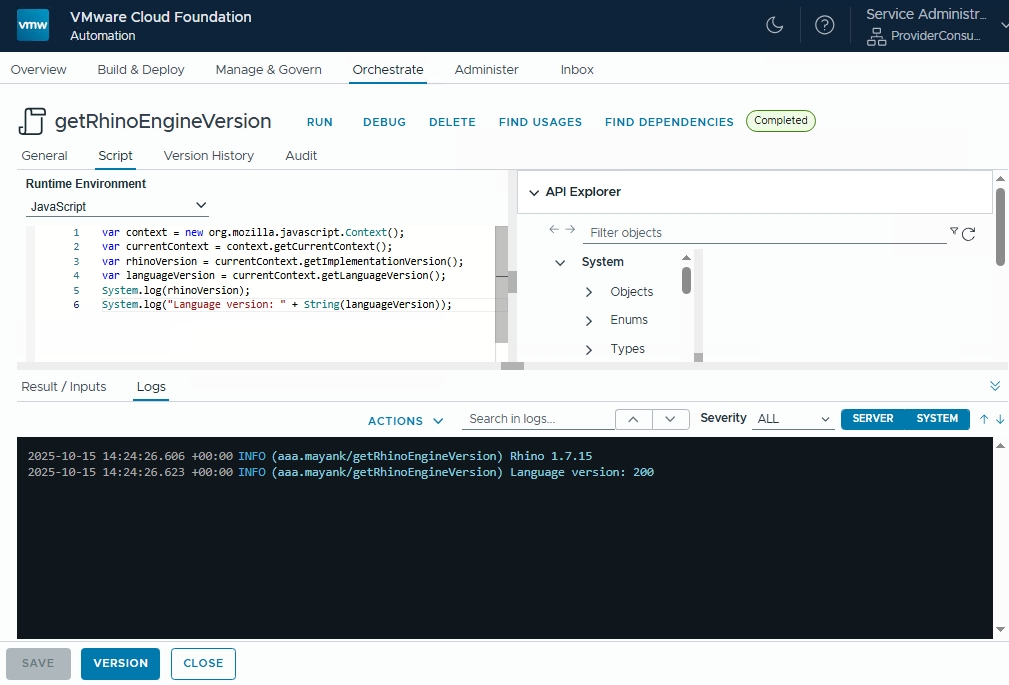
Compare their feature set at the following link: 🔗 Orchestrator Rhino Engine 8.x vs 9.x – Comprehensive guide to Modern JavaScript in vRO
Note Build Tools For Aria is still not utilizing the native JavaScript functionalities added in the new Rhino engine (e.g. Promises). (as of 15-10-2025)
🔧 Plugin Changes
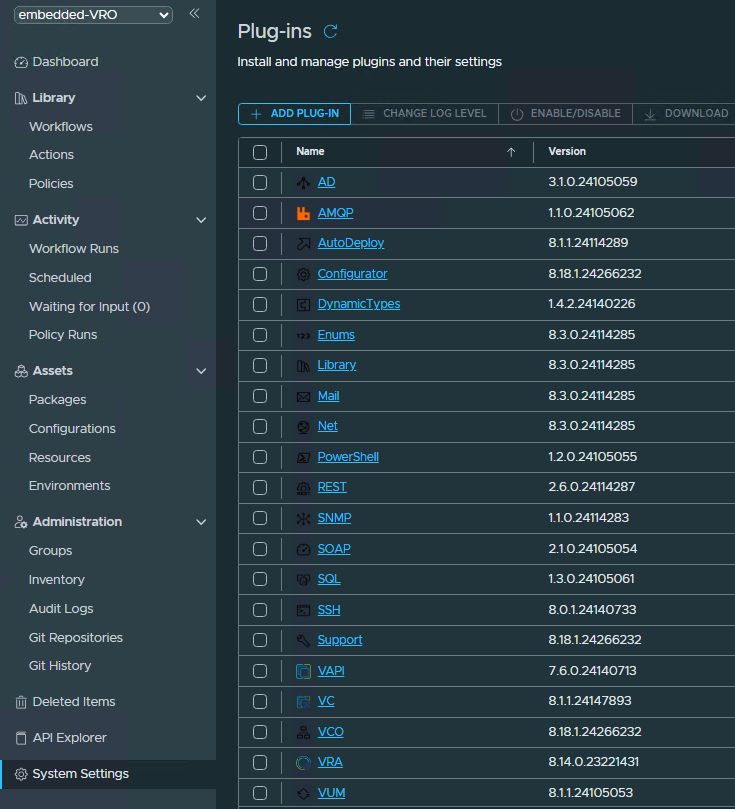
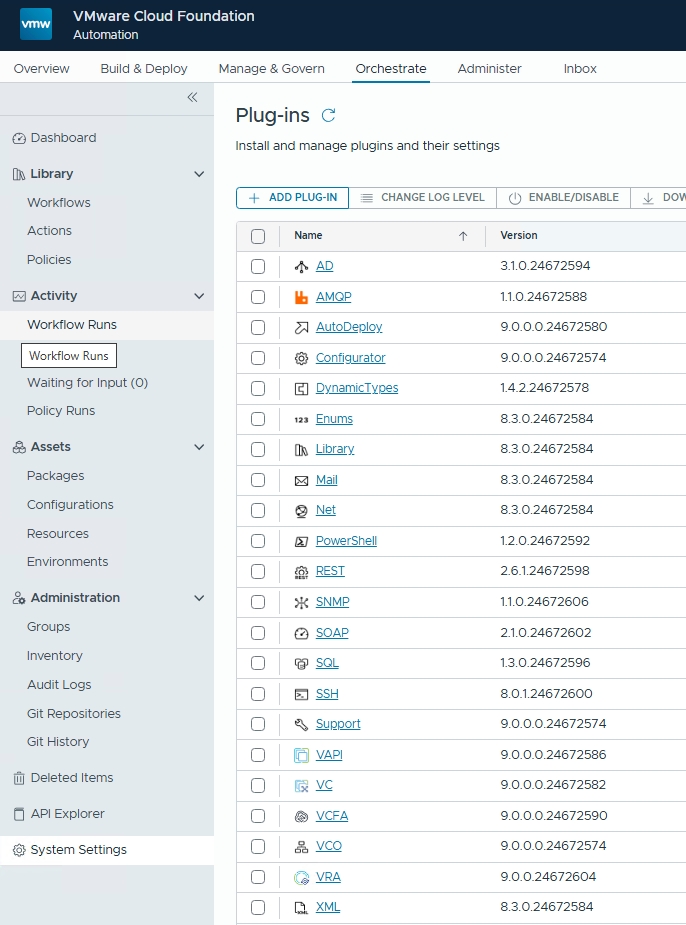
All existing plugins have been updated in this release. A new VCFA plugin has been introduced, while the VUM plugin has been removed.
It is important to note that certain plugins now correspond directly to VCF versioning, aligning them more closely with the VCF lifecycle and dependency model.
🌐 New REST APIs
This release brings a set of new REST APIs that extend and enhance the capabilities supporting the updated UI features.
Thanks to Stefan Schnell’s post, here are the (minor) differences between version 8.18.1 and 9.0.1:
System Properties Service added
➕ /server-configuration/system-properties
➕ /server-configuration/system-properties/advanced
License Service dropped
➖ /license
➖ /license/manual
➖ /license/manual/test
➖ /license/status
Action Environment Service changed
➕ /environments/{id}/rebuild
Schemes changed
➖ License
➖ LicenseKeyData
➖ LicenseStatus
➕ LogConfiguration
➕ WsDeletePropertiesRequest
➕ WsSystemPropertiesList
➕ WsSystemProperty
➕ WsUpdateSystemPropertiesRequest
Check official API Changelog here https://developer.broadcom.com/xapis/vmware-cloud-foundation-operations-orchestrator-api/latest/changelog/
Access Orchestrator Swagger UI here.
🔀 Updated Workflows
This goes without saying — several workflows have been updated and enhanced as part of the plugin update process.
🔐 NDC Controller Service (Non-Disruptive Certificate Replacement)
One of the most practical enhancements in this release is the introduction of a non-disruptive certificate replacement mechanism.
The ingress certificate update process now completes without downtime or service restarts, ensuring uninterrupted operations for users.
You can update the certificates simply by running:
vracli certificate set <…>
How it works
The VA introduces a new API endpoint, enabled through the NDC pod, which is used by VCFA, VCFOps, and vCenter clients to:
- Automatically retrieve the new certificate upon expiration of the old one
- Securely store it in their trust-store
- Maintain seamless service continuity without requiring manual certificate re-trusting
Log Locations
- Certificate change via
vracli:/services-logs/journal/systemd.journal - NDC operations via ndc-controller pod:
/services-logs/prelude/ndc/console-logs/manager.log
⚙️ No More LCM Patches
Lifecycle Manager (LCM) is no longer supported in Orchestrator 9.x.
Instead, patches and updates are now delivered as B2B upgrades, which means a complete orchestration-va.iso is provided to customers rather than a standalone patch binary.
Upgrade Process
Upgrades are initiated on the primary VA using:
vracli upgrade exec -y --profile lcm --repo cdrom://
📉 Deprecated Wavefront Integration
The vracli wavefront command is deprecated and no longer supported in this release.
🌍 New Ingress Controller (Since 8.18.1)
Starting from version 8.18.1, Contour with Envoy has replaced Traefik as the ingress controller in the VA.
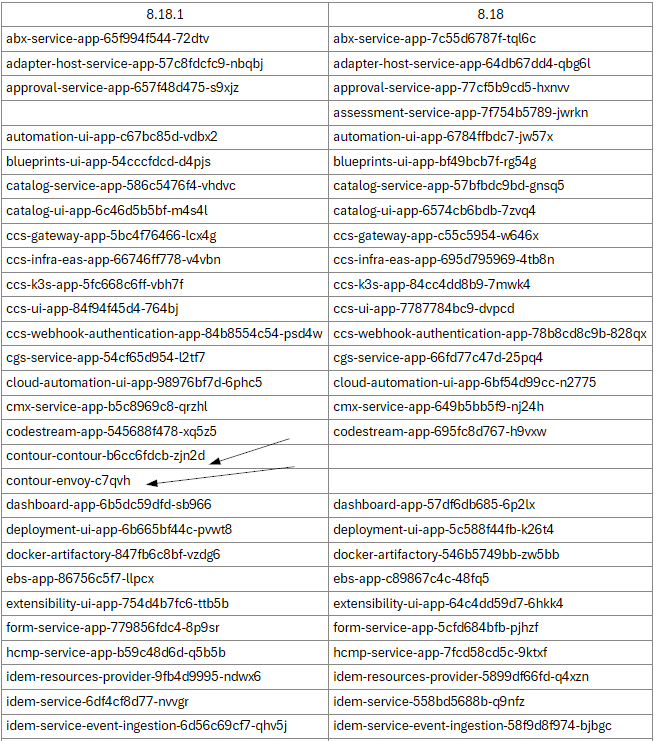
Contour with Envoy (data plane) provides:
- Better scalability and performance
- Advanced traffic management
- Enhanced observability
- Enterprise-grade reliability
Learn more here:
🔗 Broadcom Knowledge Base: Contour and Envoy Details
🛡️ FIPS and CEIP Enabled by Default
Both FIPS (Federal Information Processing Standards) and CEIP (Customer Experience Improvement Program) are now enabled by default for greenfield deployments of the VA and its services.
These can, however, be disabled if required for specific environments.
🪪 Removed License Configuration
The license configuration and license restriction checks have been removed from the VCF Operations Orchestrator.
This includes:
- Removal of license configuration options from the Orchestrator UI
- Removal of CLI commands for license setup
- Elimination of license restriction checks within Orchestrator
Licensing limitations will now be indirectly enforced by the integrated services.
For example, if the connected vCenter instance operates under a restricted license, the Orchestrator will also be unable to execute operations that are limited by that license.
🔑 New Orchestrator Authentication Methods
with New Identity Broker 🆕
The VCF Operations Orchestrator now integrates with the new Identity Broker 9.0.0.0, delivering improved security and simplified user access management.
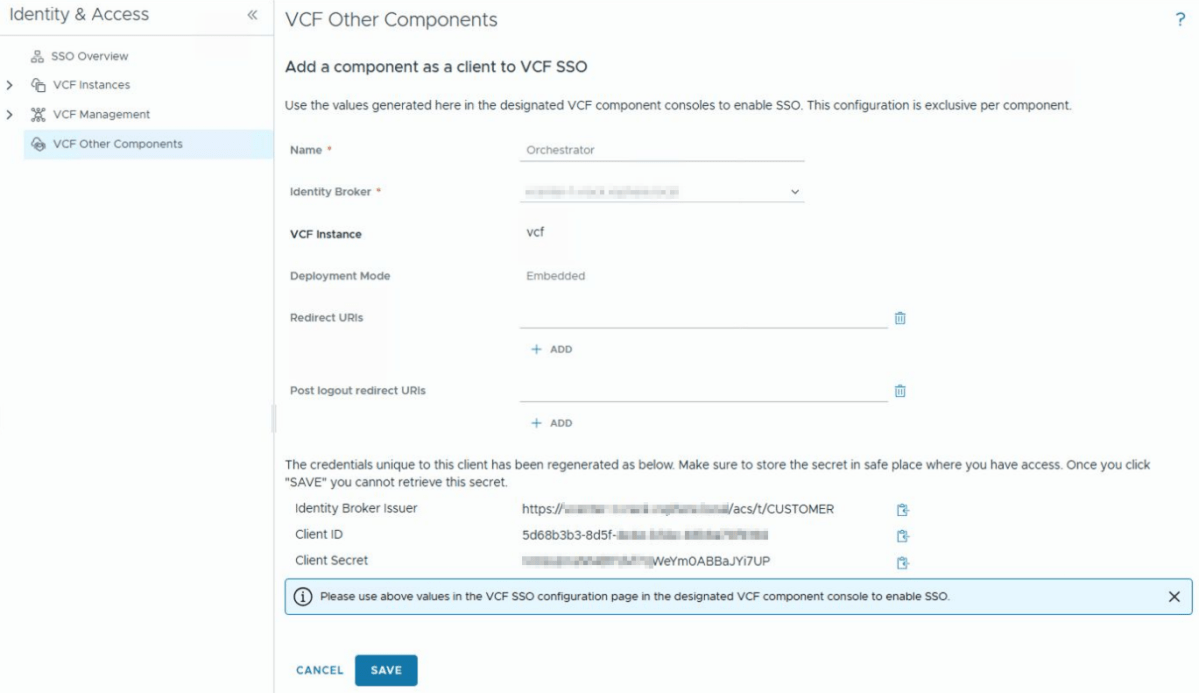
vracli vro authentication set -p vidb \
--hostname https://vcenter-1.domain.local/acs/t/CUSTOMER \
--client-id '5d68b3b3-8d5f-xxxx-xxxx-xxxxxxxxxxxx' \
--client-secret 'xxxxxxxxxxxxxxxxxxVrnM39aRA9gNP' \
--admin-group o11nadmins@adgroup1.vcf.lab

# Verify Authentication
vracli vro authentication

# Apply changes
/opt/scripts/deploy.sh
with All Apps Orgs or VM App Orgs
vracli vro authentication set -p tm
-u SERVICE_PROVIDER_ACCOUNT
-hn https://FQDN_VCF_AUTOMATION
--tenant ALL_APPS_ORG_NAME (or VM_APPS_ORG_NAME)

# Verify Authentication
vracli vro authentication

# Apply changes
/opt/scripts/deploy.shwith vSphere
vracli vro authentication set -p vsphere
--hostname https://vcenter_url
--username administrator@vsphere.local
--tenant vsphere.local
--admin-group Administrators
--admin-group-domain vsphere.local

# Verify Authentication
vracli vro authentication

# Apply changes
/opt/scripts/deploy.shBasic authentication is not officially supported, though it may still be enabled for certain use cases using existing configuration methods.
⚙️ vCOIN Configuration
The VCF Operations Orchestrator Plugin for vSphere Web Client configuration process has also undergone significant refinement in this version.
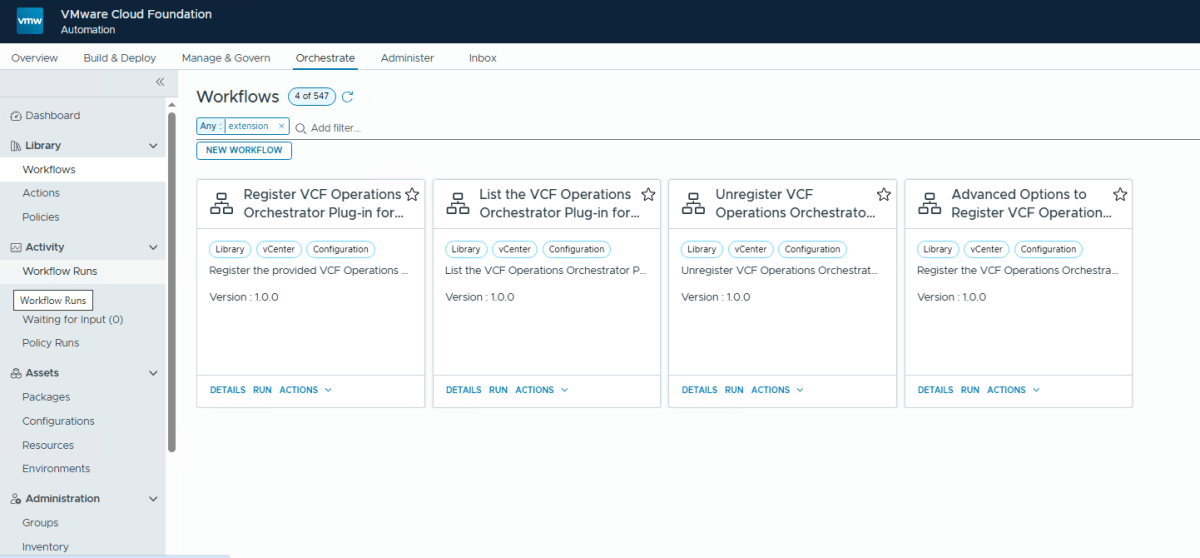
Key Changes
- Configuration is now handled through Orchestrator workflows instead of CLI commands.
- The legacy
vracli vro vcoincommands have been removed. - The service feature is now enabled via:
vracli cap vcoin --enablefollowed by/opt/scripts/deploy.sh
If the certificate of the appliance hosting the VCF Operations Orchestrator Plug-in for vSphere Web Client changes, it is mandatory to update the extension registration; otherwise, plugin functionality will cease.
To restore operation, re-run the workflow:
“Register VCF Operations Orchestrator Plug-in for vSphere Web Client Extension.”
🧭 Summary
| Coverage | 9.0.0 Changes |
|---|---|
| Rhino Engine | Updated Rhino Engine supports newer JavaScript features |
| Plugin Updates | New VCFA plugin added, VUM plugin removed |
| REST APIs | Several REST API changes to support UI enhancements |
| Certificates | Non-disruptive replacement via NDC Controller |
| LCM | Replaced by full B2B upgrade ISO |
| Wavefront | Integration deprecated |
| Ingress Controller | Contour with Envoy replaces Traefik |
| FIPS & CEIP | Enabled by default for Greenfield deployments |
| License Management | Removed from Orchestrator |
| Authentication | Can use the new Identity Broker 9.0.0.0 |
| vCOIN Configuration | Workflow-based, old commands removed |
💡 Final Thoughts
This release represents a major architectural modernization for the VCF Operations Orchestrator — focusing on automation, security, and operational continuity.
By removing legacy dependencies and adopting workflow-driven configuration, VMware (now Broadcom) has paved the way for a more robust, scalable, and secure orchestration framework aligned with the evolving VCF ecosystem.
Discover more from Cloud Blogger
Subscribe to get the latest posts sent to your email.













Great article 👌🏻
[…] with several other new features, VCF Operations Orchestrator 9.x comes with an updated Rhino Engine which is the backend execution […]