
In this article
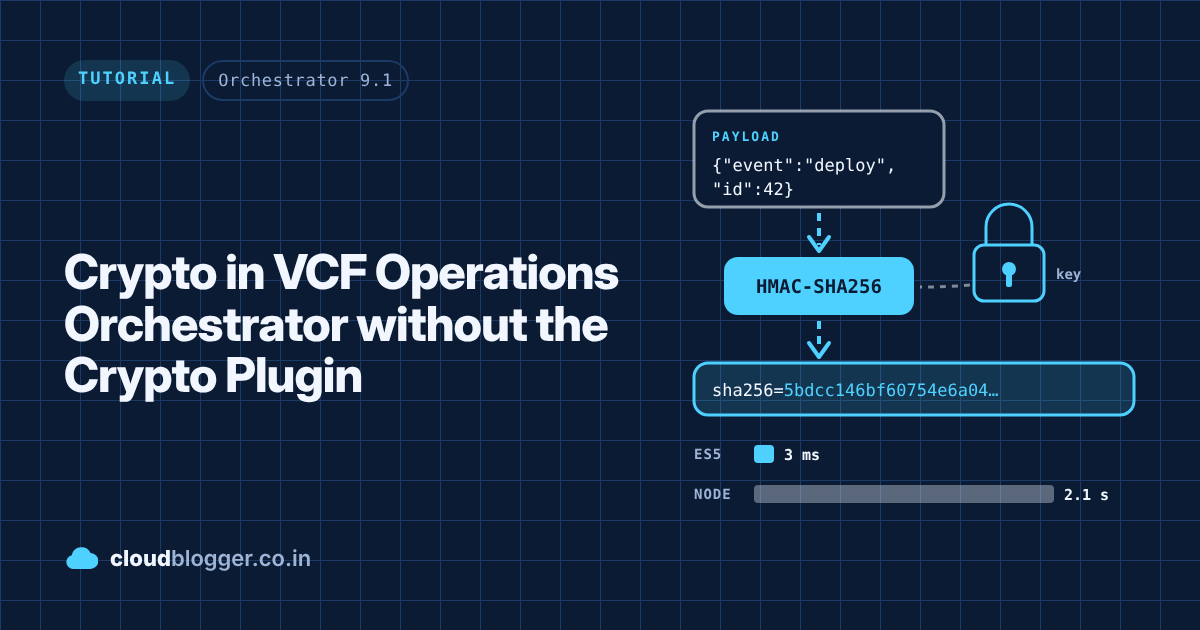
Sooner or later every Orchestrator developer needs a bit of cryptography: a Base64 value for a Basic auth header, an HMAC signature for a webhook or an API that signs its requests, or a hash to check that a payload hasn’t changed. The usual answer is the Crypto plugin, but it’s not always installed, and getting a plugin approved in a customer environment can take longer than the rest of the project. So I wrote the common pieces in plain ES5, tested them against the official test vectors, and then built a Node.js version next to it to see which one is the better fit. This post covers both, with real timings from my lab. The package is on GitHub at the end.
Tested on: VCF Operations Orchestrator 9.1.1 (build 25643527), with the Node.js 24 polyglot runtime.
What you get
The package has two action modules that do the same jobs in two different ways:
in.co.cloudblogger.crypto: plain ES5.1 scripting actions. They run inline in Orchestrator’s Rhino engine, so they’re fast and need no action environment.in.co.cloudblogger.crypto.node: polyglot actions on thenode:24runtime. They use Node’s built-incryptomodule, which is OpenSSL underneath.
Both give the same output for hashing and HMAC, so you can switch between them without changing anything else in your workflow.
The ES5 module
Everything lives in one class action, CryptoUtils, which returns a constructor you can use in any scriptable task. The other actions are thin wrappers around it, for when you’d rather drag an action into a workflow than write a script.
| Action | Returns | What it does |
|---|---|---|
CryptoUtils | class | UTF-8, hex, Base64/Base64URL, SHA-1/256/512, HMAC-SHA1/256/512, constant-time compare, random bytes |
AesCipher | class | AES-128/192/256 CBC. For lab and learning only (more on that below) |
base64Encode | string | UTF-8 text to Base64, or Base64URL when urlSafe is true |
base64Decode | string | Base64 or Base64URL, padding optional, back to UTF-8 text |
computeHash | string | SHA-1, SHA-256 or SHA-512 digest as hex, Base64 or Base64URL |
computeHmac | string | HMAC signature; the key is a SecureString given as text, hex or Base64 |
verifyHmacSignature | boolean | Checks a received signature in constant time; accepts sha256= style prefixes |
[Screenshot placeholder] The in.co.cloudblogger.crypto module in the Orchestrator Actions view, showing the seven actions.
Using CryptoUtils
Load the class once, create an instance, and call what you need. Inputs are UTF-8 text by default, and output is hex by default:
var CryptoUtils = System.getModule("in.co.cloudblogger.crypto").CryptoUtils();
var crypto = new CryptoUtils();

crypto.sha256("abc");
crypto.sha512("abc", "base64");
crypto.base64Encode("admin:VMware1!");
crypto.base64Encode("héllo ✓ 😀", true);   // Base64URL, no padding
crypto.hmac("SHA-256", "Jefe", "what do ya want for nothing?");
ba7816bf8f01cfea414140de5dae2223b00361a396177a9cb410ff61f20015ad
3a81oZNherrMQXNJriBBMRLm+k6JqX6iCp7u5ktV05ohkpkqJ0/BqDa6PCOj/uu9RU1EI2Q86A4qmslPpUyknw==
YWRtaW46Vk13YXJlMSE=
aMOpbGxvIOKckyDwn5iA
5bdcc146bf60754e6a042426089575c75a003f089d2739839dec58b964ec3843Notice the fourth line. Orchestrator strings are UTF-16 inside, so a naive Base64 function breaks on anything outside plain ASCII. CryptoUtils converts to UTF-8 bytes first, so accented letters and emoji come back exactly as they went in.
Signing a request
Many APIs want an HMAC of the request body in a header. Here’s a common pattern with a SecureString secret and a timestamp, so the receiver can also reject old, replayed requests:
var crypto = new (System.getModule("in.co.cloudblogger.crypto").CryptoUtils())();

var body = JSON.stringify({ event: "deployment.completed", id: deploymentId });
var timestamp = String(Math.floor(new Date().getTime() / 1000));
var signature = crypto.hmac("SHA-256", signingSecret, timestamp + "." + body, "hex");

request.setHeader("X-Timestamp", timestamp);
request.setHeader("X-Signature", "sha256=" + signature);
Verifying a webhook
The other direction matters just as much. When a workflow receives a signed webhook payload, compute the expected signature and compare it with verifyHmac. It compares the whole string every time instead of stopping at the first difference, so the response time doesn’t give away how much of the signature was right:
var ok = crypto.verifyHmac("SHA-256", webhookSecret, rawBody,
    headers.get("X-Hub-Signature-256"), "hex");
if (!ok) {
    throw "[CRYPTO][verifyWebhook] Signature check failed";
}
Use the raw body exactly as it arrived. If you parse the JSON and stringify it again, the spacing changes and the signature won’t match.
Is hand-written crypto safe enough?
For hashing, HMAC and Base64: yes. These are deterministic. If the output matches the official test vectors, it’s the same as what OpenSSL produces, and the API on the other side can’t tell the difference. I checked the ES5 code against NIST FIPS 180-4 (SHA), RFC 2202 and RFC 4231 (HMAC, including keys longer than one block) and a set of Unicode Base64 cases:
PASS sha1 abc
PASS sha256 2-block
PASS sha512 abc
PASS hmac-sha1 rfc2202#2
PASS hmac-sha256 rfc4231#2
PASS hmac-sha512 rfc4231#6 long key
PASS verifyHmac github-style
PASS utf8 roundtrip
... 21 of 21 passed
Encryption is a different story, which is why AesCipher is labelled for lab use only. It passes the FIPS-197 and SP 800-38A vectors, so it’s correct, but correct isn’t the same as safe:
- Its table lookups depend on the key, so in theory the timing can leak information about it.
- CBC mode can’t tell when someone has changed the ciphertext.
- Nobody has reviewed it, and with encryption a review matters more than passing test vectors.
It’s handy for learning and for testing a format, but for anything you actually need to protect, use the Node.js version below, or keep the value in a SecureString or configuration element in the first place.
The Node.js module
Orchestrator 9.x can run actions on Node.js, Python and PowerShell. Node’s crypto module is built in, so there’s nothing to install: create the action on the node:24 runtime and require it. The module has four actions:
| Action | Returns | What it does |
|---|---|---|
computeHash | string | Same inputs and output as the ES5 computeHash |
computeHmac | string | Same inputs and output as the ES5 computeHmac |
encryptAesText | string | AES-GCM with a random 12-byte IV; returns Base64 of IV + ciphertext + 16-byte tag |
decryptAesText | string | Decrypts and checks the tag; throws if the key is wrong or the token was changed |
AES-GCM is authenticated, so if a single byte of the token changes, decryption fails instead of returning garbage. Here’s the encrypt action:
const crypto = require('crypto');

const KEY_FORMATS = { hex: 'hex', base64: 'base64', base64url: 'base64url' };
const CIPHERS = { 16: 'aes-128-gcm', 24: 'aes-192-gcm', 32: 'aes-256-gcm' };

exports.handler = (context, inputs, callback) => {
    try {
        const keyEncoding = KEY_FORMATS[String(inputs.keyFormat || 'hex').toLowerCase()];
        if (!keyEncoding) {
            throw new Error("[encryptAesText] Unsupported key format '" + inputs.keyFormat + "'.");
        }
        const key = Buffer.from(String(inputs.secretKey || ''), keyEncoding);
        const cipherName = CIPHERS[key.length];
        if (!cipherName) {
            throw new Error('[encryptAesText] Key must be 16, 24 or 32 bytes (got ' + key.length + ').');
        }
        const iv = crypto.randomBytes(12);
        const cipher = crypto.createCipheriv(cipherName, key, iv);
        const text = inputs.text == null ? '' : String(inputs.text);
        const encrypted = Buffer.concat([cipher.update(text, 'utf8'), cipher.final()]);
        callback(undefined, Buffer.concat([iv, encrypted, cipher.getAuthTag()]).toString('base64'));
    } catch (e) {
        callback(e, null);
    }
};
You call polyglot actions from a JavaScript scriptable task exactly like any other action, so the rest of your workflow stays in ES5:
var node = System.getModule("in.co.cloudblogger.crypto.node");
var token = node.encryptAesText(aesKeyHex, "hex", "some text");
var plain = node.decryptAesText(aesKeyHex, "hex", token);
The token layout (IV, then ciphertext, then tag) is the same one the browser’s WebCrypto API uses, so other tools can decrypt it too.
[Screenshot placeholder] The encryptAesText action open in the editor, showing the Node.js 24 runtime selection.
ES5 vs Node.js: the timings
Speed was the real question, so I timed both from a scriptable task, the way a workflow would call them. These are medians from my 9.1.1 lab:
| Payload | SHA-256 | HMAC-SHA256 | AES encrypt | AES decrypt |
|---|---|---|---|---|
| 100 B | 1 ms / 2.1 s | 3 ms / 2.2 s | 5 ms / 2.1 s | 7 ms / 2.1 s |
| 10 KB | 79 ms / 2.1 s | 80 ms / 2.2 s | 406 ms / 2.1 s | 675 ms / 2.1 s |
| 100 KB | 846 ms / ~2 s | 862 ms / 2.2 s | 4.3 s / 2.1 s | 6.7 s / ~2 s |
Each cell is ES5 first, then Node.js, with the faster one in bold. ES5 AES is the CBC version; Node.js is GCM.
A few things stand out:
- Every Node.js call costs about 2.1 seconds, no matter how much work it does. That’s the cost of starting the action’s container and passing data in and out. The actual OpenSSL work takes almost nothing.
- The first call after the runtime has been idle took 29 seconds. A workflow that runs rarely will pay that cold start most of the time.
- For hashing and HMAC, ES5 wins below about 250 KB of input. Webhook bodies and API requests are far smaller than that.
- For AES, Node.js is faster from about 35 to 50 KB upwards, but that’s not the main reason to use it. It’s the one that’s safe.
[Screenshot placeholder] Workflow run log showing the benchmark output for the 10 KB payload.
Which one should you use?
- Base64, hashing, HMAC, webhook verification: the ES5 module. It’s fast, it’s inline, and the output is identical to OpenSSL’s.
- Encrypting something that matters: the Node.js
encryptAesText/decryptAesTextactions. The 2 seconds per call is fine for occasional use. - Encrypting many items: don’t call the Node.js action in a loop. Write one polyglot action that takes the whole list and processes it in a single call.
- Learning or testing an AES format:
AesCipheris fine, as long as it never protects real data.
Download from GitHub
The package, the plain .js sources for both modules and a changelog are in my GitHub repo: cloudblogger.co.in / crypto-for-vro. Import in.co.cloudblogger.crypto_v1.0.0_20261112.package from Assets > Packages > Import, and both modules appear under Actions. The Node.js actions need the node:24 runtime, which 9.x includes.
Summary
- You don’t need the Crypto plugin for Base64, SHA or HMAC. Plain ES5 does it, and the results match the official test vectors.
- Convert to UTF-8 bytes before hashing or encoding, or non-ASCII text will give wrong results.
- Compare signatures in constant time, and always use the raw body.
- Hand-written encryption is for learning. For real encryption, use Node.js’s
cryptomodule through a polyglot action. - Node.js actions cost about 2 seconds per call (much more on a cold start), so keep them out of loops.
If you’ve got another algorithm you’d like added, or an API whose signature scheme you’re struggling with, let me know in the comments.
Discover more from Cloud Blogger
Subscribe to get the latest posts sent to your email.
Enjoyed this post?
Was this helpful?























Leave a Reply