
In this article
After my lab VCF Automation appliance restarted, everything came back except one thing: the Orchestrator tab. It just sat there with a spinner and a message that never went away. Every other service on the appliance was healthy, so this was clearly an Orchestrator-only problem. In this post I’ll walk through how I narrowed it down to a full persistent volume, the one log line that gave it away, and how I fixed it.
Tested on: VCF Automation 9.1 with its embedded VCF Operations Orchestrator 9.1.1 (build 25643527). Full details of the lab:
| Component | Version / detail |
|---|---|
| VCF Automation | 9.1, single-node appliance, VM Apps organization |
| Orchestrator | VCF Operations Orchestrator 9.1.1, build 25643527 (embedded in VCF Automation, not standalone) |
| Orchestrator API version | 9.1.0.0 (from /vco/api/about) |
| vco container image | prelude/vco:9.1.1.0100.25757808 |
| Orchestrator pod | vco-app-0 (StatefulSet vco-app, namespace prelude) |
| vco persistent volume | vco-vol-vco-app-0, 5 GiB in this lab, storage class vmsp-default (vSphere CSI) |
The symptom
In the VCF Automation UI, the Orchestrator tab showed this and never loaded:
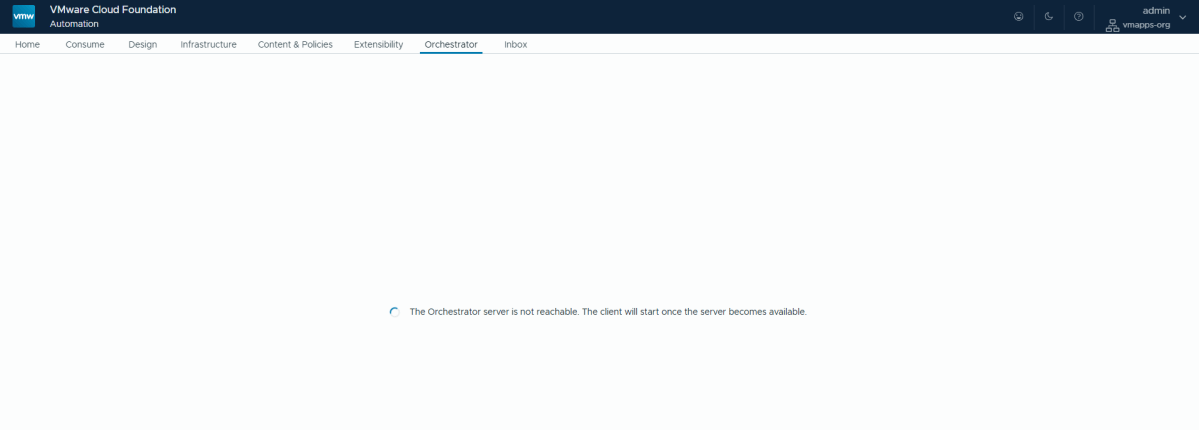
The Orchestrator server is not reachable. The client will start once the server becomes available.
Calling the Orchestrator API directly gave the same picture from another angle. VCF Automation itself answered fine (GET /iaas/api/about returned 200, and I could get a token), but every call under /vco/api came back with an HTTP 503 from the ingress:
HTTP 503upstream connect error or disconnect/reset before headers. reset reason: remote connection failure
That message comes from Envoy, the ingress in front of all VCF Automation services. It means the request reached the appliance, but nothing was listening behind the vco route. So the next stop was the pods.
Before you start: get a root shell on the appliance
Every command in this post runs on the VCF Automation appliance as root. You don’t SSH in as root directly: log in as vmware-system-user (the password you set for it at deployment), then switch to root with sudo -i.
ssh vmware-system-user@<vcfa-appliance-fqdn-or-ip>
Once you’re logged in, switch to root:
sudo -i
Enter the vmware-system-user password again. The prompt changes from $ to #, which means you’re root:
Expected output:
[sudo] password for vmware-system-user:root@vcf-auto-serv-tjs9p [ ~ ]#
💡 sudo asks for the vmware-system-user password a second time. If you mistype it you get “Sorry, try again”, which is easy to miss. Make sure the prompt ends in # (root) before running kubectl; as vmware-system-user, kubectl commands fail.
Step 1: find the Orchestrator pod
With the root shell from the previous section, list the pods in the prelude namespace:
kubectl -n prelude get pods
Output in my lab (trimmed to the interesting lines):
NAME READY STATUS RESTARTS AGEabx-service-app-598df69997-qr65l 2/2 Running 6 (176m ago) 50dcatalog-service-app-99f8b4455-r4tpg 1/1 Running 4 (176m ago) 50d...vcfapostgres-0 3/3 Running 9 (176m ago) 66dvco-app-0 0/2 Unknown 2 50d...
Every other pod had restarted about three hours earlier with the appliance and come back to Running. vco-app-0 was the only one in a different state, and the state itself is the first clue.
⚠️ Notice the status: Unknown, not CrashLoopBackOff or Error. Unknown means the kubelet lost track of the pod during the restart, so nothing was actively trying to start it. The pod would have stayed like that indefinitely. Don’t wait for it to recover by itself.
Step 2: restart it the right way (it’s a StatefulSet)
My first instinct was to scale or restart a deployment called vco-app. That fails:
kubectl -n prelude scale deployment vco-app --replicas=0
Output:
Error from server (NotFound): deployments.apps "vco-app" not found
The -0 at the end of the pod name is the giveaway: Orchestrator runs as a StatefulSet, not a Deployment. You can confirm it with:
kubectl -n prelude get statefulset | grep vco
Output in my lab:
vco-app 0/1 50d
For a StatefulSet, deleting the pod is enough; the controller recreates it with the same name and the same volume. Because the pod was stuck in Unknown, I force-deleted it and watched it come back:
kubectl -n prelude delete pod vco-app-0 --force --grace-period=0kubectl -n prelude get pod vco-app-0 -w
Output in my lab:
NAME READY STATUS RESTARTS AGEvco-app-0 0/2 Init:0/3 0 0svco-app-0 0/2 Init:1/3 0 2svco-app-0 0/2 Init:2/3 0 3svco-app-0 0/2 Init:Error 0 8svco-app-0 0/2 Init:2/3 1 (2s ago) 9svco-app-0 0/2 Init:Error 1 (6s ago) 13svco-app-0 0/2 Init:CrashLoopBackOff 1 (13s ago) 25s...
Progress, of sorts. The pod was now being recreated, but it never got past its init containers. Two of the three finished and the third (Init:2/3) failed about four seconds after it started, every time.
Step 3: read the failing init container’s log
The pod has three init containers, which you can list with:
kubectl -n prelude get pod vco-app-0 -o jsonpath='{.spec.initContainers[*].name}'; echo
Expected output:
vco-dependencies external-cert install-rpms
So the failing one is install-rpms. It installs the Orchestrator server packages into /usr/lib/vco, which lives on the pod’s persistent volume, and then configures the database connection. Here’s its log (database password redacted):
kubectl -n prelude logs vco-app-0 -c install-rpms --tail=100
Output in my lab (database password redacted):
+ VCO_INSTALL_DIR=/usr/lib/vco+ [[ -f /usr/lib/vco/app-server/conf/configured ]]+ CONFIGURED=true+ sudo rpm -Uvh --nodeps --nodigest --nofiledigest /vco-cfg-cli.rpm /vco-server.rpmPreparing... ######################################## installing package vco-server-.1785394372-25643527.noarch needs 204MB more space on the /usr/lib/vco filesystem+ sudo chown -R 2020:2020 /var/run/vco-polyglot/sslchown: cannot access '/var/run/vco-polyglot/ssl': No such file or directory...+ /usr/lib/vco/app-server/bin/vco-verify-keystore-password.shkeytool error: java.io.IOException: Keystore was tampered with, or password was incorrectKeystore password verification failed....+ /usr/lib/vco-cli/bin/vro-configure-inner.sh db --databaseName vco_db --dbUsername vco_db_owner_user --dbPassword ******** --host vcfapostgres --port 5432 --type psql/init_run.sh: line 28: /usr/lib/vco-cli/bin/vro-configure-inner.sh: No such file or directory+ echo 'ERROR: Unable to configure database.'ERROR: Unable to configure database.+ exit 1
The last line says “Unable to configure database”, and the keystore errors look alarming too. Neither is the real problem. Read the log from the top: the very first error is the one that matters.
💡 installing package vco-server … needs 204MB more space on the /usr/lib/vco filesystem. The RPM install never completed, so the configuration script it would have installed doesn’t exist, the keystore isn’t set up, and the database step fails with “No such file or directory”. Everything after the first line is a side effect.
Also note the line CONFIGURED=true. The volume still had a fully configured Orchestrator on it. install-rpms reinstalls the packages on every start, and an RPM upgrade needs room for the old and new files at the same time.
Step 4: check the vco volume, not the root disk
A quick df -h / on the appliance shows plenty of space (68% used on a 93 GB root disk in my case), which is misleading. /usr/lib/vco is not on the root disk. It’s on the pod’s own persistent volume claim:
kubectl -n prelude get pvc vco-vol-vco-app-0kubectl get scdf -h | grep pvc-f642a71d
Output in my lab:
NAME STATUS VOLUME CAPACITY ACCESS MODES STORAGECLASSvco-vol-vco-app-0 Bound pvc-f642a71d-8734-4083-b686-d3ea5f703148 5Gi RWO vmsp-defaultNAME PROVISIONER RECLAIMPOLICY VOLUMEBINDINGMODE ALLOWVOLUMEEXPANSIONvmsp-default (default) csi.vsphere.vmware.com Delete Immediate true/dev/sdw 5.0G 4.5G 459M 91% /var/lib/kubelet/pods/.../pvc-f642a71d-.../mount
There it is: the vco volume is 5 GiB and 91% full, with 459 MB free. Not enough for the RPM transaction. Two useful details in that output:
- The storage class is vSphere CSI (csi.vsphere.vmware.com), so the volume is its own virtual disk attached to the VCF Automation node VM (/dev/sdw inside the appliance).
- ALLOWVOLUMEEXPANSION is true, so the volume can be grown in place.
Step 5: expand the volume and restart the pod
I patched the claim to 10 GiB and watched until the new capacity showed up:
kubectl -n prelude patch pvc vco-vol-vco-app-0 -p '{"spec":{"resources":{"requests":{"storage":"10Gi"}}}}'kubectl -n prelude get pvc vco-vol-vco-app-0 -w
Expected output:
persistentvolumeclaim/vco-vol-vco-app-0 patchedNAME STATUS VOLUME CAPACITY ...vco-vol-vco-app-0 Bound pvc-f642a71d-8734-4083-b686-d3ea5f703148 5Gi ...vco-vol-vco-app-0 Bound pvc-f642a71d-8734-4083-b686-d3ea5f703148 10Gi ...
You don’t need to touch the VM in vCenter. The vSphere CSI driver grows the virtual disk itself and resizes the filesystem when the pod remounts it. In fact, don’t resize CSI-managed disks by hand in Edit Settings, or vCenter and Kubernetes end up disagreeing about the size. You only need a few GB free on the datastore. If you want to watch it from vCenter, look under Cluster > Monitor > Cloud Native Storage > Container Volumes.
Then restart the pod and keep an eye on it:
kubectl -n prelude delete pod vco-app-0watch -n 5 'kubectl -n prelude get pod vco-app-0; echo; df -h | grep pvc-f642a71d'
Expected output:
NAME READY STATUS RESTARTS AGEvco-app-0 1/2 Running 0 3m29s/dev/sdw 10G 4.4G 5.6G 45% /var/lib/kubelet/pods/.../pvc-f642a71d-.../mount
The filesystem is now 10 GB at 45%, install-rpms completed and the pod is Running with zero restarts. 1/2 is normal for a while: the second container is Orchestrator itself, and the first start after a package reinstall is slow. The server log shows when it’s done:
kubectl -n prelude logs vco-app-0 -c vco-server-app --tail=50
Expected output:
__ _____ ___ ___ ___ ___ ___ _ _____ ___ ___ _ _ ___ ___ ___ ___ _ _ ___ ___ _____ ___ _ _____ ___ ___ ___ _ _ __\ \ / / __| __| / _ \| _ \ __| _ \ /_\_ _|_ _/ _ \| \| / __| / _ \| _ \/ __| || | __/ __|_ _| _ \ /_\_ _/ _ \| _ \ / _ \/ | / | / \ \ V / (__| _| | (_) | _/ _|| / / _ \| | | | (_) | .` \__ \ | (_) | / (__| __ | _|\__ \ | | | / / _ \| || (_) | / \_, /| |_| || () | \_/ \___|_| \___/|_| |___|_|_\/_/ \_\_| |___\___/|_|\_|___/ \___/|_|_\\___|_||_|___|___/ |_| |_|_\/_/ \_\_| \___/|_|_\ /_(_)_(_)_(_)__/==================================== VCF Operations orchestrator Server started ====================================== nodeid: 97eb9cef-e2de-44ba-9c3f-1469a45b6ebe== instanceid: auto.vmw.lab-vco-app-0== configuration version: 02bff1b950977ee2bb29da10a274a13ba014f690542d4eff900800e8dbf008b87e== node configuration: active nodes=1000, heartbeat interval=12000, failover interval=126000
A quick API check confirmed it: /vco/api/about returned 200 with version 9.1.1.0.25643527, and my workflows were all listed with their tags intact. Workflows, actions and configurations live in the vco_db database on vcfapostgres, not on this volume, so nothing was lost. The Orchestrator tab in the UI loaded normally again.
About the supported way to do this
Patching a PVC is the standard Kubernetes way to grow a volume, but it isn’t a documented VCF Automation procedure. Two Broadcom KBs are worth knowing before you choose:
- KB 425145 describes the same failure (vco-app pods in CrashLoopBackOff because install-rpms runs out of space on the vco volume) during a 9.0.0 to 9.0.1 upgrade. Its fix is to clear the usr/lib/vco directory on the volume so install-rpms can lay it down fresh, rather than growing the volume.
- In 9.1, VCF Operations has Build > Lifecycle > VCF Management > Components > Actions > Increase Storage Size. This keeps Fleet Lifecycle aware of the new size. KB 442600 covers a known issue where the size then shows as 0 and further resizes fail with “Unsupported unit”, and has a fix script.
🚨 If you resize with kubectl like I did, run Sync on the Components page in VCF Operations afterwards and check the storage size it shows for VCF Automation, so a later upgrade doesn’t trip over a size mismatch. In a customer environment, use the KB or the VCF Operations action, or open a support case first.
Summary
- “The Orchestrator server is not reachable” with a 503 from /vco/api means the vco-app-0 pod isn’t running. Start with kubectl -n prelude get pods.
- A vco-app-0 pod in Unknown after a reboot won’t fix itself. Force-delete it; it’s a StatefulSet, so it comes back with the same volume.
- If it then loops in Init:2/3, read the install-rpms log from the top. The first error is the cause; the database and keystore errors after it are side effects.
- “needs … more space on the /usr/lib/vco filesystem” means the 5 GiB vco volume is full. The root disk can look fine at the same time.
- Grow the volume (or clear it per KB 425145), restart the pod, and give Orchestrator a few minutes to start.
Has the vco volume filled up on your appliances too? I’d like to know what was taking the space. Let me know in the comments.
Discover more from Cloud Blogger
Subscribe to get the latest posts sent to your email.
Enjoyed this post?
Was this helpful?














Leave a Reply