

If you’ve worked with Orchestrator for a while, you know the feeling. Someone hands you a .package file: a customer export, a colleague’s handover, a backup from a lab that no longer exists. You want to know what’s inside. Which workflows? Which actions do they call? What’s in that configuration element? To find out, you normally need a running Orchestrator to import it into.
And there’s a newer problem. More and more of us use AI assistants to explain, review and refactor code. But try giving one a vRO package and it gets nowhere. The package is a zip of UTF-16 XML files named by GUID, with scripts embedded inside XML and sometimes hex-encoded. Your assistant can’t see your code, so it can’t help you with it.
vRO Peekage solves both. It opens any package right in your browser, and it exports the whole thing as clean, organised plain-text files that you, your customer and your AI assistant can all read.
What is vRO Peekage?
vRO Peekage is a free, open-source web app that reads Orchestrator .package files. It supports packages from vRealize Orchestrator 7.x, Aria Automation Orchestrator 8.x and VCF Operations Orchestrator 9.x. There’s nothing to install and no sign-in: open the site, drop in a package, and browse.
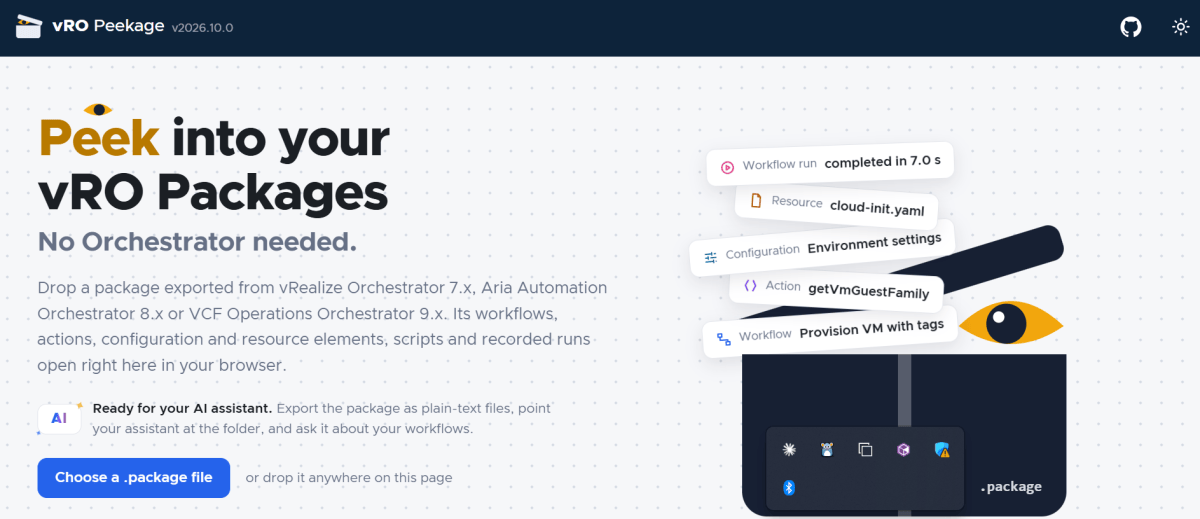
Everything happens inside your browser tab. The package is unzipped and parsed locally and is never uploaded anywhere, so it’s safe to use with customer code.
A tour of what you’ll see
Workflow schemas, drawn like Orchestrator draws them
Each workflow’s schema is drawn from the positions saved in the package, using the real Orchestrator icons. Scriptable tasks, action calls, decisions, nested workflows, waits and error handlers all look the way they do in the Orchestrator client, with the same blue, green and red-dashed paths. You can zoom and pan, click an item to jump to its details, and download the diagram as SVG or PNG for your documentation.
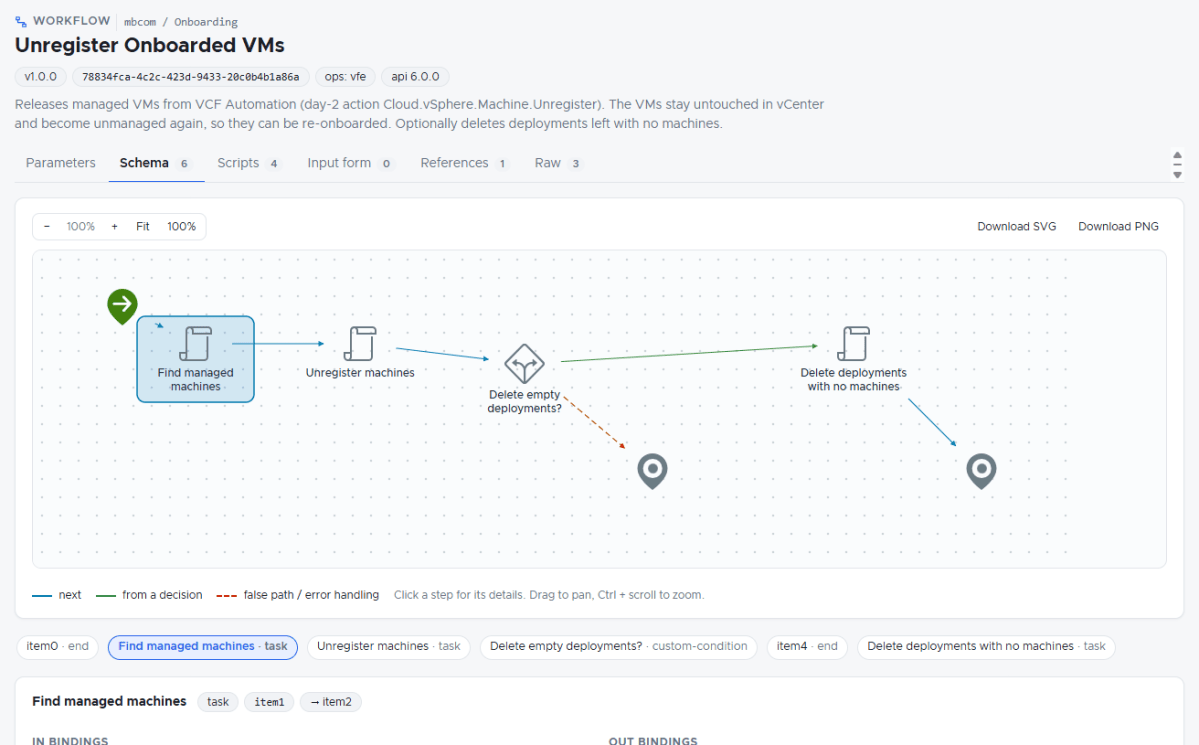
For each workflow you also get its inputs, outputs and attributes, every scriptable task with its in and out bindings, the input form, and a References tab listing the actions, configuration elements and other workflows it uses.
Actions, with clear inputs and outputs
Every action shows a table of its inputs, with type and description, followed by its output type and its script with syntax highlighting. JavaScript, PowerShell and Python are all recognised. That includes polyglot actions that run in an action environment, even when the environment itself wasn’t exported with the package.
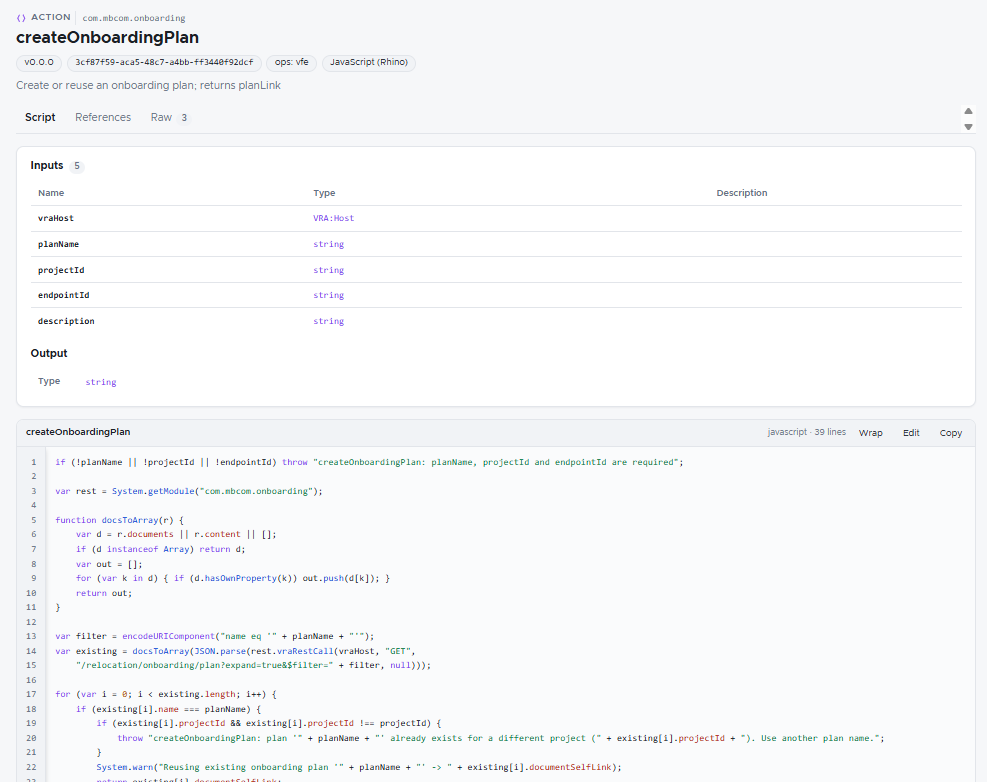
Configuration and resource elements you can actually read
Configuration element attributes are listed with their types and values. Complex values, such as an array of composite types used as a mapping table, are decoded into neat tables instead of raw serialised strings. SecureString values stay masked. Resource elements can be previewed or downloaded, and action environments list their runtime and dependencies.
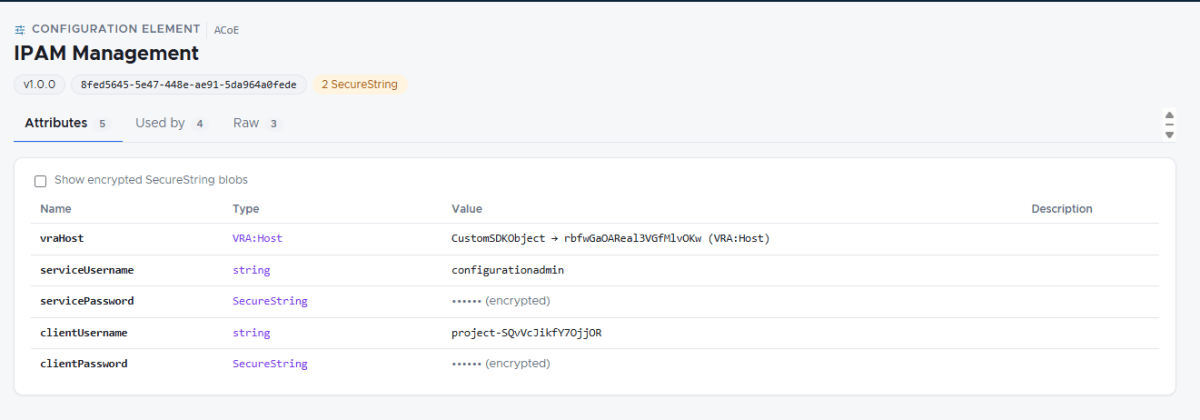
Workflow runs, replayed
Export a workflow run from its history and open it in vRO Peekage. The schema highlights the path that actually executed, with timing on each step, and you can inspect the run’s inputs, outputs, variables and logs. It’s very handy for troubleshooting a run from an environment you can’t log into.

Search, references and quick edits
Search across every script in the package at once, and follow references both ways, from a workflow to the action it calls and back. Each code viewer also has an Edit button for quick prototyping: tweak a script, copy it out, and reset it. Nothing in the package is changed.
Export everything, and let AI understand your complete code
This is the part I’m most excited about. One click on Export turns the package into a single zip of plain, readable files:
My Package - export.zip├── README.txt what's inside and how it's organised├── report.html full, print-ready documentation├── inventory.csv / .md every element with its type, folder and summary├── scripts/│ ├── actions/<module>/<action>.js | .ps1 | .py│ └── workflows/<folder>/<workflow>/01 <step>.js ...├── diagrams/ every workflow schema as SVG and PNG├── workflows-xml/ the raw workflow definitions├── configurations/ configuration elements as JSON├── resources/ environments/ runs/
Every script becomes a real file with the right extension, so editors and AI tools recognise the language straight away. Each file starts with a header comment that gives the context the script needs, which the raw package hides inside XML:
- for an action: its module, version, runtime, each input with its type, and the return type
- for a workflow step: the workflow it belongs to, the step’s name and type, and its in and out bindings, so you can see which workflow variable feeds which script parameter
The result is your entire Orchestrator solution laid out like a normal code project. Open the unzipped folder in an AI-enabled editor such as VS Code with Copilot or Cursor, point Claude Code at it, or attach the files in a chat, and your assistant can read all of it at once: the workflow logic, the actions it calls, the configuration it depends on, and how they connect.
Things you can now ask your AI assistant
- “Explain end to end what the Onboard VMs from CSV workflow does, step by step.”
- “Which actions and configuration elements does this workflow depend on? Is anything missing from the package?”
- “Find every place we call the vRA REST API, and list the endpoints.”
- “Review these actions for error handling, hard-coded values and duplicated logic.”
- “Write an LLD-style description of this package for the customer.”
- “We’re moving from vRA 8 to VCF Automation 9. What in this code is likely to need changes?”
Because the assistant sees the full solution rather than one pasted snippet, its answers are grounded in your actual code: real action names, real bindings, real configuration keys.
Secrets stay out of it too. SecureString values are never written to the export, so you can share the folder with an assistant without leaking passwords.
Open any package from a link, and share it
You don’t even need the file on your machine. Paste a link to a .package into the box on the front page, and vRO Peekage downloads it and opens it for you. GitHub links work as they are, even the normal “view file” link you copy from your browser, and so do GitLab and Dropbox links.
Better still, every package you open from a link gets its own shareable address:
https://vro-peekage.vercel.app/?url=<link-to-your-package>Click Share in the top bar to copy it, then send it to a colleague, drop it in a Slack thread, or add it to a GitHub README. Whoever opens it lands straight inside the package, with no download, no import and no Orchestrator. You can even link to one specific workflow or action. Open the item, copy the address from your browser, and the link will open right on that item.
Try it yourself: here’s the sample package from Packt’s VMware vRealize Orchestrator Cookbook (Second Edition), opened straight to its “Decision activity” workflow:
👉 Open the Orchestrator Cookbook package in vRO Peekage
If you publish vRO packages on GitHub, put a link like this in your README. Visitors can then explore your workflows in seconds before they decide to import anything.
Links only work for packages anyone can download. Anything behind a sign-in, such as a private repository or your company’s SharePoint, won’t open this way. For those, download the file and drop it onto the page as usual.
Customer-ready documentation for free
The report.html in the export is a complete, self-contained document of the package. It has a cover, an inventory, and a section per element type with diagrams, parameter tables and scripts. It carries no tool branding, so you can hand it to a customer as is, or open it in a browser and choose Save as PDF for a printable handover document.
How to use it
- In Orchestrator, export a package, or export a workflow run from its run history.
- Open vro-peekage.vercel.app and drop the file anywhere on the page.
- Browse the workflows, actions and elements, or click Export to get the zip.
- Unzip it, open the folder in your AI tool of choice, and start asking questions.
What about WDT4vRO?
vRO Peekage is the successor to WDT4vRO, which is now archived. The Orchestrator-style workflow diagrams carry over, and instead of one workflow XML at a time you now get the whole package, plus actions, configuration, runs and the export.
Try it and tell me what you think
vRO Peekage is free and open source. Give it a package from your lab and see what it shows you. If something doesn’t look right, or you’d like a feature, open an issue on GitHub or leave a comment below.
Discover more from Cloud Blogger
Subscribe to get the latest posts sent to your email.








Wow..Impressive, comprehensive, and very useful App..! A must tool for all those looking to streamline, document, reverse-engineer, or simply update Orchestrator artifacts. Thanks for sharing, Mayank..!
Appreciate it. Let me know if you find anything missing.