
In this article
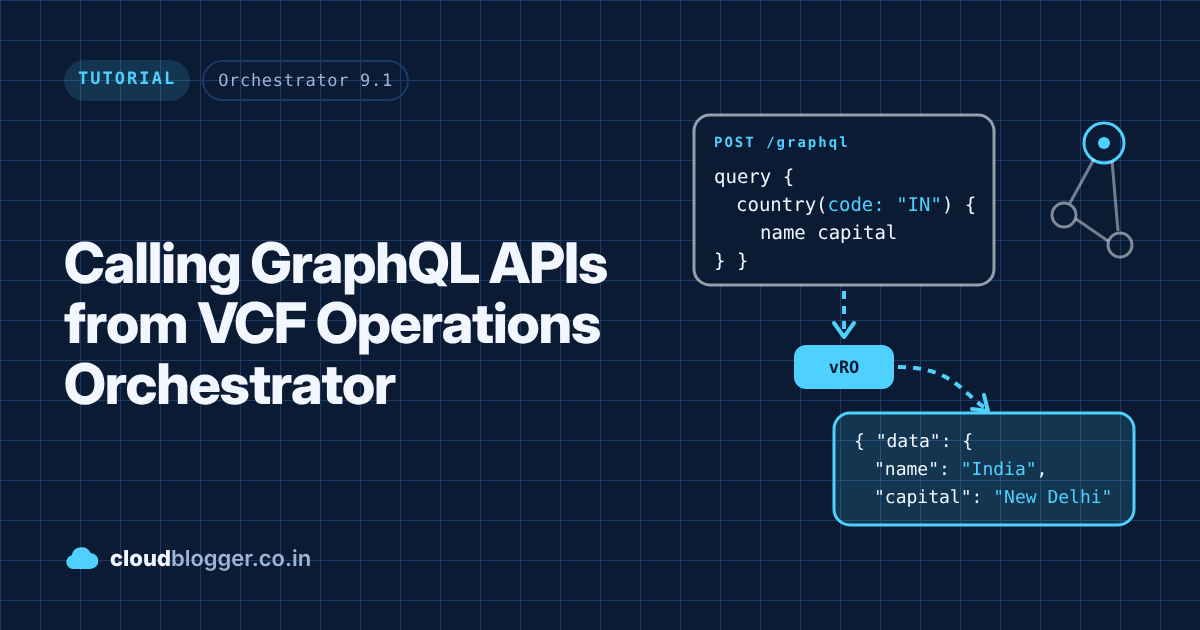
More and more products now offer a GraphQL API next to (or instead of) REST: GitHub, GitLab, Shopify, ServiceNow’s GraphQL framework, many monitoring tools, and plenty of in-house platforms. Orchestrator has no GraphQL plugin, but it doesn’t need one. A GraphQL call is just an HTTP POST with a JSON body, so the built-in HTTP-REST scripting objects can do it. In this post I’ll show how GraphQL requests work, then share three small actions that handle queries, variables, errors and schema exploration for you. You can download them as a package at the end.
Tested on: VCF Operations Orchestrator 9.1.1 (build 25643527), against the public Countries and Rick and Morty GraphQL APIs.
How a GraphQL request looks
With REST, every resource has its own URL. With GraphQL there’s usually one endpoint, and you describe the data you want in the request body. The body is JSON with up to three fields:
{
  "query": "query GetCountry($code: ID!) { country(code: $code) { name capital currency } }",
  "variables": { "code": "IN" },
  "operationName": "GetCountry"
}queryis the GraphQL document. It can be a query (read) or a mutation (write).variablesholds the values for$codeand friends. Always pass values here instead of gluing them into the query string. It avoids quoting problems and injection.operationNameis only needed when the document contains more than one operation.
The server answers with exactly the fields you asked for, wrapped in data:
{"data":{"country":{"name":"India","capital":"New Delhi","currency":"INR"}}}The minimum code in Orchestrator
Here’s the smallest working version as a scriptable task. It uses a transient REST host, so you don’t have to add the endpoint to the inventory first:
var host = RESTHostManager.createTransientHostFrom(RESTHostManager.createHost("GraphQL"));
host.url = "https://countries.trevorblades.com/";

var body = {
    query: "query GetCountry($code: ID!) { country(code: $code) { name capital currency } }",
    variables: { code: "IN" }
};

var request = host.createRequest("POST", "", JSON.stringify(body));
request.contentType = "application/json";
request.setHeader("Accept", "application/json");

var response = request.execute();
System.log(response.statusCode + " " + response.contentAsString);
That works, but in real workflows you’ll repeat it everywhere, and it misses the most important GraphQL detail: errors.
GraphQL errors usually come back as HTTP 200
This is the part that catches people coming from REST. If you ask for a field that doesn’t exist, many servers still reply with HTTP 200 and put the problem in an errors array. For example, the Countries API has no population field:
{"errors":[{"message":"Cannot query field \"population\" on type \"Country\"."}]}A response can even contain both data and errors, when part of the query worked and part didn’t. If your workflow only checks the status code, it carries on with empty data and fails somewhere much later. So the actions below check the body, not just the status code.
The GraphQL actions
The package contains one action module, in.co.cloudblogger.graphql, with three actions. All of them are plain ES5.1 and only use the built-in HTTP-REST objects, so they should also run on 8.x, though I tested them on 9.1.1.
| Action | Returns | What it does |
|---|---|---|
executeGraphQLRequest | string | Sends one query or mutation and returns the full { data, errors } body. Throws on HTTP errors. |
getGraphQLData | string | Returns only data, and throws when the server sent GraphQL errors, unless allowPartialData is true. |
getGraphQLSchemaTypes | Properties | Uses introspection to list the query fields, mutation fields and object types an endpoint offers. |
executeGraphQLRequest
This is the base action. Inputs: endpointUrl, query, variablesJson (a JSON string, optional), operationName (optional), headers (Properties, optional) and ignoreCertificate (boolean).
var logPrefix = "[GraphQL][executeGraphQLRequest] ";

if (!endpointUrl) {
    throw logPrefix + "endpointUrl is required";
}
if (!query) {
    throw logPrefix + "query is required";
}

var payload = { query: query };

if (variablesJson) {
    try {
        payload.variables = JSON.parse(variablesJson);
    } catch (e) {
        throw logPrefix + "variablesJson is not valid JSON: " + e;
    }
}
if (operationName) {
    payload.operationName = operationName;
}

var host = RESTHostManager.createTransientHostFrom(RESTHostManager.createHost("GraphQL-" + new Date().getTime()));
host.url = endpointUrl;
if (ignoreCertificate === true) {
    host.hostVerification = false;
}

var request = host.createRequest("POST", "", JSON.stringify(payload));
request.contentType = "application/json";
request.setHeader("Accept", "application/json");
request.setHeader("User-Agent", "vRO-GraphQL-Client/1.0");

if (headers) {
    var keys = headers.keys;
    for (var i = 0; i < keys.length; i++) {
        request.setHeader(keys[i], String(headers.get(keys[i])));
    }
}

System.debug(logPrefix + "POST " + endpointUrl + (operationName ? " (" + operationName + ")" : ""));
var start = new Date().getTime();
var response = request.execute();
var body = response.contentAsString;
System.log(logPrefix + "HTTP " + response.statusCode + " in " + (new Date().getTime() - start) + " ms");

if (response.statusCode < 200 || response.statusCode > 299) {
    // Many GraphQL servers return 400 with a normal { errors } body for invalid queries.
    // Keep that body in the message so the caller can see why.
    throw logPrefix + "HTTP " + response.statusCode + ": " + (body ? body.substring(0, 1000) : "(empty body)");
}

return body;
Two small details are worth knowing. The User-Agent header is there because some public endpoints reject requests without one. And variables come in as a JSON string rather than an object, because that’s the easiest thing to type into a workflow input or pass from a vRA custom form.
getGraphQLData
This is the one you’ll call most. It takes the same inputs plus allowPartialData, and turns GraphQL errors into a proper exception:
var logPrefix = "[GraphQL][getGraphQLData] ";

var body = System.getModule("in.co.cloudblogger.graphql").executeGraphQLRequest(
    endpointUrl, query, variablesJson, operationName, headers, ignoreCertificate);

var result;
try {
    result = JSON.parse(body);
} catch (e) {
    throw logPrefix + "Response is not JSON: " + (body ? body.substring(0, 500) : "(empty)");
}

var hasData = result.data !== undefined && result.data !== null;
var hasErrors = result.errors && result.errors.length > 0;

if (hasErrors) {
    var messages = [];
    for (var i = 0; i < result.errors.length; i++) {
        var err = result.errors[i];
        var where = "";
        if (err.path) {
            where = " (path: " + err.path.join(".") + ")";
        }
        messages.push(err.message + where);
    }
    if (allowPartialData === true && hasData) {
        System.warn(logPrefix + "Partial data returned with " + messages.length + " error(s): " + messages.join("; "));
    } else {
        throw logPrefix + "GraphQL error(s): " + messages.join("; ");
    }
}

if (!hasData) {
    throw logPrefix + "Response has no data";
}

return JSON.stringify(result.data);
getGraphQLSchemaTypes
When you start with a new API, the first question is “what can I ask for?”. GraphQL can answer that itself through introspection. This action sends a small introspection query and returns the root query fields, mutation fields and object type names:
var introspection =
    "query SchemaSummary { __schema { " +
    "queryType { fields { name } } " +
    "mutationType { fields { name } } " +
    "types { name kind } } }";

var dataJson = System.getModule("in.co.cloudblogger.graphql").getGraphQLData(
    endpointUrl, introspection, null, "SchemaSummary", headers, ignoreCertificate, false);
var schema = JSON.parse(dataJson).__schema;

function fieldNames(rootType) {
    var names = [];
    if (rootType && rootType.fields) {
        for (var i = 0; i < rootType.fields.length; i++) {
            names.push(rootType.fields[i].name);
        }
    }
    return names;
}

var objectTypes = [];
for (var t = 0; t < schema.types.length; t++) {
    var type = schema.types[t];
    if (type.kind === "OBJECT" && type.name.indexOf("__") !== 0) {
        objectTypes.push(type.name);
    }
}

var summary = new Properties();
summary.put("queryFields", fieldNames(schema.queryType));
summary.put("mutationFields", fieldNames(schema.mutationType));
summary.put("objectTypes", objectTypes);
return summary;
Some production APIs switch introspection off. In that case the action throws with the server’s message, and you’ll need the API’s own documentation instead.
Testing it
I ran each of these on my 9.1.1 lab. First, explore the Countries API with getGraphQLSchemaTypes:
queryFields:    continent, continents, countries, country, language, languages
mutationFields: (none)
objectTypes:    Continent, Country, Language, Query, State, Subdivision
Now a query with a variable, using getGraphQLData:
var data = System.getModule("in.co.cloudblogger.graphql").getGraphQLData(
    "https://countries.trevorblades.com/",
    "query GetCountry($code: ID!) { country(code: $code) { name capital currency emoji languages { name } } }",
    '{"code":"IN"}',
    "GetCountry",
    null,   // headers
    false,  // ignoreCertificate
    false   // allowPartialData
);
var country = JSON.parse(data).country;
System.log(country.name + ", capital " + country.capital + ", currency " + country.currency);
[GraphQL][executeGraphQLRequest] HTTP 200 in 140 ms
India, capital New Delhi, currency INRThe same actions work against any other endpoint. Here’s a filtered, paged query against the Rick and Morty API:
query Chars($page: Int) {
  characters(page: $page, filter: { name: "rick" }) {
    info { count pages }
    results { name status }
  }
}
{"characters":{"info":{"count":107,"pages":6},"results":[{"name":"Rick Sanchez","status":"Alive"},{"name":"Adjudicator Rick","status":"Dead"}, ...]}}And the error cases. Asking for a field that doesn’t exist fails the action with the server’s own message, even though the HTTP status was 200:
[GraphQL][getGraphQLData] GraphQL error(s): Cannot query field "population" on type "Country".Broken variables are caught before anything is sent:
[GraphQL][executeGraphQLRequest] variablesJson is not valid JSON: SyntaxError: Unexpected token in object literalMutations and authentication
A mutation goes through the same actions; only the document changes. Real APIs that allow writes need authentication, which you pass in the headers input. For example, with a GitHub token:
var headers = new Properties();
headers.put("Authorization", "Bearer " + githubToken);  // githubToken is a SecureString input

var mutation =
    "mutation AddComment($subjectId: ID!, $body: String!) { " +
    "addComment(input: { subjectId: $subjectId, body: $body }) { commentEdge { node { url } } } }";

var data = System.getModule("in.co.cloudblogger.graphql").getGraphQLData(
    "https://api.github.com/graphql",
    mutation,
    JSON.stringify({ subjectId: issueNodeId, body: "Deployment finished from Orchestrator" }),
    "AddComment",
    headers,
    false,
    false
);
Keep the token in a SecureString input or a configuration element, never in the script itself. The actions don’t log headers, so the token stays out of the workflow logs.
The ignoreCertificate input is there for labs with self-signed certificates. In production, import the endpoint’s certificate into Orchestrator’s trust store and leave it set to false.
Download from GitHub
The package and the plain .js sources are in my GitHub repo: cloudblogger.co.in / graphql-for-vro. Import in.co.cloudblogger.graphql_v1.0.0_20261101.package from Assets > Packages > Import, and the three actions appear under the in.co.cloudblogger.graphql module.
Summary
- A GraphQL call is an HTTP POST with a JSON body, so Orchestrator’s built-in HTTP-REST objects are enough. No plugin needed.
- Pass values as
variables, not by building the query string. - Always check the
errorsarray. A 200 status doesn’t mean the query worked. - Use introspection to find out what an unfamiliar API offers.
If you use these with a GraphQL API at work, I’d like to hear which one. Let me know in the comments, along with anything you’d want added to the module.
Discover more from Cloud Blogger
Subscribe to get the latest posts sent to your email.
Enjoyed this post?
Was this helpful?
One response to “Calling GraphQL APIs from VCF Operations Orchestrator”
-
[…] T300 · Calling GraphQL APIs from VCF Operations Orchestrator […]













Leave a Reply